ATLAS changelog
Paste Filtering – Bulk Value Filtering Across ATLAS Grids
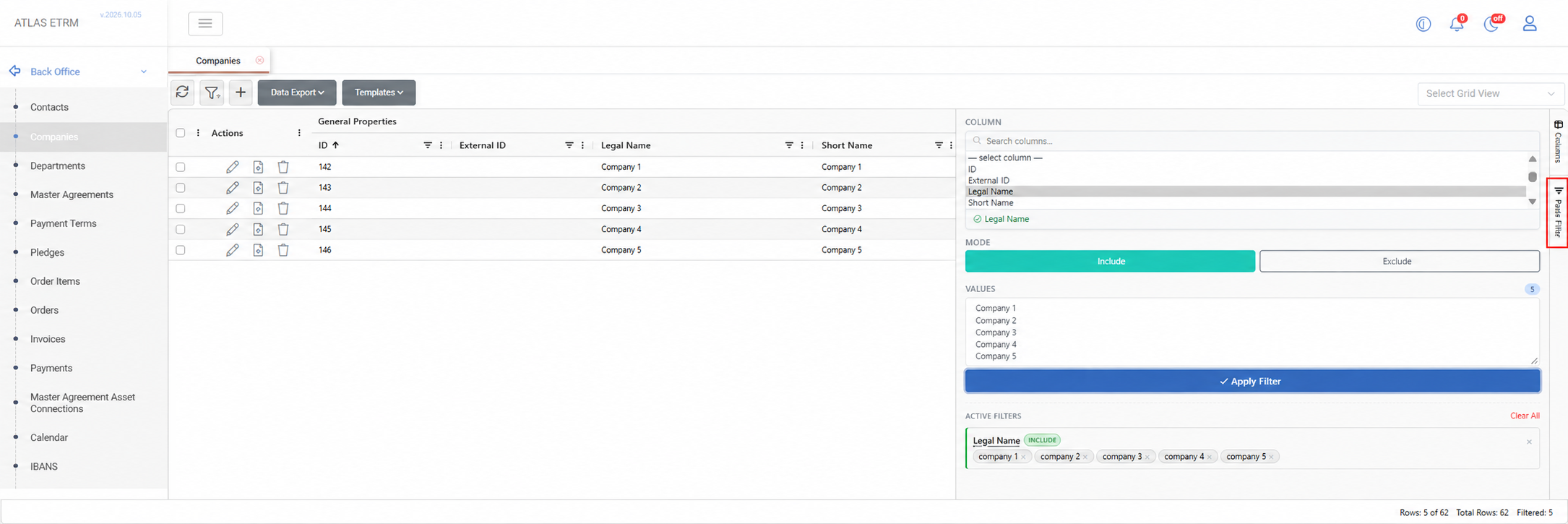
This release introduces Paste Filtering, a faster way to narrow large grids down to exactly the records you need by pasting a list of values instead of building filters one condition at a time.
Whether the list comes from a spreadsheet, an email or another ATLAS screen (company names, contract IDs, asset codes), you simply choose a column, paste the values, and the grid shows only the matching rows. Switch to Exclude mode to hide them instead.
Paste Filtering is available in the right-hand sidebar of supported grids, including Back Office (Companies, Contacts, Departments, Payment Terms, Assets), Portfolio Management (Clusters, Deal Collections, Deal Limits) and the Scheduling tabs. Values can be pasted directly from Excel or another grid, or separated by tabs, semicolons or commas. Matching is case-insensitive, duplicates are removed, and unmatched values are flagged so typos or missing entries stand out. Multiple paste filters can be combined with each other and with standard column filters, and saved as part of a grid view.
Features
Customer Portal – Participant Pages & Configuration — Redesign portal pages for Orders, Documents, Assets, Asset Timeseries, Master Agreements, Contacts and an embedded dashboard, all driven by administration settings, with a customisable OTP sender name.
Dispatching – Commissioning Schedules — New Commissioning screen to enter commissioning schedules per balancing service provider, with the corresponding market XML and Excel files generated automatically.
Math Editor – New Functions — Added quarter-hour and half-hour shift functions, weekly and weekday/weekend aggregations (sum and average),
daysofquarter()andtofixeddate().Orders – Activity Log — The Orders History tab is replaced by an Activity tab that records key events such as status changes and submissions to external systems.
Data Room – Ability to delete values in Dataseries — Users can now enter blank (null) values in dataseries, both in the grid and through Excel uploads, with nulls treated as deletions.
Data Room – ENTSO-E DAM Prices per Bidding Zone — New datasets provide day-ahead prices per bidding zone for multi-zone countries such as Italy and Denmark, alongside the existing per-country series.
Widgets – Value Labels on Bar Charts — Values can now be shown on top of bar columns, configurable per timeseries within the same widget.
Notifications – Pause & Silence — Users can temporarily pause or silence notifications to stay focused during busy trading sessions.
User Management – Concurrent Session Limit — Administrators can optionally cap the number of concurrent sessions per user.
Order Items – Future Horizon Generation — Order items can be created for a defined future horizon rather than the entire delivery period of a deal.
Improvements
Interface – Modernised Back Office, Portfolio & Data Room Screens — Back Office, Portfolio, Dataseries and Collections pages have moved to the new interface framework and grid for a faster, more consistent experience.
Data Downloads – Progress Reporting — Data Room and Bidding downloads now show progress as each day is downloaded and stored, and run as tracked background executions.
Deal Collections – Saved Grid Views — Saved grid views (columns, order, grouping) can now be applied in the Deal Collections grid.
Order Items calculation improvement
Market Data - DAM Aggregated Curves — Adjusted the logic of disaggregating and reconstructing the quarter-houlry and hourly curves by taking into account accepted block orders and implicit/explicit imports/export so that buy and sell quarter-hourly curves always intersect in MCP.
Forecasting – Smoother PV Forecasts & Model Training Metrics — The theoretical PV model no longer produces artificial break points, and training metrics are now visible in the job manager alongside linked training and inference jobs.
Data Room – ENTSO-E Gaps Shown as Blanks — Missing ENTSO-E values now appear as blanks instead of being filled with the last available value.
Balancing Market – Non-Tradeable Offers — Non-tradeable offers on the real-time balancing offers screen now appear as disabled rows rather than disappearing.
Dashboards – Clearer Selection & Chart Readability — Dashboards make the current selection clear, chart areas render more cleanly, and dates appear on both the x-axis and tooltips.
Math Editor – Faster Recalculation — Cache refreshes now trigger only on actual value changes and run in the background, improving performance.
Fixes
Deals – Automatic Naming — Fixed an issue where automatic deal naming failed on counterparty when opening a new deal.
Orders – Edit & Totals — Fixed an issue where editing an order failed, and where removing order items did not recalculate the order total.
Master Agreements Autoname fix — Fixed an issue where automatic naming triggered a "name required" error.
Market Data – ENTSO-E Austria DAM Price — Fixed an issue where the Austrian day-ahead price was split across two series.
Widgets – Charts in UTC — Fixed an issue where a widget chart disappeared after reopening when set to UTC.
Alerts – Index Alerts Page — Fixed an issue where the "View Alerts" page failed to load when deleting an index linked to alerts.
Grids – Context Menu Tooltip — Fixed an issue where a tooltip covered the right-click menu in Deal Capturing.
API & MCP
Orders – Activity Logging — External systems can now log activity against an order through the API Gateway.
Orders – Update Behaviour — Fixed an issue where updating an order through the API cleared its compensation dates or failed on a missing name.
Notifications – Event Payloads — Fixed an issue where webhook event payloads were sent without their content.
Authentication – Token Handling — Fixed an issue in OAuth token handling for MCP connections.