ATLAS changelog
User Management – Centralised Access Control & Password Recovery
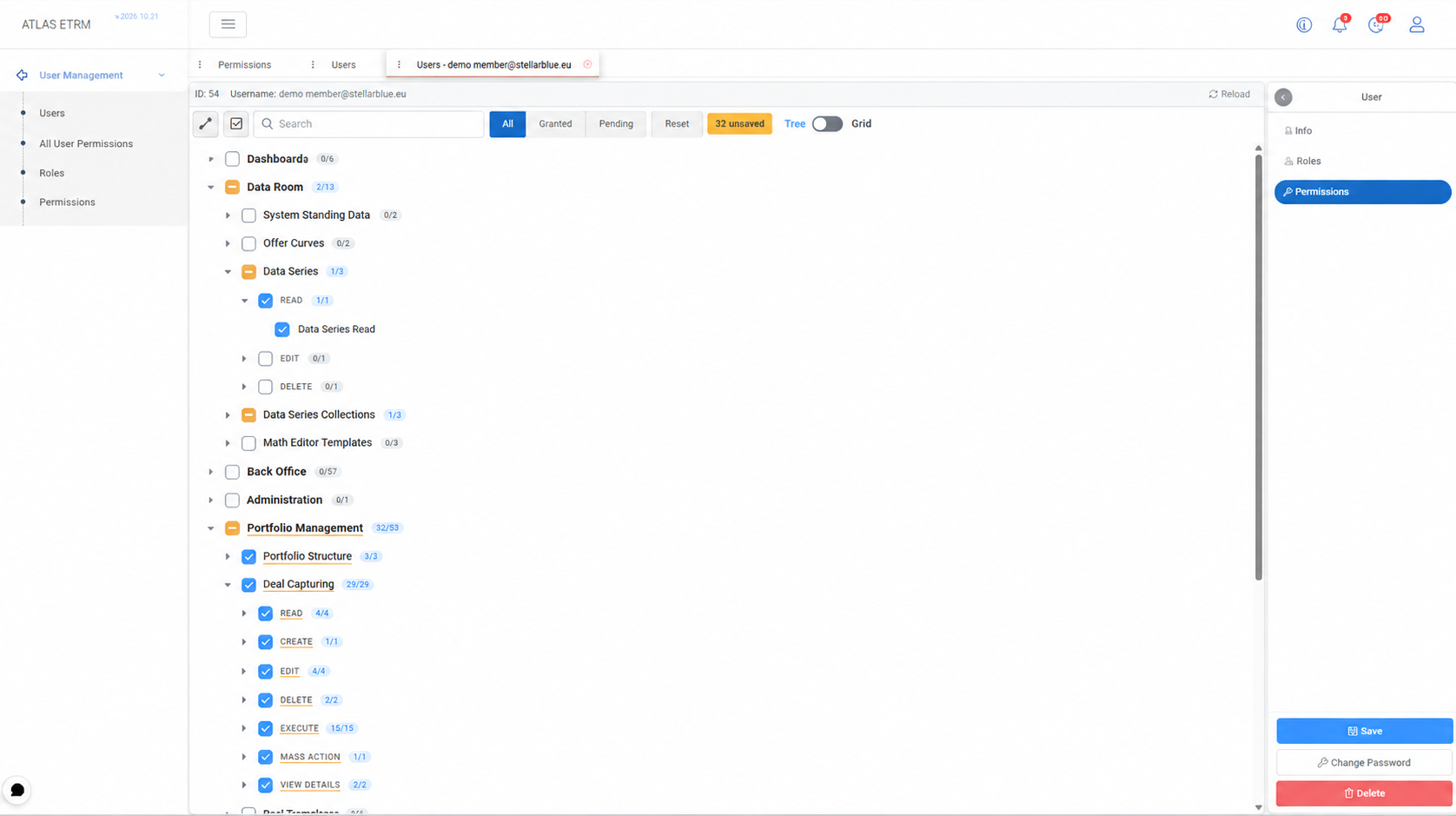
This release strengthens User Management, giving IT Admins a clearer, more consistent way to control who can access what in ATLAS, and giving users a simpler way to regain access when they need it.
Access is organised through reusable Roles, which can be linked to Microsoft Entra roles, with individual permissions added per user only where needed. The new Permissions catalogue shows how permissions are structured across modules and pages, and All User Permissions gives a single grid to review and compare access across accounts without opening each user record.
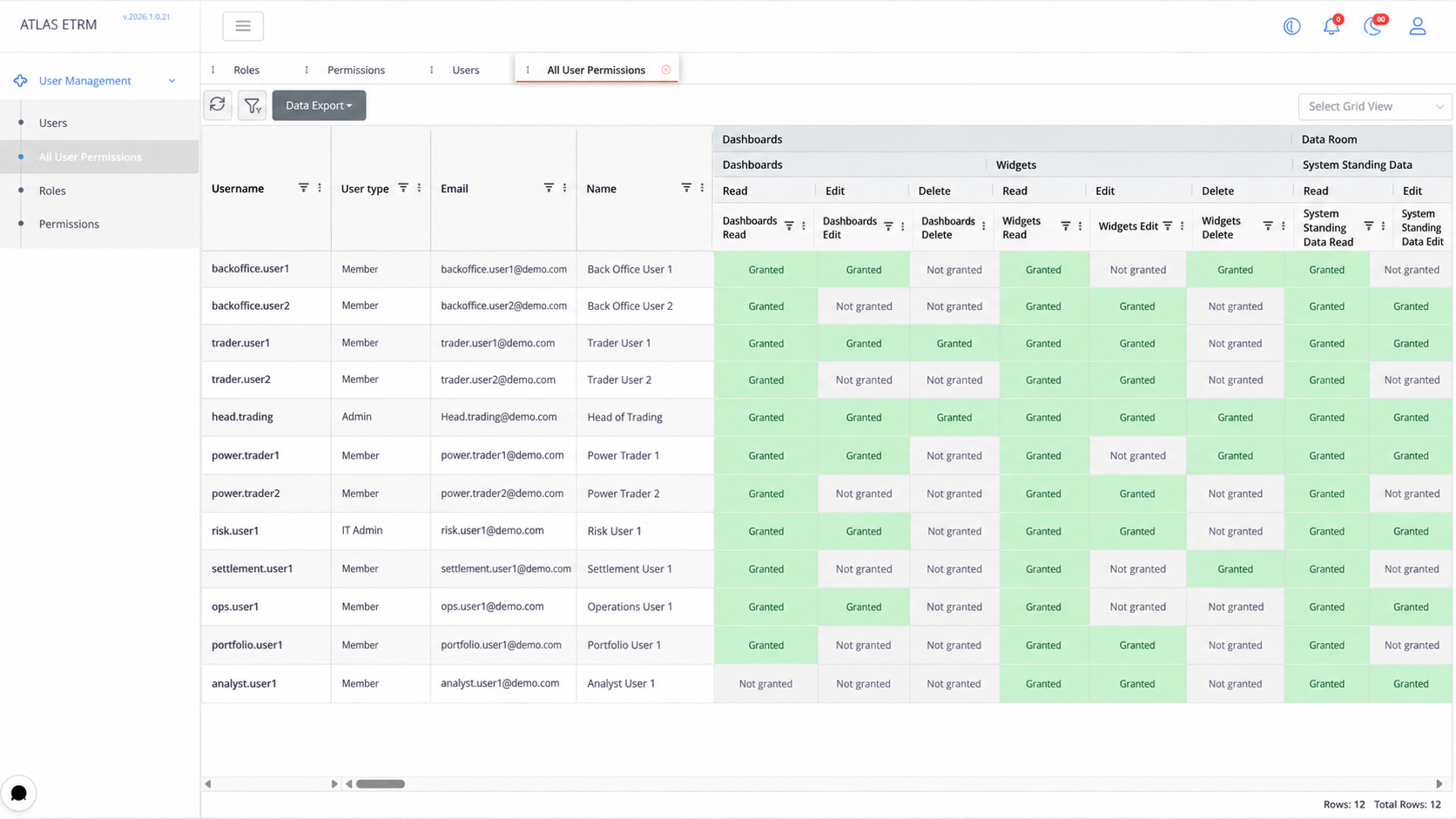
Users, Roles and permission grids support column filtering, saved views and Excel or CSV export, including filtered exports. Accounts can be marked as Service Accounts for API-only use or Locked to block sign-in, and predefined systemic roles are read-only so core access rules stay protected.
For a full walkthrough of Users, Roles, Permissions and All User Permissions, see the User Management documentation.
Features
Dashboards – Date range & resampling for Timeseries widgets — Timeseries widgets support a date range picker and resampling options directly on the widget.
Math Editor – MOVINGSUM function — Added a moving sum function for rolling-window calculations.
Data Room – Saved display configurations — Collections and dataseries info pages can now store their display configuration together with an alias, similar to how dashboards and widgets handle timeseries configurations.
Data Room – ISP generic constraints as timeseries — Generic constraints for the ISP are now available as quarter-hourly timeseries, including each constraint limit, its contributing factors and a flag showing whether a unit is in constraint.
Companies – IBAN update prompt for related deals — When a company's IBAN is updated or removed, users are shown the related deals and can choose to update them as well or skip.
Improvements
Orders – Total quantity export — The central Orders table can now export the total quantity of each order in MWh.
Data Room – Systemic price forecasting for DAM MCP — Systemic price forecasting now also handles the DAM MCP price.
Create-on-the-fly – Unified behaviour — Creating an item on the fly now works the same way everywhere, including Tag creation in the Data Room.
Master Agreements – Name trimming — Leading and trailing spaces in master agreement names are now discarded, preventing near-duplicate agreements.
Deals – Exchange short name & simplified deal collections — Deals now include the exchange short name and use a simpler model for the collections they belong to.
Fixes
Math Editor — Fixed an issue where MAXMONTH returned a result even when the selected date range did not cover the whole month.
Math Editor — Fixed an issue where formulas using standing entities failed to evaluate when their timeseries values were themselves Math Editor formulas.
Companies — Fixed an issue where reloading the page repeated the company type multiple times; company type columns now use a checkbox display.
Documents — Fixed an issue where downloading multiple document versions produced a ZIP named after a single file rather than a meaningful name.
Data Room — Fixed an issue where cross-border capacities from ENTSO-E forecasts were displayed at roughly double the published values.
Assets — Fixed an error that occurred when changing an asset's charge.
Bidding — Fixed a memory leak in the XBID best bid/offer snapshot feature that caused very high memory consumption.
API & MCP
MCP – Single Get_Entities tool — The separate per-entity Get tools have been replaced by one Get_Entities tool that returns a list of core entities (for example all assets when no ID is given), reducing tool clutter for the AI assistant.
API Gateway & MCP – Timeseries values as CSV — A new GetValuesCsv endpoint returns timeseries values as a CSV of timestamps and values, with days correctly starting at midnight in the selected time zone.
MCP – Math Editor Calculate tool — Math Editor calculations are exposed as an MCP tool and verified end to end.
Paste Filtering – Bulk Value Filtering Across ATLAS Grids
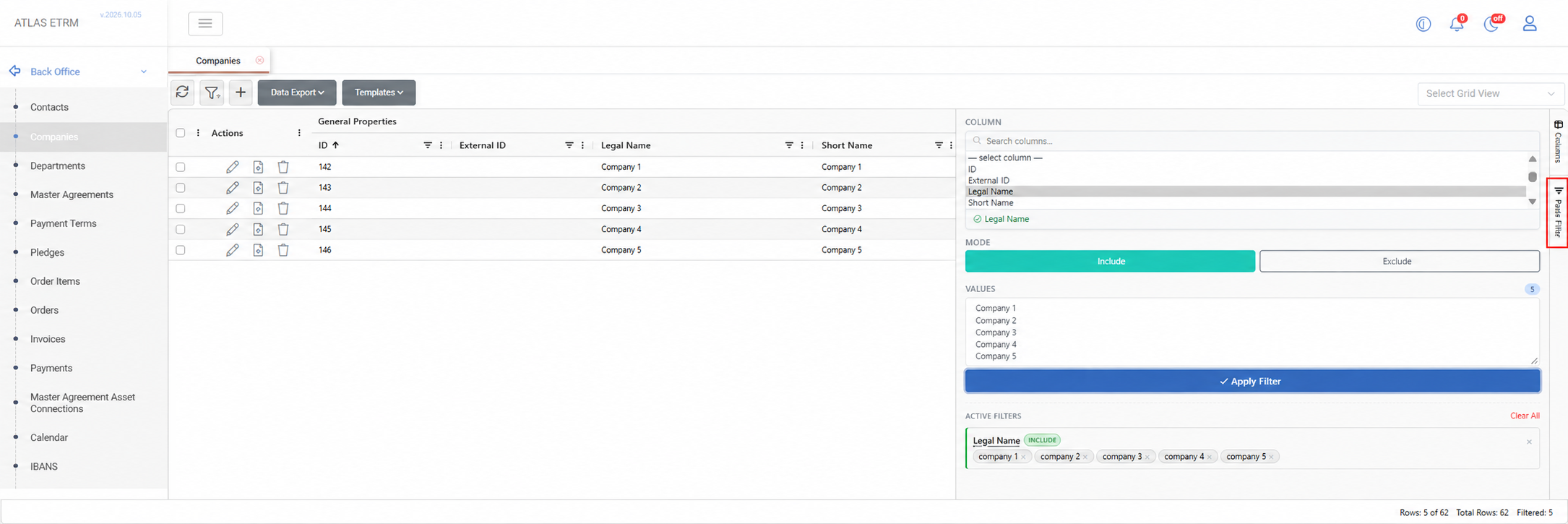
This release introduces Paste Filtering, a faster way to narrow large grids down to exactly the records you need by pasting a list of values instead of building filters one condition at a time.
Whether the list comes from a spreadsheet, an email or another ATLAS screen (company names, contract IDs, asset codes), you simply choose a column, paste the values, and the grid shows only the matching rows. Switch to Exclude mode to hide them instead.
Paste Filtering is available in the right-hand sidebar of supported grids, including Back Office (Companies, Contacts, Departments, Payment Terms, Assets), Portfolio Management (Clusters, Deal Collections, Deal Limits) and the Scheduling tabs. Values can be pasted directly from Excel or another grid, or separated by tabs, semicolons or commas. Matching is case-insensitive, duplicates are removed, and unmatched values are flagged so typos or missing entries stand out. Multiple paste filters can be combined with each other and with standard column filters, and saved as part of a grid view.
Features
Customer Portal – Participant Pages & Configuration — Redesign portal pages for Orders, Documents, Assets, Asset Timeseries, Master Agreements, Contacts and an embedded dashboard, all driven by administration settings, with a customisable OTP sender name.
Dispatching – Commissioning Schedules — New Commissioning screen to enter commissioning schedules per balancing service provider, with the corresponding market XML and Excel files generated automatically.
Math Editor – New Functions — Added quarter-hour and half-hour shift functions, weekly and weekday/weekend aggregations (sum and average),
daysofquarter()andtofixeddate().Orders – Activity Log — The Orders History tab is replaced by an Activity tab that records key events such as status changes and submissions to external systems.
Data Room – Ability to delete values in Dataseries — Users can now enter blank (null) values in dataseries, both in the grid and through Excel uploads, with nulls treated as deletions.
Data Room – ENTSO-E DAM Prices per Bidding Zone — New datasets provide day-ahead prices per bidding zone for multi-zone countries such as Italy and Denmark, alongside the existing per-country series.
Widgets – Value Labels on Bar Charts — Values can now be shown on top of bar columns, configurable per timeseries within the same widget.
Notifications – Pause & Silence — Users can temporarily pause or silence notifications to stay focused during busy trading sessions.
User Management – Concurrent Session Limit — Administrators can optionally cap the number of concurrent sessions per user.
Order Items – Future Horizon Generation — Order items can be created for a defined future horizon rather than the entire delivery period of a deal.
Improvements
Interface – Modernised Back Office, Portfolio & Data Room Screens — Back Office, Portfolio, Dataseries and Collections pages have moved to the new interface framework and grid for a faster, more consistent experience.
Data Downloads – Progress Reporting — Data Room and Bidding downloads now show progress as each day is downloaded and stored, and run as tracked background executions.
Deal Collections – Saved Grid Views — Saved grid views (columns, order, grouping) can now be applied in the Deal Collections grid.
Order Items calculation improvement
Market Data - DAM Aggregated Curves — Adjusted the logic of disaggregating and reconstructing the quarter-houlry and hourly curves by taking into account accepted block orders and implicit/explicit imports/export so that buy and sell quarter-hourly curves always intersect in MCP.
Forecasting – Smoother PV Forecasts & Model Training Metrics — The theoretical PV model no longer produces artificial break points, and training metrics are now visible in the job manager alongside linked training and inference jobs.
Data Room – ENTSO-E Gaps Shown as Blanks — Missing ENTSO-E values now appear as blanks instead of being filled with the last available value.
Balancing Market – Non-Tradeable Offers — Non-tradeable offers on the real-time balancing offers screen now appear as disabled rows rather than disappearing.
Dashboards – Clearer Selection & Chart Readability — Dashboards make the current selection clear, chart areas render more cleanly, and dates appear on both the x-axis and tooltips.
Math Editor – Faster Recalculation — Cache refreshes now trigger only on actual value changes and run in the background, improving performance.
Fixes
Deals – Automatic Naming — Fixed an issue where automatic deal naming failed on counterparty when opening a new deal.
Orders – Edit & Totals — Fixed an issue where editing an order failed, and where removing order items did not recalculate the order total.
Master Agreements Autoname fix — Fixed an issue where automatic naming triggered a "name required" error.
Market Data – ENTSO-E Austria DAM Price — Fixed an issue where the Austrian day-ahead price was split across two series.
Widgets – Charts in UTC — Fixed an issue where a widget chart disappeared after reopening when set to UTC.
Alerts – Index Alerts Page — Fixed an issue where the "View Alerts" page failed to load when deleting an index linked to alerts.
Grids – Context Menu Tooltip — Fixed an issue where a tooltip covered the right-click menu in Deal Capturing.
API & MCP
Orders – Activity Logging — External systems can now log activity against an order through the API Gateway.
Orders – Update Behaviour — Fixed an issue where updating an order through the API cleared its compensation dates or failed on a missing name.
Notifications – Event Payloads — Fixed an issue where webhook event payloads were sent without their content.
Authentication – Token Handling — Fixed an issue in OAuth token handling for MCP connections.
Introducing Indexes: Single-Value Metrics from Your Data
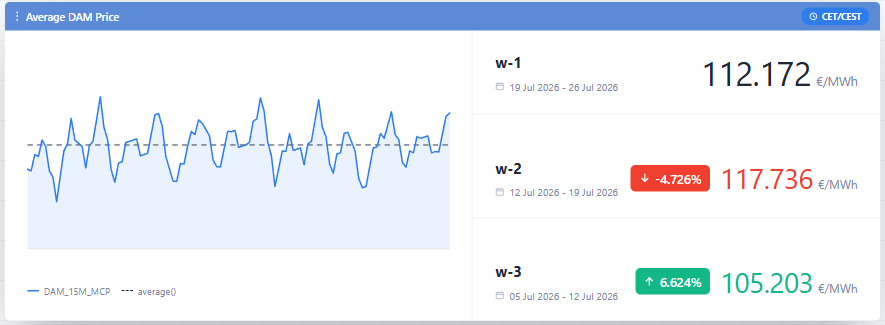
This release introduces Indexes, a new way to track key performance metrics directly from ATLAS Dashboards, without needing to dig through the underlying time series.
An Index turns raw data into a single, meaningful number - an average price, a spread, a forecast accuracy score, a demand range - calculated for whatever period matters. Instead of scanning granular values, users get the metric that summarizes them.
Indexes can be created in Data Room → Indexes by naming the calculation, choosing a unit of measurement, and defining the formula, or defined directly inside an Index Widget. Once available, an Index can be added to a Dashboard, where the same calculation can be evaluated over different periods to track trends over time, or placed side by side with other Indexes to compare markets, portfolios, or assets. One entry can be set as the reference point, with the rest shown as a difference, ratio, or percentage change against it, making it easy to spot how a metric is moving without leaving the dashboard.
For step-by-step instructions and example workflows, see the Indexes and Index Widgets sections in ATLAS documentation.
Features
Cancel in-progress timeseries copy jobs — Added the ability to cancel a running timeseries copy job instead of waiting for it to finish
Circular block orders — Added support for circular block orders in scheduling
Progress bar for job executions — Job executions now show a progress bar in the Job Manager (Timeseries copy, Order Items, Orders, Forward Curves, ATLASi executions)
Simplified weather and production data flow for Meteologica integration — Simplified how production and certified weather data is captured for clusters by treating them as assets, removing redundant per-cluster logic
Automatic cleanup of old ATLASi execution data — Added a retention job that automatically cleans up old model execution data to prevent storage growth issues
Load forecasting for multi-voltage-level portfolios — Extended ML-based load forecasting to support portfolios structured by voltage level
Improvements
Optimized public trades and contract capturing for XBID — Improved how public trades and active contracts are captured, with new endpoints for historical public trades and best-bid/offer snapshots
Do not disturb mode: Hide/pause notifications — Added the ability to pause or hide notifications so they don't interrupt focused work
Master Agreements mass actions — Added bulk mass-action updates in Master Agreements for status, validity dates (valid from/to), and self-billing
Improved dashboard date range panel — Removed unusably fine time-step options and disabled time-step choices that are guaranteed to return empty data for the selected range, auto-selecting the next valid option instead
Time-sliced custom field display on grids — Grids now display the current value of time-sliced custom fields, with a tooltip showing the full history of values on hover
BSP inherits bidding entity validity — When a bidding entity is disabled with a valid-to date, its related BSP entity now inherits the same valid-to date
Fixes
Fixed mass actions on grouped grids — Mass actions on grouped grids no longer send null IDs
Fixed math editor expression error — Resolved a "key not present" error occurring in expanded expressions in the math editor
Fixed Technoeconomic default view in Assets — The Technoeconomic page in Assets now opens to the latest available data by default instead of the oldest
Fixed missing capacity validation on bidding portfolio creation — Bidding portfolio creation now validates missing capacity at creation time instead of only on later changes
Fixed date filters on grids — Resolved date formatters breaking when used in grid filters
Fixed timeseries validation messaging — Corrected validation error handling and messaging in timeseries
Fixed timeseries query deletion error — Resolved an error occurring when deleting a timeseries query
Dataseries Tags & Tag-Based Queries
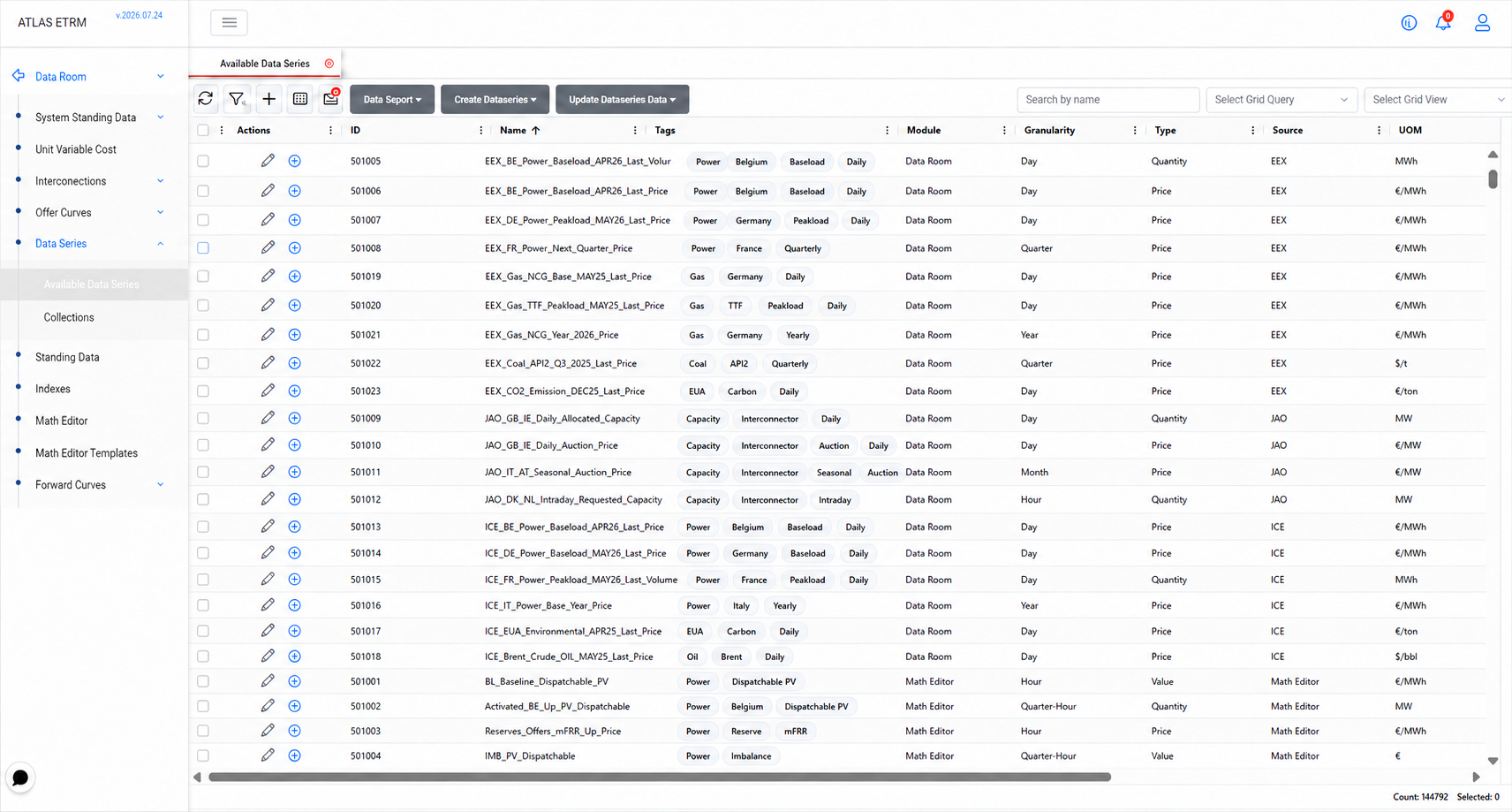
This release introduces Tags for Dataseries in the Data Room, letting users classify timeseries by their own criteria alongside the existing metadata.
System-generated names identify each series by provider and market context, and wildcard search makes them quick to locate. Tags add a second, user-defined dimension on top of that: any label the business finds meaningful can be attached to a series and used as a filter, independently of how the series is named.
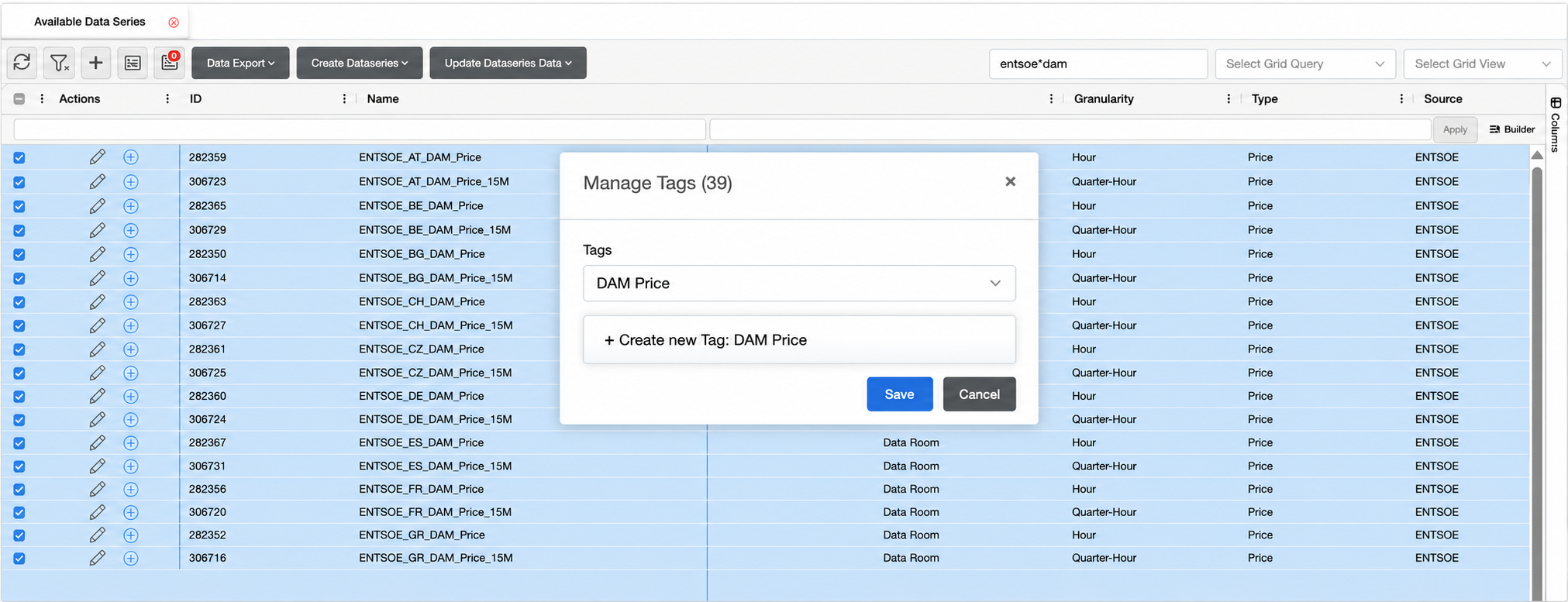
To assign a tag, go to Data Room → Data Series → Available Data Series, select one or more series, right-click and choose Manage Tags. The drop-down lists the tags already defined in Administration → Tags, and a new one can be created inline if it doesn't exist yet. A series can carry multiple tags.
Tags then work as a filtering criterion like any other grid field. A query such as [Tags] contains "DAM Prices" returns the full tagged set and can be combined with conditions like Granularity equals "Quarter-Hour" to narrow it further.
Features
Force exchange reconnection from the XBID screen — Added a reset button that re-establishes the private and public market feeds on demand and reloads the screen once the connection is restored
Extra fields on Technoeconomic Declarations — The Dispatching declarations screen now supports maximum daily energy, special raw-material and maintenance costs, and shutdown cost
Notification settings tailored to each user — Users now see only the notifications actually enabled for them based on their assigned tags, rather than everything they have ever had access to
XBID Public Trades & Best-Bid Offer Curves store — All public market data are now stored upon retrieval and can be retrieved for back-testing purposes via the API
Improvements
Saved views on the XBID grid — Column selections on the XBID grid can now be created and saved per user
Auto-closing brackets in the Math Editor — Typing an opening bracket now inserts its closing pair automatically, making expression entry faster and less error-prone
Job execution logs follow new output — The Job Manager execution log panel now stays pinned to the latest line as it streams
Faster notification dispatch — Webhook, SMS and e-mail delivery are now queued in parallel and in the background, so they no longer hold up the saving of audit events
Clearer handling of grid query dependencies — Queries referenced by deal limits, internal deals configuration or jobs are now tracked properly, so removing the dependency correctly frees the query for deletion
Fixes
Fixed an issue where deal collections closed with an imbalanced net position — Closing a collection with a non-zero net position created a rest deal without a total quantity
Fixed an issue where custom fields were mapped incorrectly in the Orders grid
Fixed an issue where the audit events grid in Notifications timed out on server-side loading
Fixed an issue where a job's next execution time was shown in the wrong timezone — The Job Manager now handles UTC and local formats consistently in the next-execution field
Fixed an issue where alert timestamps in the Timeseries module used an incorrect date kind
Fixed an issue where deleting a company referenced the wrong entity name — The dependency error message in Back Office now says Company rather than Counterparty
Fixed several issues in deal background jobs affecting reliable execution
Fixed an issue where the XBID real-time feed required a service restart to recover — A partial or empty response from the exchange could deactivate every cached active contract with no path back to recovery
API
Spot and XBID endpoints available on the API Gateway — Retrieving, submitting, editing and cancelling orders, along with XBID operations and analysis, can now be performed through the official API Gateway
Cross-border support & dynamic market timestep in Scheduling
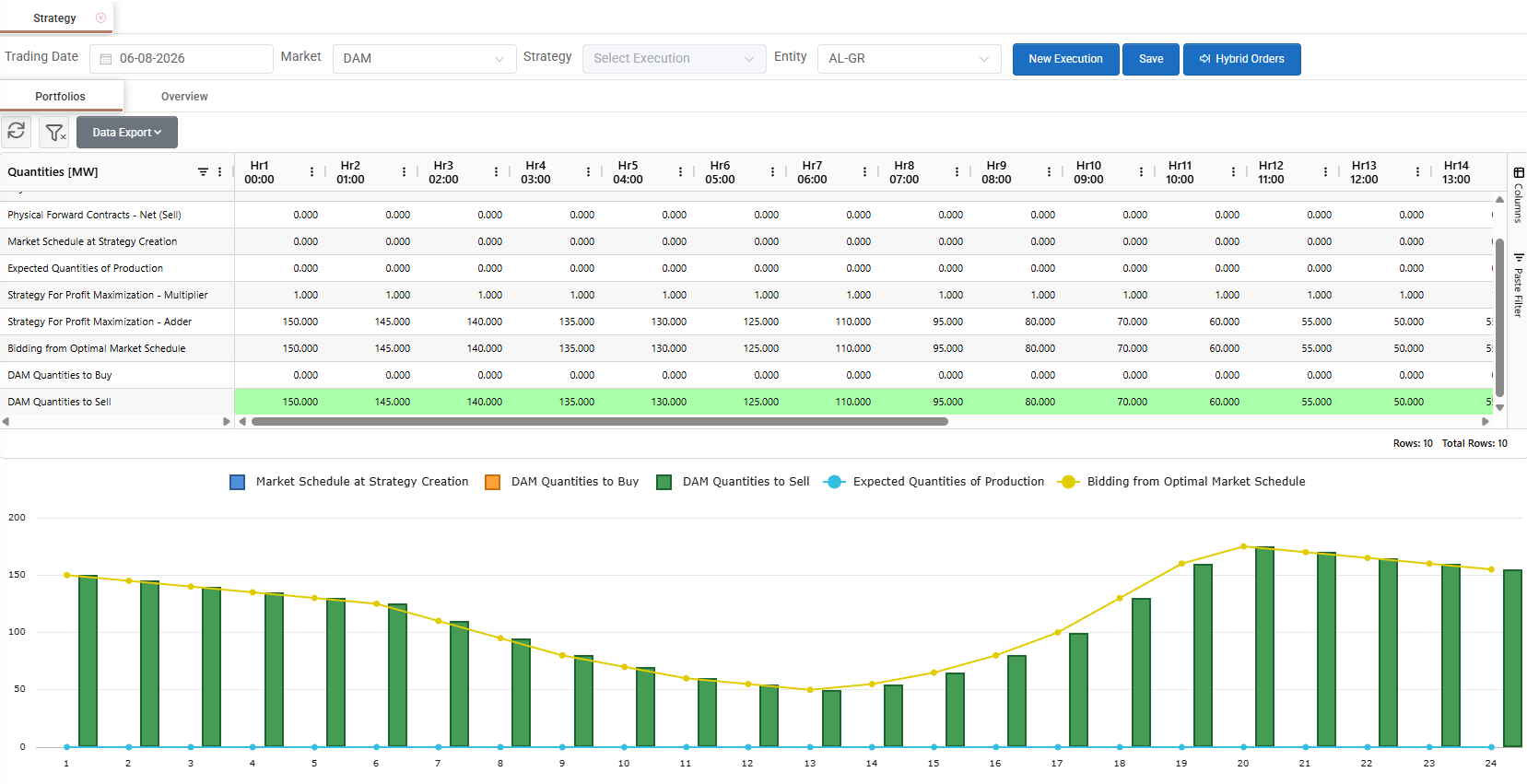
This release introduces Dynamic Market Granularity in the Scheduling module, letting each Bidding Entity trade on its own market timestep.
Market granularity varies by entity and market: most bidding zones use 15-minute intervals, while several cross-border interconnections still operate on hourly timesteps. A single desk needs to work with entities on different timesteps, across different markets, within the same workflow, rather than switching tools or rebuilding grids by hand.
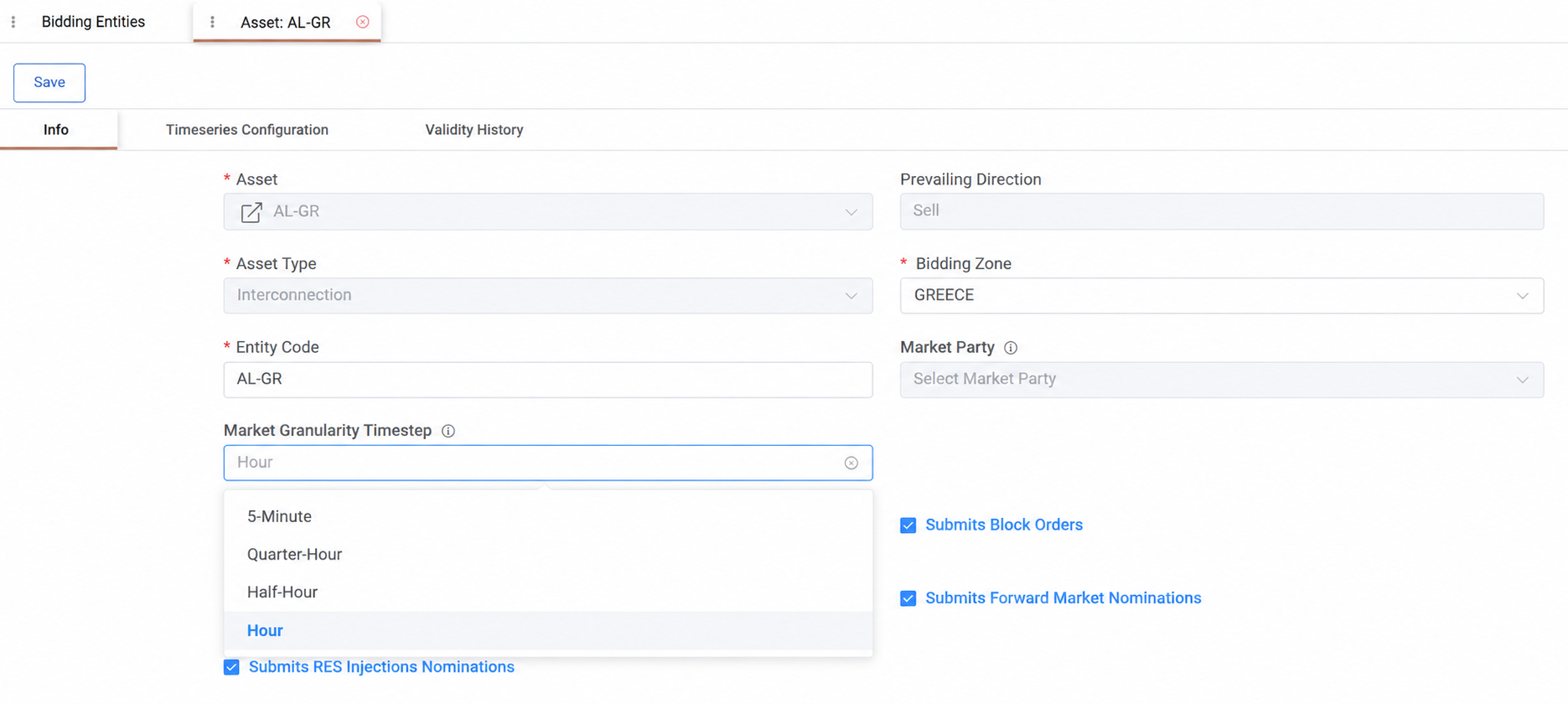
To use it, set the Market Granularity Timestep field on the relevant Bidding Entity to 5-Minute, Quarter-Hour, Half-Hour, or Hour, matching the entity's actual bidding interval. An interconnection entity like AL-GR can be set to Hour while other entities keep their own timestep, each configured independently.
The setting then applies automatically wherever the entity trades: in Strategy, Hybrid Orders, and Block Orders, the grid resizes to the entity's timestep as soon as it's selected. The same granularity carries through to the resulting timeseries, from bid to settled result, keeping the entity's data consistent end-to-end.
Features
Custom fields in Deals and Orders — Custom fields are now supported on Deals and Orders
Auto-assigned roles via Microsoft Entra — Users authenticating through Microsoft Entra can now be automatically assigned a role based on their Entra group membership. View the integration guide for more details.
Quantile forecasting in systemic imbalance and price forecasts — Point forecasts can now also be produced with quantile bands (1%, 2.5%, 5%, 10%…50%…97.5%, 99%), giving a view of forecast uncertainty alongside the central estimate
Automatic RES injection submission — Users can now manage and submit RES injection forecasts through the same bidding order workflow already used for stepwise and hybrid orders
Timeseries Copy Job enhancements — The Timeseries Copy Job now supports copying multiple source-to-target timeseries pairs in a single run
Fixed Amount fee type — Fees in Administration can now be defined as a flat amount, independent of quantity or percentage
Improvements
Required custom fields without a default value — Custom fields marked as required can now be saved without a default value; the value will instead be required when creating or editing each entity
Market Schedule variance on XBID — The XBID screen now displays the percentage difference between Market Schedule and Optimal Quantity
Cleaner Deal Limits input — Removed redundant unit-of-measure labelling from the Deal Limits screen
Fixes
Fixed an issue where XBID grid cells did not flash to indicate updates when dark mode was enabled
Fixed an issue where hydro filling rate timeseries were not populated and were labelled with the wrong unit of measure
Fixed an issue where capacity forecast values were only inserted for the first timestamp instead of the full horizon
Fixed an issue where editing the middle of a timeseries name in the Math Editor search would crop the search term incorrectly
Fixed an issue where newly created dashboards did not show the expected sidebar actions
Fixed an issue where balancing energy offers for wind assets were only generated in the Down direction
Fixed an issue where order statuses did not display correctly
Fixed an issue where the "Export to Excel" option on the Cash Flow chart's data export menu did not produce output
Fixed an issue where failed deal saves or updates did not roll back related changes made in other modules
Fixed an issue where changing the timezone or product on a deal did not trigger a recalculation of Total Quantity
Fixed an issue where adding new options to a custom field did not work as expected
Fixed an issue where scheduled Meteologica forecast data parsing could fail due to an expired session
Fixed an issue where the RES Injection Forecast Nomination screen did not display assets or portfolios at exactly 1 MW capacity
Fixed an issue where exporting the Queries grid to Excel showed the Scope column as an ID instead of its name
Fixed an issue where exporting certain timeseries data produced files without a file extension
Dashboards & Widgets – Refined Configuration Workflow
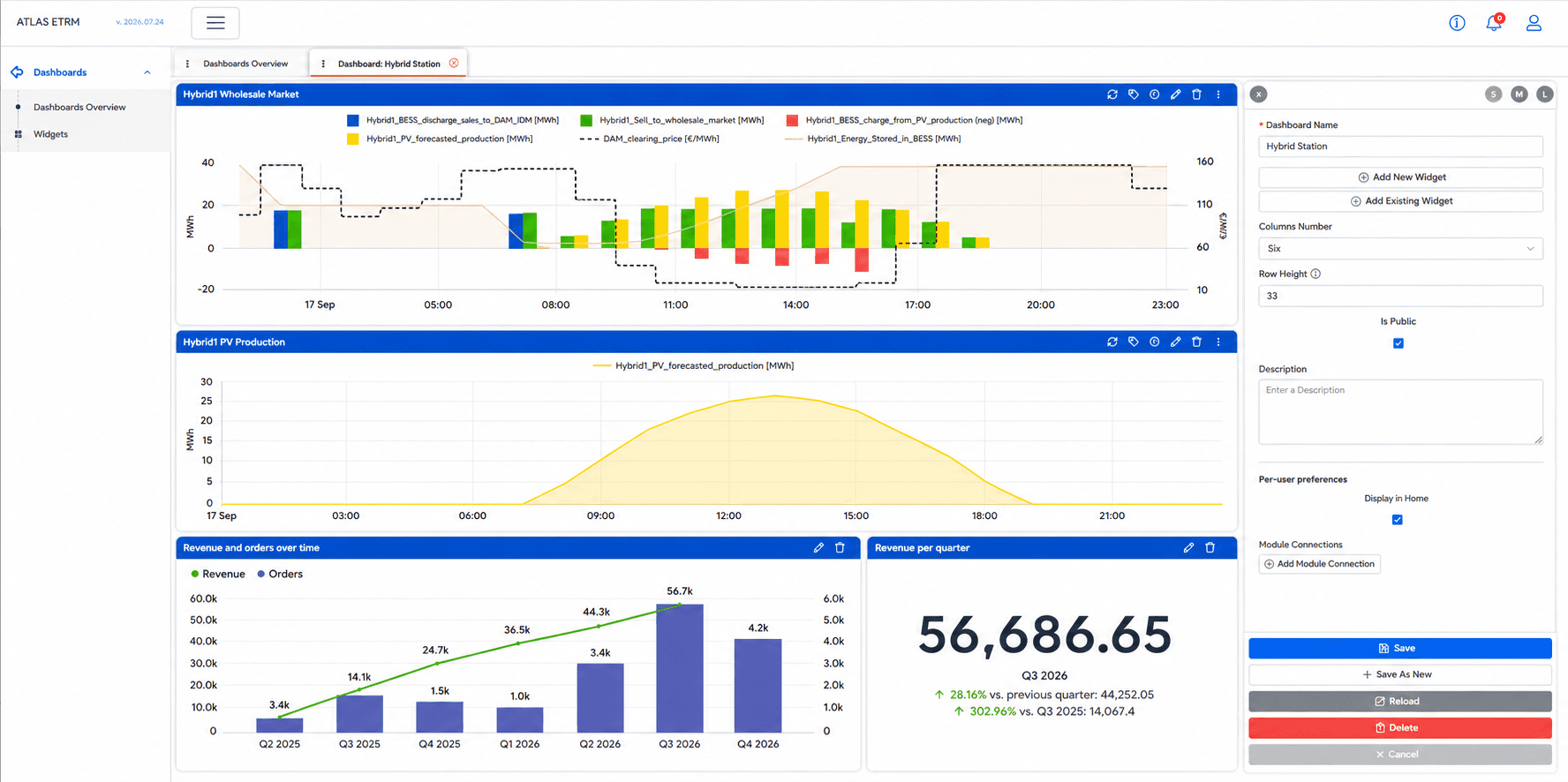
This release introduces a refreshed configuration experience for Dashboards and Widgets, making complex visualizations easier to configure and maintain.
The widget editor has been reorganized into logical configuration sections that group related settings together, allowing users to move through the configuration process more naturally. Chart settings, display options, axes, stacking, and data selection are now organized into dedicated areas, while the live preview updates instantly as changes are made, allowing users to validate the final result before saving.
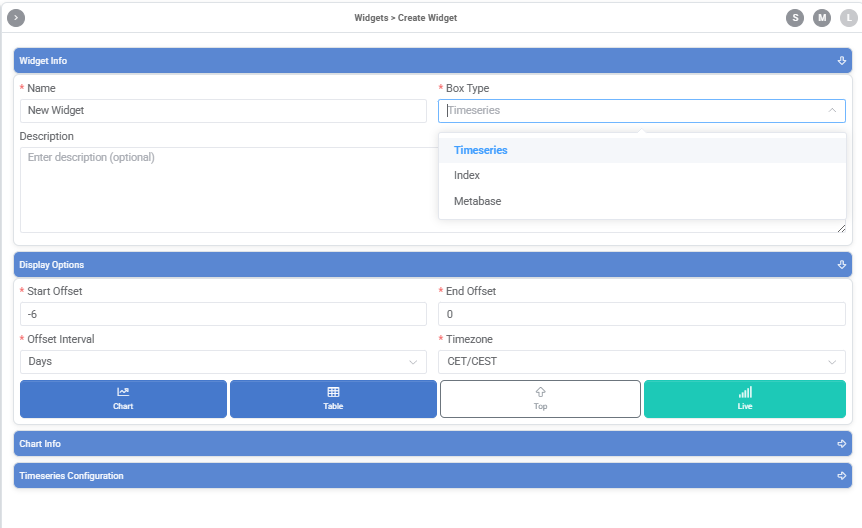
The dashboard editor has also been refreshed with a cleaner and more consistent layout, making it easier to organize widgets, configure dashboard properties, and build dashboards tailored to different operational and business monitoring scenarios.
Whether you're monitoring market prices, renewable generation, forecasts, portfolio exposure, settlement metrics, or other business KPIs, the updated workflow helps you configure and maintain your dashboards more efficiently while keeping the flexibility to build visualizations that match your business needs.
To explore the new workflow, navigate to Dashboards → Dashboards Overview, create a new dashboard, and configure your widgets using the redesigned editor.
Features
Battery storage configuration made easier — New setup options let you configure battery energy storage assets more quickly and with more flexibility.
Fuel cost tracking for thermal assets — Track fuel costs for thermal generation units on a daily basis, giving you more granular visibility into generation economics.
Additional declaration fields — Added the extra data fields needed for technoeconomic declarations adapting to IPTO balancing market specifications.
More market data in the Data Room — Cyprus forward market and day-ahead market data (renewable and conventional) is now available directly in the Data Room.
Dashboard version history — Dashboards now keep a history of previous versions, so you can review how a view has changed over time.
Audit trail for formulas and templates — Changes to formulas and templates are now tracked, giving you full visibility into who changed what and when.
Tagging support for data uploads — Time series upload templates now support tags, making it easier to organize and find your data.
Improvements
Save default views for grid queries — Set a default view when building a grid query, so your preferred layout is ready every time.
Smarter custom field requirements — Custom fields are now required only when relevant, reducing unnecessary data entry.
Further Cashflow page refinements — Continued usability refinements to the Cashflow page following the recent redesign.
Quicker data retrieval — Time series and Data Room queries now return results faster, especially for large data sets.
Fixes
Fixed Math Editor template comment behaviour so saved comments carry over correctly when a template is reused.
Fixed Math Editor search responsiveness while typing formulas.
Fixed cleared energy volume calculations for non-quarter-hourly XBID contracts.
Fixed Deal Template copying so price fields remain intact on the original template.
Fixed Deal duplication so class options are retained.
Fixed Deal ID assignment during deal limit validation.
Fixed Asset search filtering in Deals for more accurate results.
Fixed PnL report downloads within deals.
Fixed time series ordering in Deals for synthetic profiles.
Fixed Asset data synchronization in Math Editor when saving asset updates.
More flexible dashboard data widgets
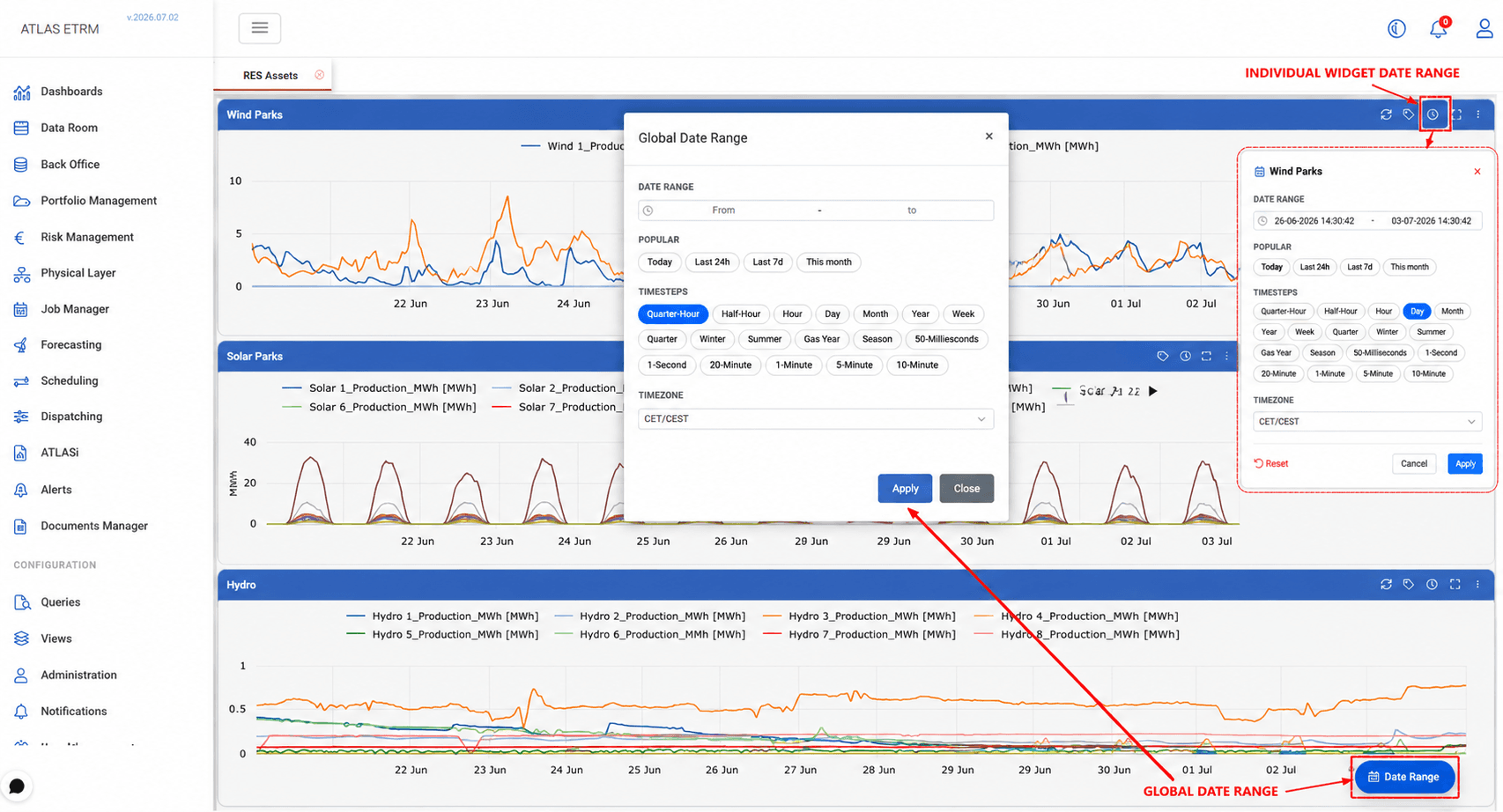
Dashboards now include a Date Range Selector that sets the exact period and level of detail for every widget at once — an exact "from – to" range, or a ready-made option like Today, Last 24h, or This month — making it easy to zoom into a specific event or compare periods at a glance.
Each widget can also be adjusted individually, letting you take a closer look at one chart without changing the rest of the dashboard, then reset it back to the shared view when you're done.
You can also choose the level of detail shown, from fine, minute-by-minute data to broader daily, monthly, or seasonal summaries.
The result: less time rebuilding dashboards, more time on analysis — faster investigation, clearer trends, and views that adapt to how your team works.
Features
Interconnection entities bidding support — Bidding entities can now be tuned to override the default market timestep, supporting the optimal participation of interconnection bidding entities.
Expanding into flexibility and demand response — Atlas now supports demand-response participation as a first-class part of the platform. Assets and balancing service providers can be set up to handle flexibility, with data flowing seamlessly to and from the customer portal.
New math editor functions — Extended the math editor with monthly hour counts and median calculations.
Expanded market data coverage — Added Romanian market data to the available data room timeseries.
Improvements
Faster loading for large data grids — Key grids across the platform, such as activity history and deal templates views, now load and export data more quickly.
Refreshed cashflow view — Updated the layout and calculations on the cashflow page for improved clarity.
Better visibility into submitted volumes — Submitted quantities are now tracked separately for each market, updated with every submission.
Improved e-signature synchronisation — Signed document status now stays in sync automatically for relevant workflows.
Improved balancing market order list — General usability improvements to the balancing market order list.
Fixes
Fixed simultaneous order entry — Corrected an issue preventing buy and sell orders from being submitted at the same time in the intraday auction screen.
Fixed portfolio structure display — Corrected a missing tooltip and a calculation issue in the commodity filter within portfolio structure views.
Fixed saved query deletion — Corrected an error when deleting a saved query.
XBID Trading Screen Enhancements
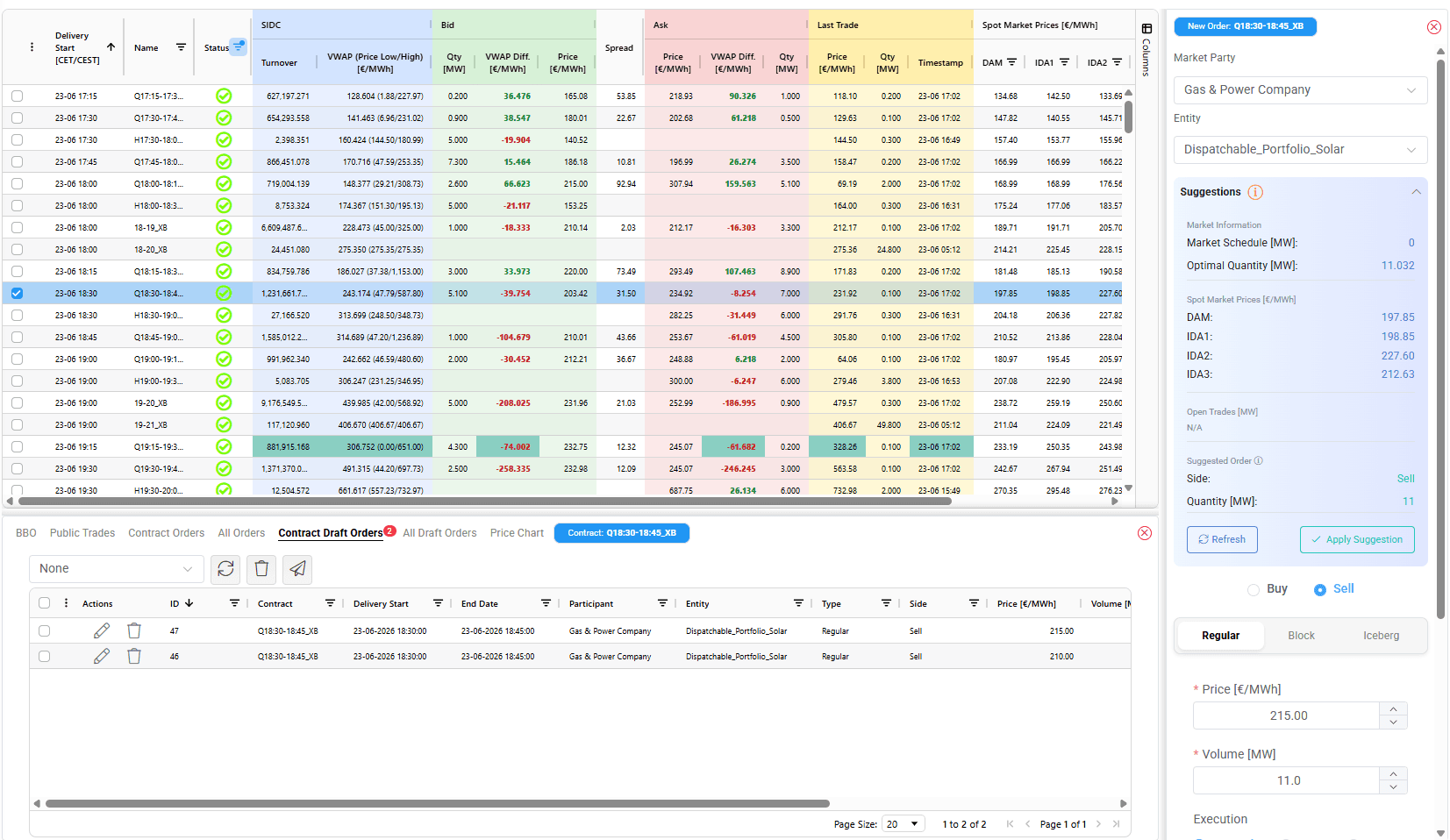
The latest Atlas ETRM update brings a set of targeted improvements to the XBID trading screen, expanding the information available at the point of execution and introducing greater workspace flexibility.
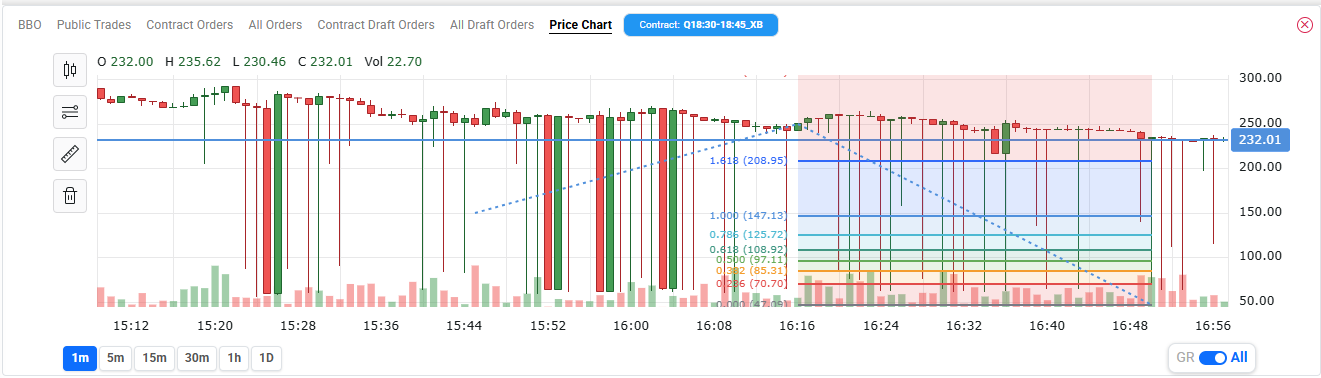
Live trading chart: A trading chart is now available directly within the XBID screen, accessible via a dedicated tab in the lower panel. The chart displays price data for the selected contract across multiple timeframes and includes built-in tools for analysing trends and patterns, allowing traders to examine price action without leaving the trading interface.
Spot market reference prices: The order panel now includes a Spot Market Prices section, displaying current reference prices for DAM, IDA1, IDA2, and IDA3 directly alongside the order entry form, keeping market context immediately accessible when placing an order.
Multi-market order suggestions: The suggestion engine now accounts for positions already submitted across all spot markets when calculating the recommended order quantity, ensuring suggestions reflect the trader's full market exposure.
Unified order management: The All Orders and All Draft Orders tabs provide a consolidated view of open and draft orders across all active contracts.
Enhanced trading grid: Colour coding has been introduced on the trading grid to support faster visual interpretation of market data.
Layout flexibility: The XBID screen now supports independent resizing of the contract details area and the new order panel. The contract details area resizes vertically, while the new order panel resizes horizontally, allowing traders to adapt the workspace layout to their workflow and screen size.
Features
IBAN Pledges Tab — A dedicated Pledges tab has been added under IBAN records, displaying all pledges associated with a specific IBAN directly from the account view, eliminating the need to search for this information elsewhere.
Inclined Irradiance Weather Data — A new weather timeseries type covering inclined irradiance is now available from the platform's market data sources, broadening the PV dataset of our forecasting module and enhancing the meteorological data accessible for renewable asset analysis.
Market Participant Auto-Selection — When selecting an entity in relevant screens, the associated Market Participant is now automatically preloaded, reducing manual steps in the order entry and configuration workflow.
Improvements
Audit Trail Server-Side Processing — The Audit Trail grid now processes and filters data server-side, with date range and quick-filter support, ensuring consistent performance regardless of the volume of audit records.
Bidding Entities Screen Reorganisation — Bidding Entities and Balancing Service Providers pages have been converted to a tabbed layout, bringing them in line with the platform's standard navigation pattern.
Asset Timeseries Page Redesign — The Asset Timeseries page has been updated with a cleaner layout: a unified header row for date range, time zone, and key actions, with a toggle to switch between chart and grid views. The chart is now the default view.
Hybrid Asset Optimisation — Hybrid energy stations (combining multiple generation or storage technologies) are now included in the asset optimisation workflow, broadening the scope of assets that can be optimised through the platform.
Fixes
Fixed an issue where filtering deals by the Internal flag in Deal Capturing was returning an error rather than the expected results.
Fixed an issue where auto-generated component names during bulk asset creation were not guaranteed to be unique, which could cause naming conflicts when multiple assets were initialised in the same operation.
Fixed an issue where Index evaluation requests could time out under certain query patterns, causing dashboard widgets that rely on index data to fail to load.