↵Open
ATLAS changelog
Asset Management – A Dedicated Module with a New Assets Overview
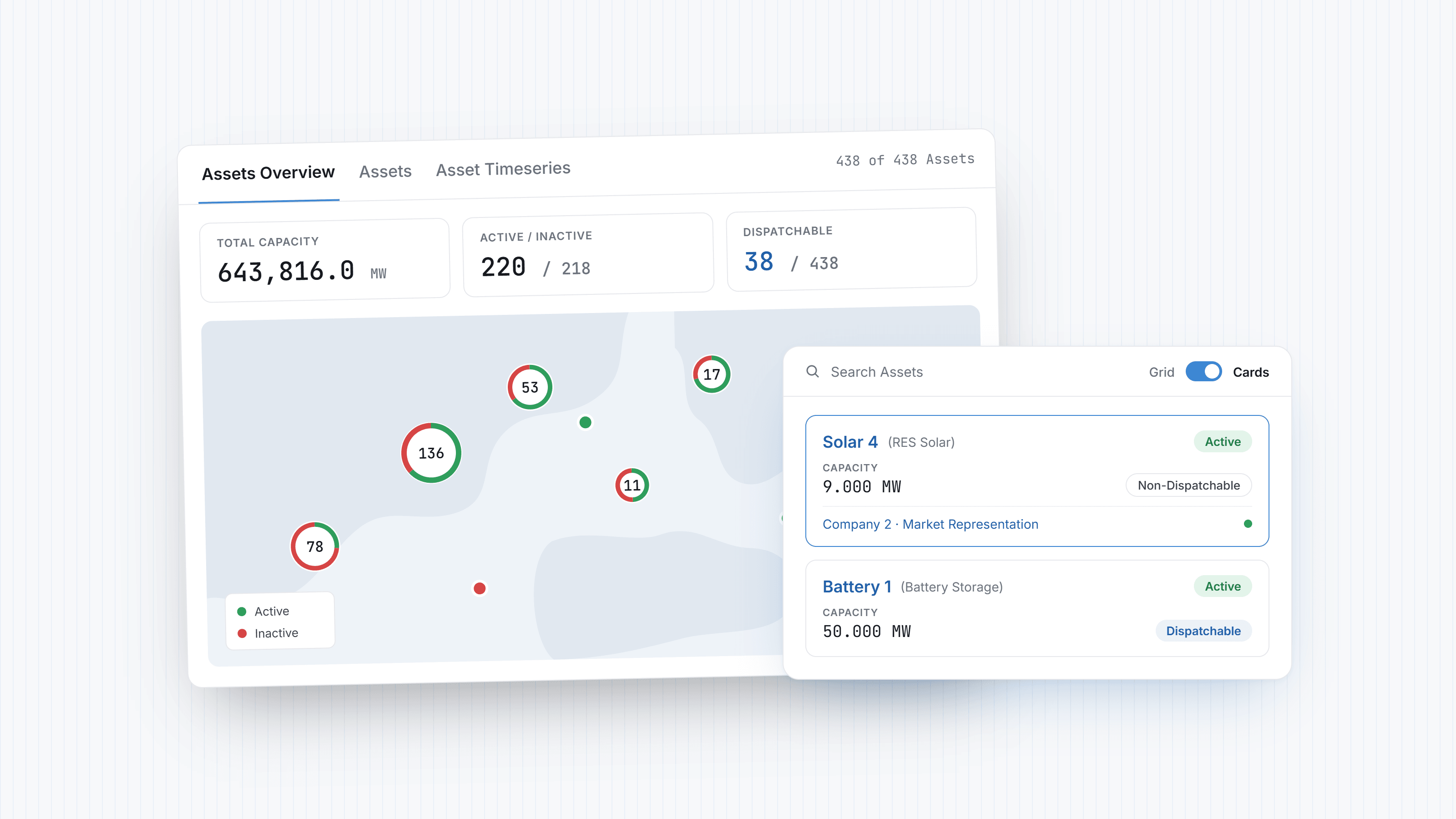
Assets now have their own Asset Management module, separate from Back Office. It comes with a new Assets Overview that brings your whole portfolio onto one screen, so you can see at a glance what you manage and which assets are covered by a valid Master Agreement.
What’s new
Assets Overview – one screen combining summary metrics, an interactive asset map, the asset list and Master Agreement connections.
Portfolio metrics – total capacity, active and inactive assets, number of locations, assets per type and dispatchable assets. All of them reflect the assets you are currently viewing.
Active status – an asset is active when at least one of its Master Agreement connections is valid today, so assets without a valid agreement stand out immediately.
Asset map – assets are grouped by area and separate as you zoom in. Hover over an asset to see its capacity, status and type. Pick a timeseries category to see today’s values directly on the map.
Grid or cards – switch the asset list between the familiar grid and cards that summarize capacity, status, dispatchability and connections.
Master Agreement Asset Connections – connections grouped per Company and Master Agreement, with total capacity, status and validity dates.
What’s sharper
Your saved Assets grid views now apply to the whole Overview, so the metrics, map, asset list and connections all follow the same filter. Assets and Asset Timeseries are now separate sub-tabs, and the View Timeseries action opens the selected assets directly in Asset Timeseries.
Where to find it
Asset Management now appears as its own module in the menu. Your asset records, timeseries and connections are unchanged; only their place in the menu has moved.
For the complete guide, see Asset Management.
Improvements
Deals & Templates – Valid From Date Picker — Dates before the start of delivery can no longer be selected, and leg dates adjust automatically when the delivery range changes.
Deals – Volume in the PnL Tab — Volume is now shown on the deal PnL chart and included in its export.
Deal Templates – Open in New Tab — Saving a deal as a template now opens the new template in a separate tab.
Dashboards – Configurable Sentiment for Index Widgets — Users can choose whether an increase or a decrease counts as positive, so metrics like forecast error (MAPE) are coloured correctly.
Data Room – Widgets from Unsaved Collections — A widget can now be created straight from a Collection without saving the Collection first.
Data Grids – Paste Filtering with Grouping & Filters — Paste filters now work together with column grouping and regular filters instead of resetting each other.
Market Results – ISP Time Series for Storage Units — When ISP files are downloaded, storage, RES portfolio and dispatchable load entities that are not yet mapped are detected and their time series created automatically.
Bidding – Excel Report in Automated Bidding Emails — Automated bidding emails now include an Excel attachment with the market orders, their latest status and log.
Bidding – Multi-Type Market File Export — Exporting market files for several order types at once from the Market Order List and Balancing Market Order List now produces a correctly organized download.
Fixes
Deal Templates – Save as Template — Fixed an issue where saving a deal as a template failed for some deals.
Deal Templates – Unique Names — Fixed an issue where templates with duplicate names in the same Deal Cluster could block deal operations such as Change Charge; template names are now validated.
Bidding – Hybrid Order Quantity Validation — Fixed an issue where pasted values with more than three decimals were rounded inconsistently and quantity checks on sell orders did not behave as expected.
Bidding – Market Submission Job Status — Fixed an issue where order submission jobs reported success even when orders were rejected by the market; they now show a warning.
Data Room – Data Series Chart Title — Fixed an issue where renaming a Data Series did not update its chart title until the page was refreshed.
VAT Validation — Fixed an issue where a valid VAT number could fail validation.
API & MCP
Atlas MCP – Single Sign-On through Atlas — MCP clients such as Claude or ChatGPT now connect through the standard Atlas sign-in, with Microsoft Entra or Atlas login, followed by an approval screen; separate MCP credentials are no longer needed.
Atlas MCP – Bidding Tools — Bidding entities, hybrid orders and block orders can now be read and updated through the Atlas MCP, and market orders can be retrieved.