ATLAS changelog
Introducing Indexes: Single-Value Metrics from Your Data
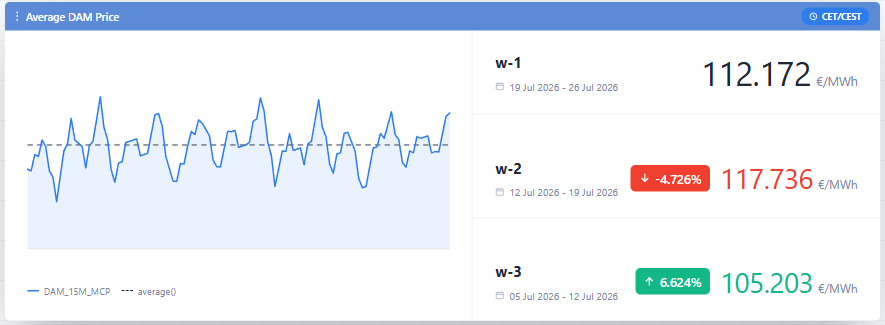
This release introduces Indexes, a new way to track key performance metrics directly from ATLAS Dashboards, without needing to dig through the underlying time series.
An Index turns raw data into a single, meaningful number - an average price, a spread, a forecast accuracy score, a demand range - calculated for whatever period matters. Instead of scanning granular values, users get the metric that summarizes them.
Indexes can be created in Data Room → Indexes by naming the calculation, choosing a unit of measurement, and defining the formula, or defined directly inside an Index Widget. Once available, an Index can be added to a Dashboard, where the same calculation can be evaluated over different periods to track trends over time, or placed side by side with other Indexes to compare markets, portfolios, or assets. One entry can be set as the reference point, with the rest shown as a difference, ratio, or percentage change against it, making it easy to spot how a metric is moving without leaving the dashboard.
For step-by-step instructions and example workflows, see the Indexes and Index Widgets sections in ATLAS documentation.
Features
Cancel in-progress timeseries copy jobs — Added the ability to cancel a running timeseries copy job instead of waiting for it to finish
Circular block orders — Added support for circular block orders in scheduling
Progress bar for job executions — Job executions now show a progress bar in the Job Manager (Timeseries copy, Order Items, Orders, Forward Curves, ATLASi executions)
Simplified weather and production data flow for Meteologica integration — Simplified how production and certified weather data is captured for clusters by treating them as assets, removing redundant per-cluster logic
Automatic cleanup of old ATLASi execution data — Added a retention job that automatically cleans up old model execution data to prevent storage growth issues
Load forecasting for multi-voltage-level portfolios — Extended ML-based load forecasting to support portfolios structured by voltage level
Improvements
Optimized public trades and contract capturing for XBID — Improved how public trades and active contracts are captured, with new endpoints for historical public trades and best-bid/offer snapshots
Do not disturb mode: Hide/pause notifications — Added the ability to pause or hide notifications so they don't interrupt focused work
Master Agreements mass actions — Added bulk mass-action updates in Master Agreements for status, validity dates (valid from/to), and self-billing
Improved dashboard date range panel — Removed unusably fine time-step options and disabled time-step choices that are guaranteed to return empty data for the selected range, auto-selecting the next valid option instead
Time-sliced custom field display on grids — Grids now display the current value of time-sliced custom fields, with a tooltip showing the full history of values on hover
BSP inherits bidding entity validity — When a bidding entity is disabled with a valid-to date, its related BSP entity now inherits the same valid-to date
Fixes
Fixed mass actions on grouped grids — Mass actions on grouped grids no longer send null IDs
Fixed math editor expression error — Resolved a "key not present" error occurring in expanded expressions in the math editor
Fixed Technoeconomic default view in Assets — The Technoeconomic page in Assets now opens to the latest available data by default instead of the oldest
Fixed missing capacity validation on bidding portfolio creation — Bidding portfolio creation now validates missing capacity at creation time instead of only on later changes
Fixed date filters on grids — Resolved date formatters breaking when used in grid filters
Fixed timeseries validation messaging — Corrected validation error handling and messaging in timeseries
Fixed timeseries query deletion error — Resolved an error occurring when deleting a timeseries query