Overview
The Bidding Entities screen is used to configure the individual assets and portfolios through which users participate in energy markets. Each entity defines its market identity, participation settings and the quantities used in nominations and bidding.
A bidding entity may represent a single asset or a portfolio of connected assets. Its configuration determines the supported order and nomination types, forecast sources, capacity, validity period and any entity-specific market timestep.
Users typically configure bidding entities during the initial setup and update them when their portfolio composition or market participation requirements change.
Creating a Bidding Entity
Creating an Asset Bidding Entity
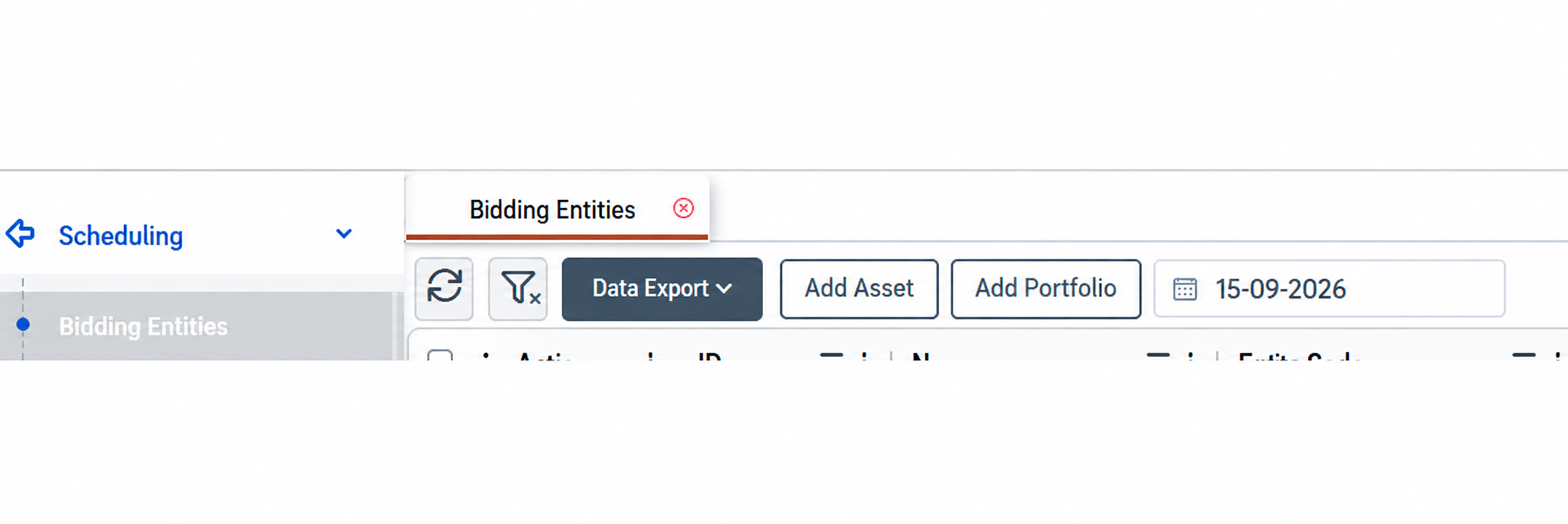
Select Add Asset to configure an existing asset for market participation. The bidding entity links the physical asset to its market identity, including its entity code, bidding zone and market party.
Complete the applicable participation settings, connect forecast and availability time series where required, and define the period during which the entity is valid. Click Save to store the configuration.
The entity becomes available for the configured market processes according to its validity and participation settings. Detailed field descriptions are provided in Appendix - Field Details.
Creating a Portfolio Bidding Entity
Select Add Portfolio to create an entity that represents a group of assets in the market. The portfolio provides a common configuration for their participation, while asset connections determine its composition over time.
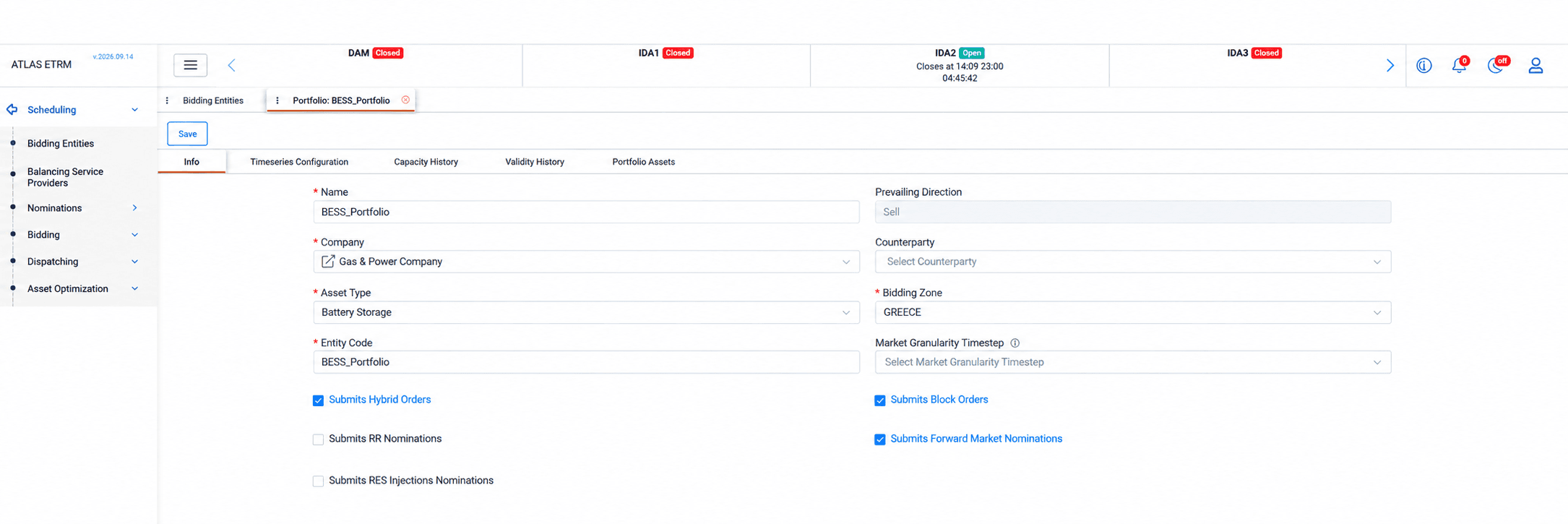
In Info, define the portfolio’s identification details, company, asset type and bidding zone, and enable the applicable order and nomination types. The Market Granularity Timestep can be set when the portfolio requires a different bidding interval from the market default.
Note: For a company to appear in the selection list, its Entity Code must be entered in its Back Office record, and its portfolio structure must be defined in Portfolio Management.
Timeseries Configuration determines the sources used for forecasting and availability. If no forecast series is connected directly to the portfolio, the system calculates its forecast by aggregating the applicable forecasts of the connected assets. If portfolio-level forecast series are configured, these are used instead. This allows users to apply an external consolidated forecast or a calculated, strategy-adjusted series.
The Capacity History tab records the portfolio’s capacity for market participation and the date from which each capacity record applies. Capacity is entered manually and represents the licensed capacity declared to the exchange. It is not automatically calculated from the connected assets and may differ from their total installed capacity.
Validity History defines when the portfolio itself is active.
Portfolio Assets defines which assets belong to it and the validity period of each connection. These dates allow the portfolio composition to change over time while preserving its history.
Once the configuration is complete, click Save.
Editing a Bidding Entity
Editing a Bidding Entity
Open an existing entity by double-clicking its row or selecting the pencil icon in the Actions column. Update the relevant settings and click Save.
For changes to portfolio capacity, entity validity or asset membership, use the corresponding history or connection dates to reflect when the change takes effect. This preserves the configuration applicable to earlier periods.
Deactivating a Bidding Entity
Select the × icon (Deactivate) in the Actions column to deactivate an entity.
Deactivation ends the entity’s validity while preserving its historical record. An entity can also be terminated by setting an appropriate Valid To date in its validity history.
Managing Asset Connections
When an asset leaves a portfolio, set the appropriate Valid To date in Portfolio Assets. This records the end of its membership while preserving the connection history.
Connections added by mistake can be removed or deleted using the right-click menu, depending on whether they have been saved. Remove applies to newly added, unsaved entries. Delete applies to saved connections and can be used to correct an erroneous addition. To delete an individual saved connection, use the trash icon in its row and save the changes.
These actions affect the asset’s connection to the bidding portfolio, not the underlying asset record.
Mass Actions
Adding Multiple Assets to a Portfolio
Users can populate a portfolio by pasting multiple asset names from an external source, such as Excel.
Open Portfolio Assets, add the required rows and paste the asset names into the grid. Review the entries, complete their connection validity dates and click Save.
Removing Unsaved Asset Connections
If an incorrect list of assets has been added but not yet saved, select the relevant rows, right-click and choose Remove.
This action discards the selected new entries before they are saved. It is unavailable for saved connections.
Deleting Saved Asset Connections
If incorrect asset connections have already been saved, select the relevant rows in Portfolio Assets, right-click and choose Delete. Review the remaining connections and click Save.
Use this action to correct mistakenly added connections. For assets that genuinely participated in the portfolio and subsequently leave, set their Valid To dates to retain their membership history.
Example Workflows
Adding New Assets to an Existing Portfolio
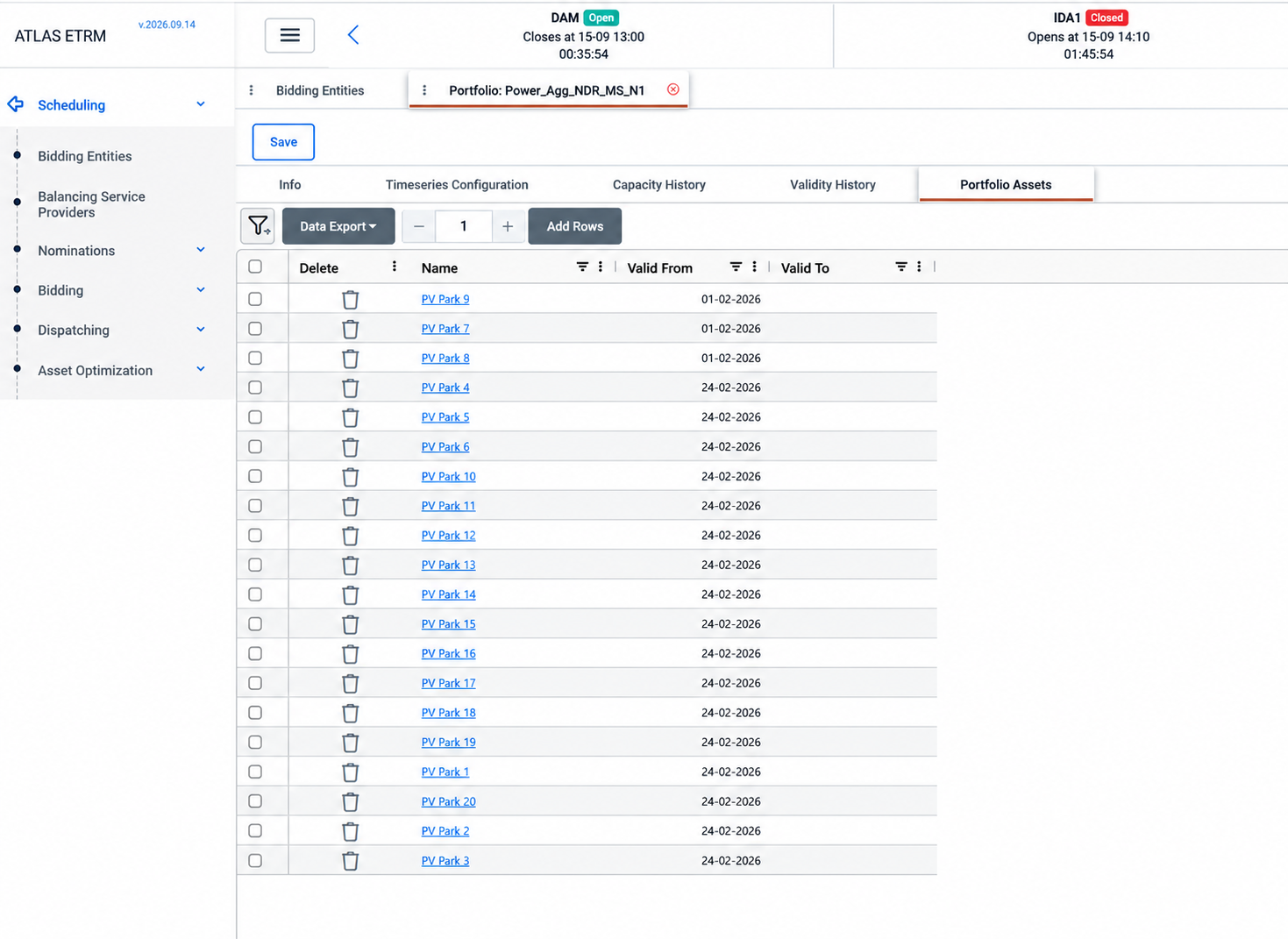
As an aggregator takes on additional assets, its bidding portfolio needs to reflect when each asset starts participating. For example, newly represented renewable plants can join an existing portfolio from an agreed date, contributing to its aggregated forecast from that point onward.
In Scheduling → Bidding Entities, open the portfolio by double-clicking its row or selecting the pencil icon in the Actions column.
Go to Portfolio Assets, add the assets to be included in the portfolio and set their Valid From dates to the start of their participation. If the portfolio’s licensed capacity also changes, add a record in Capacity History with the new capacity and its applicable Valid From date. Click Save to store the changes.
If the portfolio uses aggregated asset forecasts, the new assets contribute to its forecast during the validity of their connections.
Using a Portfolio-Level Forecast
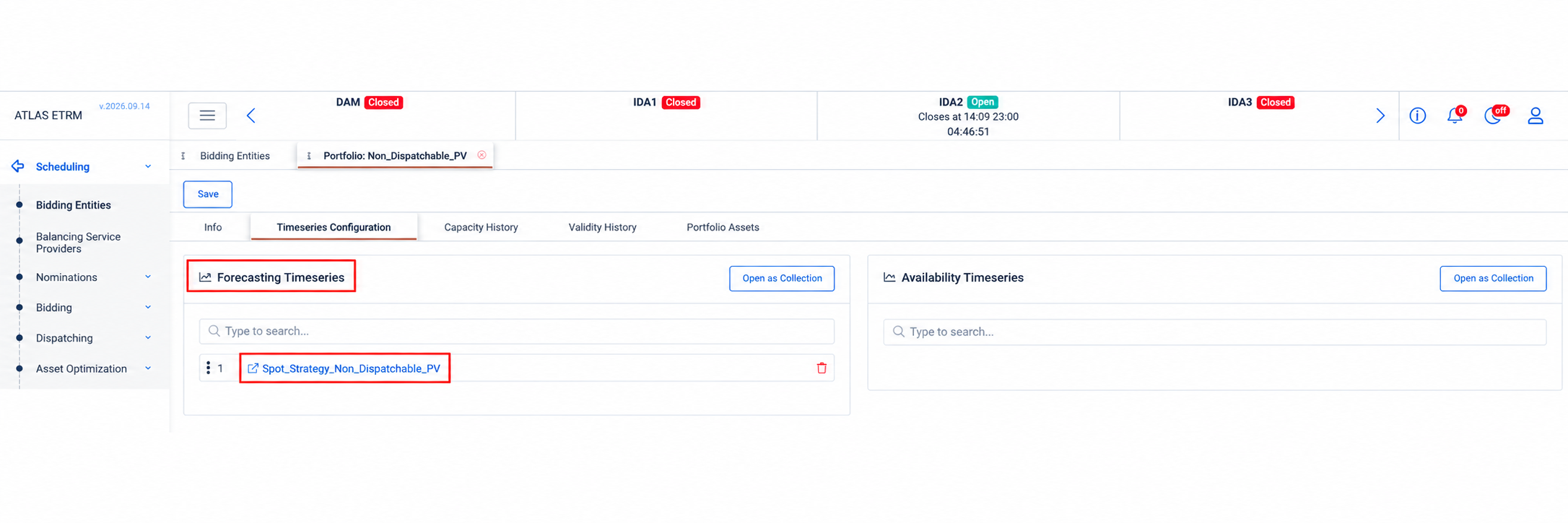
An aggregator may base its nominations and bids on a consolidated forecast from an external provider or on a forecast adjusted to reflect its trading strategy. Connecting this forecast directly to the portfolio allows the expected quantities to reflect that approach, replacing the sum of the individual asset forecasts.
Prepare or import the required forecast series in the Data Room. In Scheduling → Bidding Entities, open the portfolio by double-clicking its row or selecting the pencil icon in the Actions column.
Go to Timeseries Configuration and connect the series under Forecasting Timeseries, then click Save.
The portfolio-level forecast is used instead of the aggregated forecasts of the connected assets, providing the expected quantities used in nominations and bidding.
For practical examples, including weighted combinations of forecast models and different adjustment factors for specific time windows, see the Portfolio-Level Forecast Override section of the RES Aggregator tutorial.
Configuring Hourly Bidding for an Interconnection Entity
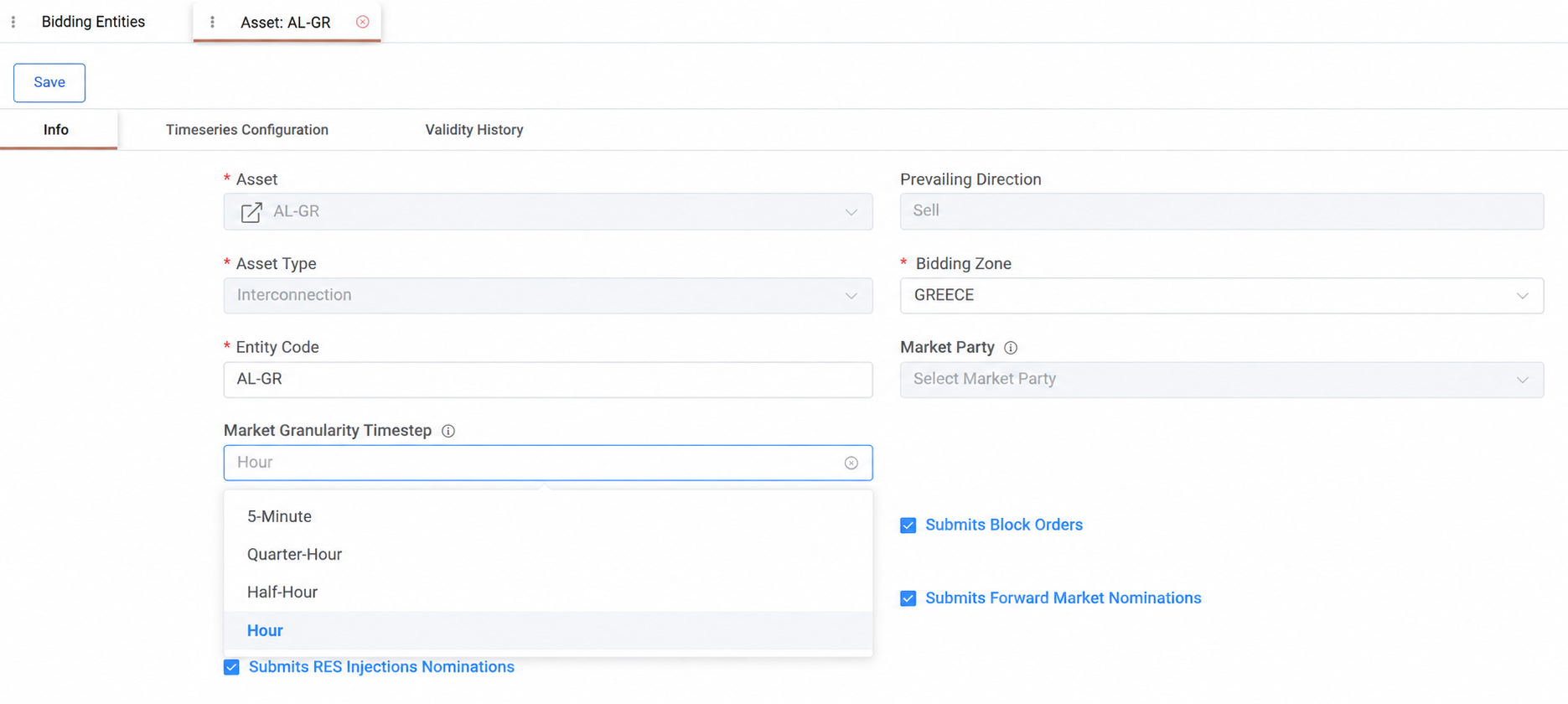
A trading portfolio may include entities with different bidding intervals. For example, an interconnection entity may require hourly bidding while other entities use quarter-hour intervals. Configuring the appropriate interval for each entity allows traders to prepare orders within the same workflow while keeping quantities aligned with each entity’s participation requirements.
In Scheduling → Bidding Entities, open the interconnection entity, such as AL-GR, by double-clicking its row or selecting the pencil icon in the Actions column.
In Info, set Market Granularity Timestep to Hour, matching the entity’s actual bidding interval, then click Save.
Open Strategy, Hybrid Orders or Block Orders and select the entity. The grid automatically adjusts to hourly intervals. Selecting another entity adjusts the grid to that entity’s applicable timestep, allowing hourly and quarter-hour entities to be managed within the same workflow.
The configured granularity carries through to the resulting time series, from bidding to settlement results, maintaining consistent intervals without manually rebuilding grids.
Appendix - Field Details
Info
(Fields vary between individual asset and portfolio entries.)
Field | Description |
|---|---|
Asset | The existing asset represented by an individual bidding entity. |
Name | The name used to identify the bidding portfolio. |
Company | The company associated with the entity’s market participation. Available companies are those registered in Back Office with an Entity Code and a portfolio structure defined in Portfolio Management. |
Asset Type | The type of asset or portfolio represented, such as generation, load, battery storage or interconnection. |
Entity Code | The identifier used for the entity in the relevant market system. |
Prevailing Direction | Automatically determined by the selected asset type: Sell for generation assets and Buy for consumption assets. For battery storage (BESS), both Buy and Sell directions are available. No manual input is required. |
Counterparty | Where applicable, the company representing the portfolio in spot market transactions. |
Bidding Zone | The market zone in which the entity participates. |
Market Granularity Timestep | Overrides the market’s default timestep for the entity. Available options are 5-Minute, Quarter-Hour, Half-Hour and Hour. If no override is configured, the market default applies. |
Submits Hybrid Orders | Enables the entity for hybrid order preparation. |
Submits Block Orders | Enables the entity for block order preparation. |
Submits RR Nominations | Enables the entity for RR nominations. |
Submits Forward Market Nominations | Enables the entity for forward market nominations. |
Submits RES Injections Nominations | Enables the entity for RES injection forecast nominations. |
Timeseries Configuration
Field | Description |
|---|---|
Forecasting Timeseries | Forecast sources used to determine the entity’s expected quantities. For portfolios, directly connected forecast series take precedence over the aggregation of connected asset forecasts. Multiple sources may be configured with priority logic. |
Availability Timeseries | Availability data sources connected to the entity. |
Capacity History
Field | Description |
|---|---|
Valid From | The date from which the capacity record applies. |
Capacity [MW] | The portfolio’s licensed capacity declared to the exchange. |
Min. Capacity [MW] | The minimum capacity applicable to the portfolio, where relevant. |
Validity History
Field | Description |
|---|---|
Valid From | The date from which the bidding entity is valid. |
Valid To | The optional date on which the entity’s validity ends. |
Portfolio Assets
Field | Description |
|---|---|
Name | The asset connected to the bidding portfolio. |
Valid From | The date from which the asset belongs to the portfolio. |
Valid To | The optional date on which the asset’s membership ends. |