Overview
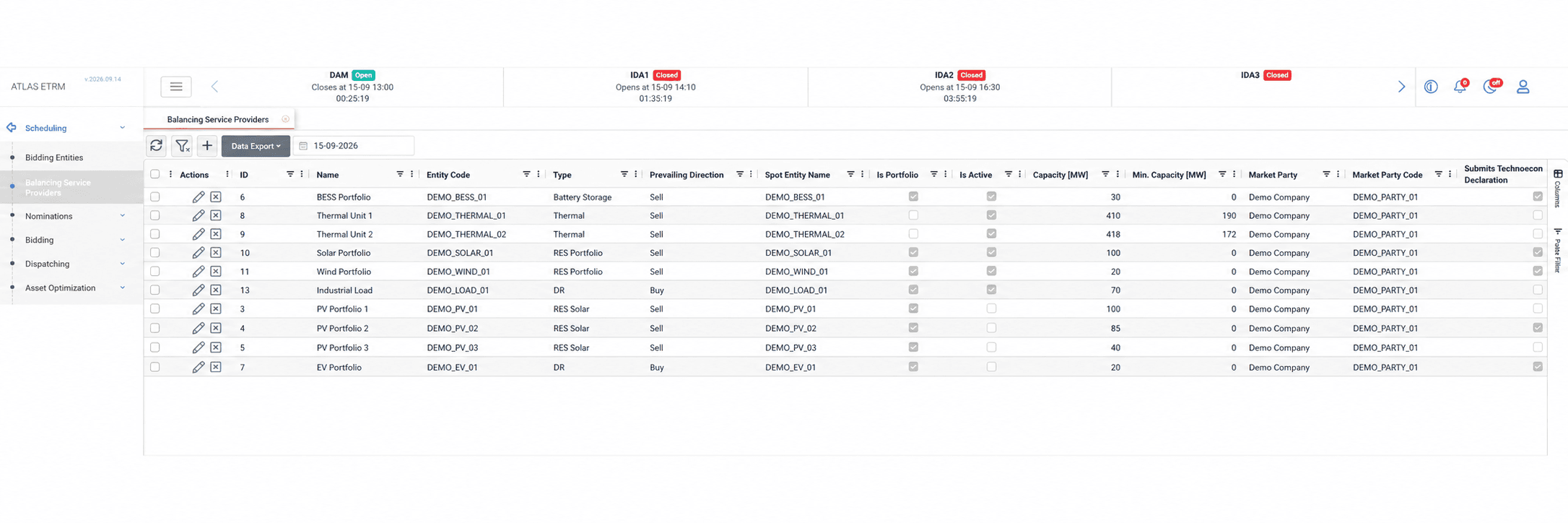
The Balancing Service Providers screen is used to configure the individual assets and portfolios that participate as BSPs in the Balancing Market. Each BSP holds its balancing market identification, its connection to a spot market bidding entity and the settings required for the relevant Dispatching processes.
Users can enable non-availability declarations, technoeconomic declarations, balancing energy offers, reserve offers and commissioning schedules, according to the entity’s role and the requirements of the supported market.
The configuration also includes dispatching, baseline and flexibility time series, where applicable, and the periods during which the BSP is valid.
Creating a BSP
Select + in Scheduling → Balancing Service Providers to create a new BSP.
In Info, select the entity to be represented and complete its balancing market identification. The Spot Entity field links the BSP to the corresponding bidding entity used for spot market participation. Enable the declarations, offers and schedules that the BSP will submit through Dispatching.
In Timeseries Configuration, connect the applicable operational data sources. These include dispatching series, baseline consumption series and optional flexibility series, depending on the entity’s configuration and participation requirements. The required series should be available in the Data Room before they are connected.
In Validity History, select + to add a validity record. Enter the Valid From date and, where applicable, a Valid To date. Multiple records allow the system to retain the history of the BSP’s validity.
Click Save to store the configuration. Enabling a submission type makes the BSP available for the corresponding process; the declarations, offers or schedules are prepared separately in Dispatching.
Editing and Deleting a BSP
Editing a BSP
Open an existing BSP by double-clicking its row or selecting the pencil icon in the Actions column. Update the relevant identification details, submission settings, time series connections or validity records, then click Save.
Ending a BSP’s Validity
To deactivate a BSP, select the × icon (Deactivate) in the Actions column. Deactivation ends the BSP’s validity while preserving its historical record. Alternatively, open Validity History, set the appropriate Valid To date and click Save.
Disabling a linked Βidding Εntity automatically applies the same Valid To date to its BSP.
Example Workflows
Enabling Commissioning Schedules for a Battery
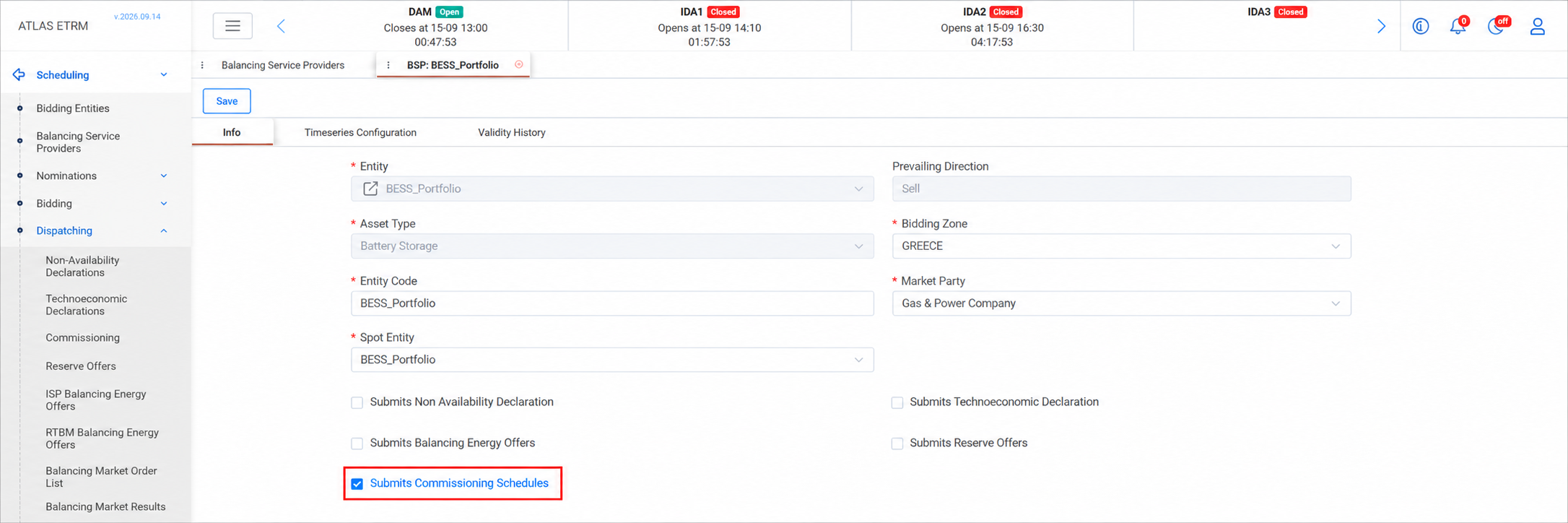
During a battery’s commissioning phase, its planned trial operation needs to be recorded in a schedule and prepared in the required formats for submission. The BSP configuration enables the battery to participate in this process, while the schedule itself is entered through Dispatching → Commissioning.
In Scheduling → Balancing Service Providers, open the battery’s BSP by double-clicking its row or selecting the pencil icon in the Actions column. In Info, enable Submits Commissioning Schedules and click Save.
Open Scheduling → Dispatching → Commissioning, select the required time interval and enter the commissioning values per BSP and period. Click Save to store the schedule. The system automatically creates the corresponding records in the Balancing Market Order List, with the order type Commissioning Schedule. From the order list, use Export Market Files to generate an XML or Excel file per entity.
Configuring a BSP-Level Flexibility Profile
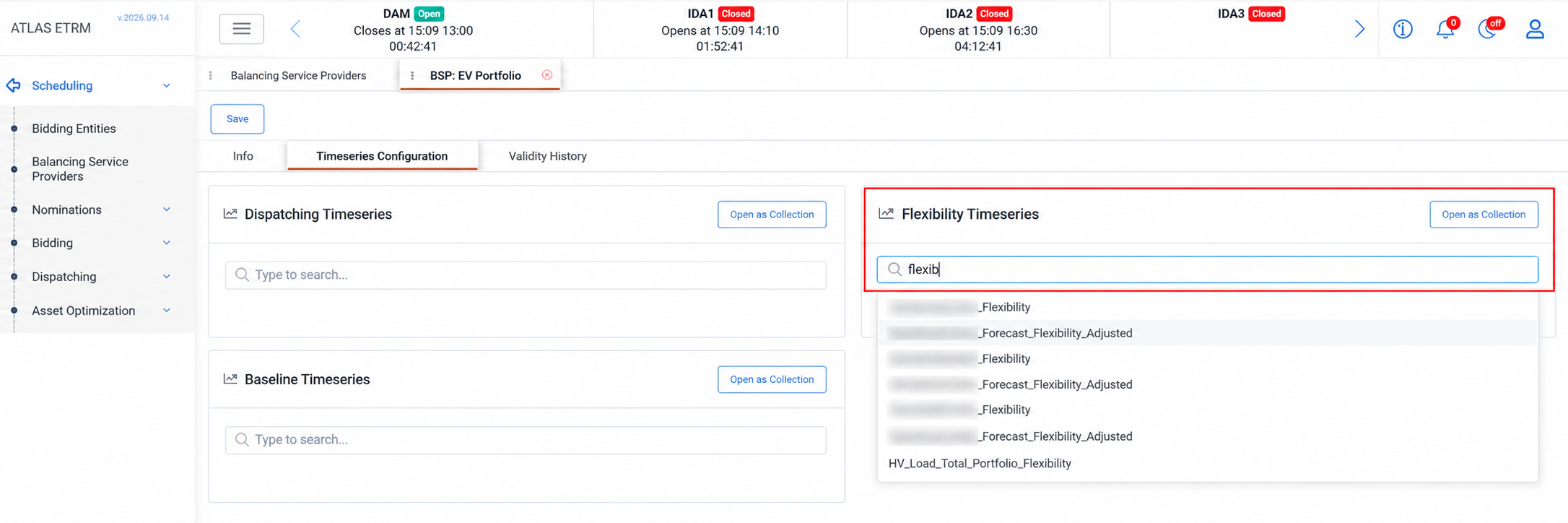
For an entity participating in demand response, a consolidated flexibility profile may be available for the represented portfolio. Connecting this profile directly to the BSP allows it to be used instead of the individual assets’ flexibility data.
In Scheduling → Balancing Service Providers, open the relevant BSP by double-clicking its row or selecting the pencil icon in the Actions column. Go to Timeseries Configuration and connect the required series under Flexibility Timeseries and click Save to store the connection.. The series should be available in the Data Room.
If no flexibility series is connected directly to the BSP, the portfolio’s total flexibility is calculated by summing the flexibility time series of its underlying assets.
Appendix - Field Details
Info
Field | Description |
|---|---|
Entity | The individual asset or portfolio represented by the BSP. |
Asset Type | The classification inherited from the selected entity, such as load or battery storage. See Asset Types for the full list. |
Entity Code | The identifier used for the BSP in the relevant balancing market system. |
Spot Entity | The corresponding bidding entity used for spot market participation. |
Prevailing Direction | The direction derived from the selected asset type, such as Sell for generation or Buy for consumption. |
Bidding Zone | The market zone in which the BSP participates. |
Market Party | The company associated with the BSP’s market participation. Companies configured in the portfolio structure are available for selection. |
Submits Non Availability Declaration | Enables the BSP for non-availability declarations. |
Submits Technoeconomic Declaration | Enables the BSP for declarations of the operational and technical or economic parameters required by the market. |
Submits Balancing Energy Offers | Enables the BSP for balancing energy offers. |
Submits Reserve Offers | Enables the BSP for reserve offers. |
Submits Commissioning Schedules | Enables the BSP for the preparation of commissioning schedules in Dispatching. |
Timeseries Configuration
Field | Description |
|---|---|
Dispatching Timeseries | The dispatching data sources connected to the BSP. |
Baseline Timeseries | The baseline consumption data sources connected to the BSP for processes that require a reference consumption profile. |
Flexibility Timeseries | Optional time series inputs representing the BSP’s flexibility. |
Validity History
Field | Description |
|---|---|
Valid From | The date from which the BSP is valid. |
Valid To | The optional date on which the BSP’s validity ends. Disabling the linked bidding entity automatically applies the same end date to its BSP. |