Part 2 - Market Participation Workflow
Bidding Entities - Nominations - Spot Market - Balancing Market - Deals - Settlement
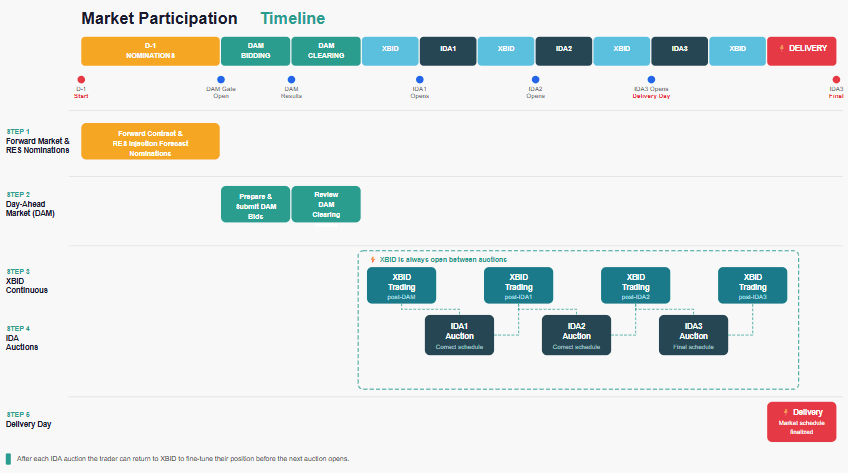
After completing the initial setup of system entities, assets and portfolio structure, the portfolio is ready to participate in organized electricity markets. The focus shifts from configuration to day-to-day market operations.
ATLAS ETRM enables direct participation in the Forward Market, Spot markets (DAM, IDAs, XBID) and the Balancing Market for all supported assets. The system provides the operational environment through which a RES Aggregator prepares nominations, submits bidding orders, monitors clearing results and records dispatch outcomes.
Market interaction is structured through Bidding Entities, which act as the market-facing representation of the RES portfolio. Forecast quantities are translated into nomination proposals and bidding strategies, while cleared volumes and market prices are stored as structured data series within the system.
These market results constitute the quantitative bridge between operational execution and financial processing, ensuring that cleared quantities and prices are consistently transferred to deal capturing and settlement.
1. Bidding Entity Setup
The Bidding Entity constitutes the operational market-facing unit of a RES Aggregator. While Assets are the structural representation of physical units, the Bidding Entity defines how these units participate in organized markets (DAM, IDA, XBID, Balancing).
A Bidding Entity may represent a single asset or an aggregated portfolio. Its configuration determines the bidding zone, the exchange-facing entity code, the applicable market modules (e.g. Hybrid Orders, Forward Market, RES Injection Nominations), the prevailing direction, the licensed capacity declared to the exchange and the activation period through Valid From / Valid To.
The Prevailing Direction is automatically derived from the selected Asset Type. If the entity represents generation (e.g. PV or Wind), the direction is set to Sell. If it represents consumption (Load), it is set to Buy. In case of BESS Assets, both directions (Buy, Sell) are provided. No manual intervention is required.
Capacity is defined manually at Bidding Entity level and is not automatically derived from the installed capacities of the connected assets. The value entered corresponds to the licensed capacity declared to the exchange (e.g. HEnEx in Greece), which may differ from the technical or aggregated installed capacity of the underlying units.
Portfolio Construction
Within the “Portfolio Assets” section, the user connects all relevant assets to the Bidding Entity. Each connection is validity-controlled. From that point onward, the portfolio becomes the aggregation layer above asset-level forecasts.
Each asset may have one or more forecast time series connected at Back Office level. These are evaluated with priority logic, ensuring that if a primary series is unavailable, the system reads the next available one. This guarantees continuity of forecast values.
Forecast as Target Quantity
The forecast represents the target quantity proposed to the market. It is the quantitative basis for nominations and bidding.
Where the Forecast module is available, the user firstly configures the required static data (technical characteristics, geo parameters, etc.). The module then generates forecast time series per asset using machine learning models that incorporate meteorological inputs. The produced forecast can be linked to the respective asset as an active time series.
If the Forecast module is not available, or if the user prefers external sources, forecast time series must be imported or manually created under Available Data Series and then connected to the asset. In all cases, the asset requires at least one active forecast series in order to participate operationally.
Portfolio-Level Forecast Logic
At Bidding Entity level, the system determines the bidding quantity using one of two alternative approaches.
- Option A: Automatic Aggregation (Default)
If no forecast time series is connected at Bidding Entity level, the system automatically calculates the portfolio forecast by summing the active forecast series of all connected assets for each delivery interval.
In this configuration, the bidding quantity equals the total of the asset-level forecasts that are valid and prioritized at that specific time. The aggregation is performed dynamically and reflects exactly the forecasts linked to each asset.
- Option B: Portfolio-Level Forecast Override
If the user connects one or more forecast time series directly within the Bidding Entity (Timeseries Configuration), the system reads those instead of summing asset-level forecasts.
In practice, a portfolio-level override is typically used when the Aggregator does not wish to submit the pure physical sum of asset forecasts but instead apply a risk-managed or strategy-adjusted quantity to the market.
The portfolio-level series may come either from an external consolidated forecast provider, available as a timeseries in Dataroom, or from internally calculated logic created through the Math Editor in the Data Room. The Math Editor allows the user to construct calculated time series based on existing system data and link the result directly to the Bidding Entity.
For example, a weighted combination of different forecast models may be used when the portfolio relies on more than one prediction source:
Forecast_portfolio = 0.4 × Forecast1 + 0.6 × Forecast2
In this case, Forecast1 and Forecast2 may correspond to two different machine learning models or to an internal model and an external provider. Τhe weights may be determined based on historical backtesting performance metrics or based on predefined confidence levels assigned to each forecasting source. The resulting time series represents a statistically optimized portfolio forecast rather than a simple selection of one source.
Another common use case is risk adjustment. An Aggregator may deliberately bid a slightly reduced quantity in order to mitigate imbalance exposure:
Forecast_adjusted = Forecast_sum × 0.98
Here, the portfolio forecast is reduced by 2%, creating a conservative bidding strategy. This approach is typically applied when imbalance penalties are asymmetric or when upward deviations are financially more exposed than downward ones.
A more advanced strategy may apply different adjustment factors across specific time windows. This allows the Aggregator to intentionally under- or over-declare quantities depending on expected market conditions or forecast uncertainty.
For example:
Forecast_strategy =
band("00:00","08:00") × 0.9 × Forecast +
band("08:00","16:00") × 1.1 × Forecast +
band("16:00","24:00") × Forecast
In this example, the band() function activates the corresponding multiplier within each time interval. The declared quantity is reduced during the night hours, increased during the main production window, and left unchanged for the remaining periods.
Multiple portfolio-level series may also be configured with priority logic, ensuring continuity in case the primary source is unavailable.
This mechanism allows the Aggregator to separate physical production modelling (asset level) from commercial bidding strategy (portfolio level), while preserving full auditability of the applied logic.
2. Nominations
The Nominations screens are used to declare contractual quantities that must be communicated to the market operator. For RES portfolios, the focus is primarily on Forward Market Nominations and RES Injection Forecast Nominations.
Forward Contract Nominations
The Forward Contract Nominations screen is used to declare bilateral forward contracts. Each record represents a contractual energy exchange between two market participants that must be registered in the market system.
When creating a new record, the user fills in the relevant contractual fields, including:
Participant: the market participant submitting the nomination
Counterparty: the contracting party on the opposite side of the agreement
Flow Direction: indicates whether the nominated energy represents a sale or purchase
FCN Bilateral Contract: the unique identifier of the bilateral forward contract
Market Version and
the nominated quantities per trading interval.
Special attention should be given to the FCN Bilateral Contract field. This identifier is used by the exchange to match the nomination submitted by each counterparty. The exchange performs a validation process using this field to link the two declarations referring to the same bilateral contract. For this reason, the value must be entered carefully and consistently by both parties.
Anomaly Report for Forward Contracts
After nominations are submitted, the system displays the Anomaly Report for Forward Contracts grid. This grid highlights potential discrepancies between the nominations submitted by the two counterparties of the same contract.
Typical differences may include mismatches in nominated quantities or other contract parameters. If such discrepancies are detected, both parties have the opportunity to correct their declarations within the permitted nomination window.
If the discrepancy is not resolved within the allowed timeframe, the exchange automatically applies a reconciliation rule. In many cases, this results in the lowest quantity declared by the two parties being accepted as the final nominated value.
Physical Delivery / Offtake Nominations
Once the forward contract quantities have been declared, the nominated volume must be allocated to the underlying assets or portfolios. This is performed in the Physical Delivery / Offtake Nominations grid.
In this section, the user distributes the previously declared contractual quantities across the relevant assets or portfolios that will physically deliver or consume the energy. This step ensures that the contractual commitments are properly linked to the operational units responsible for fulfilling them.
Mismatch Quantity
The Mismatch Quantity grid provides a control mechanism that compares the total forward contract nominations with the quantities allocated to the assets. For the nomination process to be valid, the mismatch must eventually be equal to zero.
RES Injection Forecast Nominations
The RES Injection Forecast Nominations screen is used to declare to the market the expected energy injection from RES portfolios for the delivery day. These nominations represent the forecasted production that will be injected into the system and are required by the market operator for scheduling and balancing purposes.
The nominated quantities are displayed per trading interval (timestamp) and are automatically populated by the system based on the forecast configuration of the portfolio. Specifically, the values are derived either from the forecast time series connected to the Bidding Entity or, if no portfolio-level forecast has been defined, from the aggregation of the forecast time series connected to the underlying assets, as described in the bidding entities section.
Although the values are initially populated automatically, the user may manually adjust the quantities before submission if necessary.
Once the nomination is saved, the record is transferred to the Market Order List. From there, the user can review the nomination and execute Approve and Send in order to submit it to the market. The detailed submission workflow is described in the Bidding section later in this document.
3. Spot Market
Spot market participation in ATLAS ETRM is performed through a structured workflow that begins with strategy definition and culminates in the submission of market orders. The process is organized under the Bidding section of the Scheduling module and is executed per market and per Bidding Entity (portfolio).
Strategy and relation to the Bidding Entity
The Bidding Strategy screen incorporates various features to assist users in formulating their bidding strategies and optimizing their trading decisions.
The trading date is set to the next delivery day by default, although it can be modified by the user. The user selects the relevant Market and the Entity, which corresponds to the previously configured Bidding Entity (portfolio). Based on this selection, the system automatically derives the list of entities available for bidding in the selected market and retrieves the operational data associated with that portfolio by creating a new execution (Actions → New Execution).
Several quantities are automatically retrieved by the system. Forward contract quantities and the current market schedule are imported through the exchange integration. These values represent the portfolio’s existing market position and define the starting point for the bidding strategy. For example, when preparing participation for an Intraday auction (IDA), the system retrieves the schedule resulting from the Forward Market + Day-Ahead Market + XBID.
In addition, the expected production quantities are derived from the forecast time series connected to the portfolio or, when applicable, from the aggregated forecasts of the underlying assets.
The strategy itself is defined through two parameters entered by the user: Multiplier and Adder. These parameters represent a linear adjustment of the forecasted quantities, expressed as: Strategy Quantity = α × Forecast + β
By modifying these values, the user can scale or shift the proposed quantities according to the desired trading strategy. Based on these adjustments and the market schedule, the system calculates the resulting buy or sell quantities for each trading interval.
The strategy grid supports copy-paste operations to facilitate quick adjustments across multiple time intervals.
The screen also provides a graphical visualization of the bidding quantities through charts, allowing users to assess the impact of their strategy on the expected trading position.
Once the parameters are defined, the user can save the strategy configuration.
Stepwise Orders / Hybrid Orders
After defining the strategy, the user selects Stepwise Orders/ Hybrid Orders, which transfers the calculated quantities to the Stepwise Orders/ Hybrid Orders screen. Depending on the market regulations, the screen appears either as Hybrid Orders (e.g. in Greece) or Stepwise Orders (e.g. in Cyprus), but the functionality remains the same and allows the user to define the price–quantity structure of the bids.
Alternatively, the user may access the Stepwise Orders / Hybrid Orders screen directly, without defining a strategy beforehand. In this case, the quantities of all offers are automatically initialized to the expected quantities of the selected entity, without applying any multiplier or adder adjustments.
Once the process is initiated, the system displays a grid containing the trading period, the current market schedule, and multiple quantity–price pairs representing the allowed bidding steps according to spot market rules.
The quantities proposed by the strategy are automatically populated but remain editable, allowing the user to adjust them if necessary.
Prices are then assigned to the quantity steps. For sell orders, the default price is initially set to zero. The user may populate all price cells simultaneously using the Initialize Price field or manually enter values for specific trading periods. For buy orders, prices are not pre-filled and must be entered by the user.
The grid supports bulk editing through copy-paste functionality, enabling quick updates across multiple trading periods.
Before submission, the user can execute the Validate function. This performs automated checks to ensure that quantities do not exceed the portfolio capacity or that prices fall within the permitted market range.
Once validated and saved, the generated orders are transferred to the Market Order List.
Market Order List and approval workflow
The Market Order List serves as the supervisory screen for reviewing orders before they are sent to the exchange. At this stage, users can verify prices, quantities, trading periods and the target market.
Orders can exist in several states during their lifecycle, including:
Scheduled – the order has been created but the submission gate for the market has not yet opened
To be approved – the gate is open but the order has not yet been approved for submission
Submitted – the order has been transmitted to the market
Revoked – the order has been cancelled by the user or replaced by a newer version
Rejected – the order was rejected due to validation issues
Cleared / Partially Cleared / Not Cleared – the order has been accepted and fully or partially matched in the market, or has been accepted but has not been cleared.
Depending on the connected exchange, other intermediate statuses can appear such as Pending Validation and Not Released. These are exchange-specific statuses that the exchange supports and sends to Atlas in real-time.
To complete the submission process, the user selects the relevant orders and executes Approve and Send Orders.
The History section records all status changes, while the system logs allow the user to review the reason for rejection when an order is not accepted by the market.
The Export Market Files function allows the orders to be exported in Excel or XML file format for manual submission through the exchange platform if required. This is useful in case of exchange API unavailability and emergency cases.
Orders can also be cancelled directly through the Cancel Market Order option on supported exchanges. The system additionally displays the gate opening and gate closure times for the selected market session.
Market Results
The Market Results screen provides access to official market clearing outcomes once they become available.
Users can filter results by market and date range, and the information is presented both in tabular form and through graphical charts.
Cleared quantities and clearing prices are automatically stored as time series within the system and can subsequently be used in portfolio management, risk analysis and settlement processes.
XBID
The XBID screen supports continuous intraday trading on supported exchanges.
Unlike auction-based markets, XBID trading typically requires rapid execution, and therefore orders are usually submitted directly to the market without the approval workflow described above.
From the XBID interface, the user can create a new order by selecting the relevant delivery interval and defining the order direction (buy or sell), price and volume. The system supports multiple order types, including regular, block, and iceberg orders. Different execution conditions can also be specified depending on the trading objective:
Normal execution: the order is executed immediately if possible; otherwise, it remains in the order book and may be partially executed against multiple counter orders.
Fill-or-Kill (FoK): the order must be executed immediately and in full; otherwise, it is automatically cancelled without entering the order book.
Immediate-or-Cancel (IoC): the order is executed immediately for any available quantity, while any unfilled volume is automatically cancelled.
Additional parameters such as execution validity may also be specified before submission, for example Good for Session (GFS), where the order remains active for the duration of the trading session, or Good till Date (GTD), where the order remains valid until a user-defined date and time.
Orders that have not yet been executed can be cancelled directly from the interface. Users may also save orders as drafts, allowing multiple orders to be prepared and then submitted together as basket orders.
When creating a new order, a Suggestions panel is displayed to support the trading decision. The panel presents the current Market Schedule and the Optimal Quantity derived from the forecasting configuration of the entity. Based on the difference between these two values, the system proposes a Suggested Order, indicating the recommended side (buy or sell) and the corresponding quantity for the selected delivery contract.
If the user chooses to follow this recommendation, the Apply Suggestion option automatically populates the order fields with the suggested values. The Refresh option recalculates the suggestion based on the latest available market information.
Automation through Job Manager
In addition to manual order creation and submission, ATLAS ETRM allows the automation of market participation through the Job Manager module. Using configurable jobs, users can automatically generate and/or submit market orders for the supported spot markets.
Within the job configuration, the user selects the target market, the delivery day offset, and the entities for which the orders will be generated. The job can be configured to perform different actions, such as order generation, automatic submission to the market, and/or notification via email, including the market files, once the process is completed.
Optional parameters can also be defined, such as strategy inputs (multiplier and adder timeseries) or price configuration, allowing the automated process to follow the same bidding logic described in the previous sections.
This functionality is used for auction-based market sessions (e.g. DAM or IDA), where order generation and submission follow predefined timelines.
4. Balancing Market
The Balancing Market section supports the operational processes required for participation in the balancing markets. Through these screens, entities acting as Balancing Service Providers (BSPs) can submit operational declarations and balancing energy offers to the system operator for the relevant dispatch day.
Several modules are available under this section, including Non-Availability Declarations, Technoeconomic Declarations, Reserve Offers, and ISP/RTBEM Balancing Energy Offers, as well as monitoring screens such as the Balancing Market Order List and Balancing Market Results.
For the purposes of RES portfolio participation, most of these processes are applicable with the exception of Reserve Offers, which typically relate to reserve capacity provision rather than variable renewable generation.
Non-Availability Declarations
The Non-Availability Declarations screen allows BSPs to declare periods during which a generation or consumption unit is fully or partially unavailable. The declaration includes the reason for the unavailability, the type of declaration (partial, total, or cancellation), and the available capacity per dispatch period.
These declarations are communicated to the system operator and are used for operational planning and reliability monitoring. Declarations of this type are sent directly to the market without the approval workflow upon the click of the Submit button. These nominations can be performed by unit operators with limited access to the rest of the platform, so direct submission helps streamline the unit operator workflow.
Technoeconomic Declarations
The Technoeconomic Declarations screen is used to declare the operational characteristics and cost parameters of generation units. These declarations are submitted per Balancing Service Entity and cover the parameters required for dispatch optimization within the Integrated Scheduling Process (ISP).
For a RES Aggregator operating variable generation units (PV, wind), the scope of this process is significantly reduced. The cost-related parameters required for thermal units — such as fuel costs, start-up costs and carbon-related components — are not applicable. If the portfolio includes dispatchable units — such as BESS or hybrid configurations — a Technoeconomic Declaration may be submitted for those units.
Declarations are submitted per Dispatch Day within the ISP bid submission deadline. A more recent declaration replaces any previously submitted one. If no valid declaration is submitted, the last accepted declaration remains in effect. Similar to above, declarations of this type are sent directly to the market without the approval workflow upon the click of the Submit button.
ISP/RTBEM Balancing Energy Offers
The Balancing Energy Offers screen allows BSPs to submit balancing energy offers for the Integrated Scheduling Process (ISP) and real-time balancing markets (RTBEM). Offers are defined through price–quantity steps per dispatch period, enabling the system operator to activate balancing energy when needed to maintain system balance. For RES assets, balancing offers are typically submitted only in the Down direction, reflecting the operational capability of renewable generation to reduce output when required by the system operator.
Balancing Market Order List
All declarations and offers created in the Dispatching modules are collected in the Balancing Market Order List, where users can review their submissions and track their status. From this screen, authorized users can approve and send orders to the system operator, similar to the workflow described previously for spot market submissions.
Balancing Market Results
The Balancing Market Results screen provides access to the official results published by the system operator. These results include balancing energy prices, reserve prices, accepted quantities, and dispatch instructions for each dispatch period.
The interface provides both tabular data and graphical representations, enabling users to analyse balancing market outcomes and reconcile submitted offers with the final activated volumes.
Data Series Results and Settlement Integration
The results of market participation are recorded in the system as time series data, forming the link between market operations and the financial processes of the ETRM platform.
Once market results become available, key outputs such as Market Clearing Prices (MCP) and cleared quantities are stored in the Data Series module. These time series represent the official outcome of the market sessions and are used by the system for further processing.
The stored results serve as the primary input for deal capturing and settlement processes. Cleared quantities determine the executed volumes of market transactions, while the corresponding MCP values provide the pricing basis for financial calculations. Through this mechanism, operational market participation is directly connected to the commercial and accounting layers of the ETRM system.
5. Market Deals
Market Deals record the financial transactions resulting from the aggregator's participation in organized electricity markets. They are created in Portfolio Management → Deal Capturing and capture the commercial terms under which cleared market volumes are settled. Depending on the market and the commercial model, deals may be physical or financial, and pricing may be indexed, fixed or MTM-based.
A typical RES Aggregator maintains a set of long-running deals covering the full operational horizon, structured per market and per direction. The counterparty is typically the relevant exchange, the quantity is derived from the corresponding cleared volume time series, and the price references the applicable market index.
Payment terms are configured within each deal by selecting from the options defined in Back Office → Payment Terms.
Once created, deals can be reviewed individually or managed in bulk through the Mass Updates function, accessible via right-click. Each deal carries a status reflecting its stage in the commercial lifecycle — Pending, Active, Approved, Confirmed or Rejected.
Main Action Steps
Navigate to Portfolio Management → Deal Capturing and create a new deal.
Define the general parameters (commodity, direction, delivery type and date range).
Select the portfolio structure (company, business unit, folder, book, portfolio).
Set the counterparty.
Configure quantity and price references according to the market and commercial model.
Configure payment terms and settlement settings.
Save and activate the deal.
6. Settlement
Once Market Deals are active and settlement inclusion is enabled, the system can begin generating Order Items for each settlement period. Order Items represent the financial amounts arising from cleared market transactions and are derived directly from the active deals.
Order Item Generation
Order Items can be generated in two ways. The first is manually, by right-clicking on a Deal in Deal Capturing and selecting Actions → Execute Order Items. The second is automatically, through a scheduled job configured in the Job Manager module (see Part V).
Once generated, Order Items are visible both in the Settlement tab of the individual Deal and in Back Office → Order Items. The Profit and Loss tab within the Deal provides a graphical and tabular view of the calculated volumes, notional values, MTM and PnL per trading interval.
Order Items remain editable and will be recalculated each time a new execution is performed. Once grouped into an Order, they are locked and no further changes are applied.
Order Creation
Orders can be created manually or automatically through a scheduled job in the Job Manager module (see Part V). For manual creation, navigate to Back Office → Order Items. Using the toggle at the top of the screen, switch the view to Not in Order to display only Order Items that have not yet been assigned to an Order. Select the relevant items and either right-click and choose Create Order by Selected Order Items, or use the Create Order button at the top of the screen. Additional options are also available from the right-click menu, including Add to Existing Order and Delete Order Items.
Main Action Steps
Ensure Deals are active and settlement inclusion is enabled.
Generate Order Items via right-click → Actions → Execute Order Items, or through the automated job (Part V).
Review Order Items in the Settlement tab of the Deal or in Back Office → Order Items.
Switch the view to Not in Order to identify items pending grouping.
Create an Order manually via right-click or the Create Order button, or through the automated job (Part V).