Viewing Your Invoices (Orders)
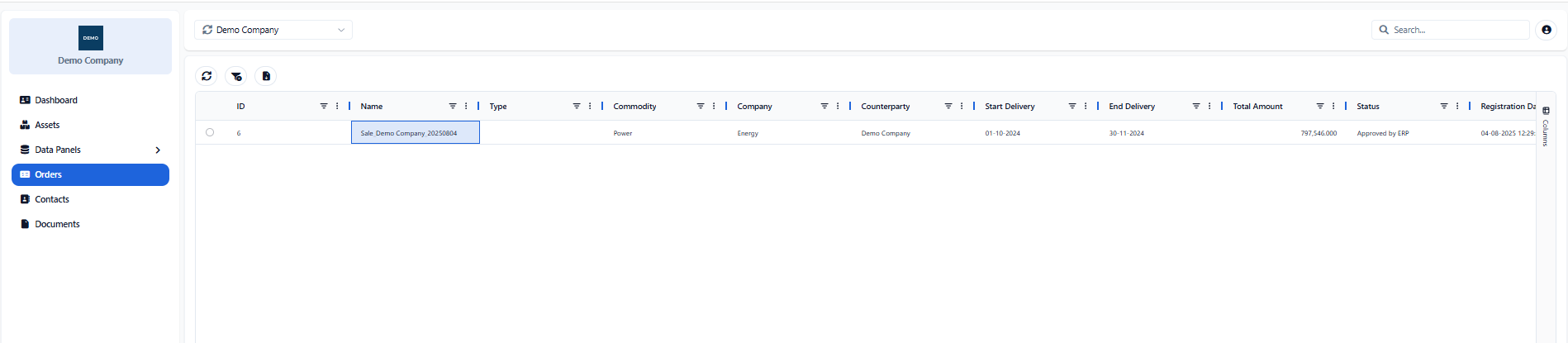
The Orders page provides access to the orders associated with the selected company. These records contain settlement and invoicing information for a specific delivery period, together with the parties involved, the total amount and the current status.
The table is read-only. Users can search, filter, sort and export the available records using the common table controls described in Searching, Filtering and Exporting Information.
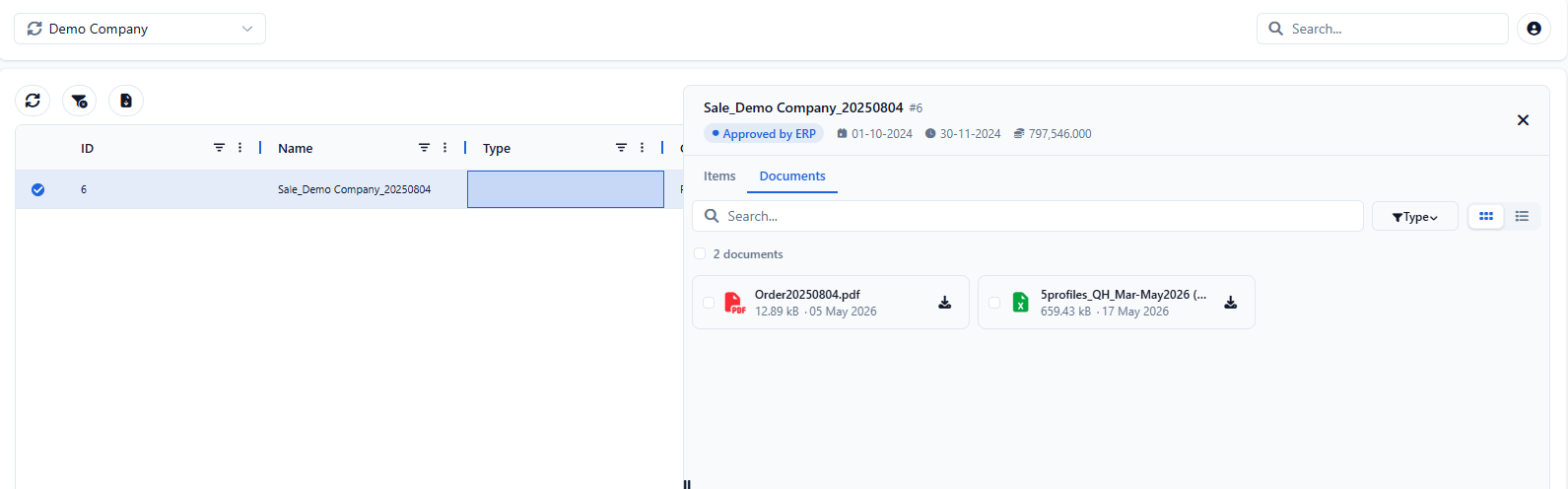
Selecting an order opens its detail panel, where users can review the order summary, the associated order items and any attached documents. Available documents can be searched, filtered by file type and downloaded directly from the panel.
Viewing Order Items & Documents
Selecting an order opens the Order Detail panel. The header displays the order name and ID, its current status, the start and end delivery dates and the total amount.
The Items tab lists the individual components included in the order. Each item provides information about the relevant asset, amount, delivery period, business unit and creation date.
The Documents tab contains the files associated with the selected order, such as invoices & settlement reports.
The search field can be used to locate a document by name, while the file-type filter narrows the results to a specific format (pdf or excel). Users can switch between icon and list view, depending on how they prefer to review the available files.
One or more documents can be selected and downloaded using the available download action.
Appendix - Field Details
Orders
Field / Element | Description |
|---|---|
Order Name | Descriptive name of the selected order. |
Order ID | System-assigned numeric identifier displayed next to the order name. |
Status | Current processing status of the order. |
Start Delivery | Start date of the delivery period covered by the order. |
End Delivery | End date of the delivery period covered by the order. |
Total Amount | Total financial amount of the order. |
Status | Current processing status of the order. |
Registration Date | Date on which the order was registered. |
Order Items
Field / Element | Description |
|---|---|
ID | System-assigned numeric identifier of the order item. |
Asset | Asset associated with the order item. |
Amount | Financial amount of the order item. |
Start Delivery | Start date of the delivery period covered by the item. |
End Delivery | End date of the delivery period covered by the item. |
Info | Additional information associated with the item. |
Business Unit | Business unit associated with the order item. |
Created At | Date and time when the order item was created. |
Order Documents
Field / Element | Description |
|---|---|
Search | Searches the available documents by name. |
File Type Filter | Filters the documents according to their file format. |
Icon / List View | Switches between icon and list presentation. |
Document Selection | Allows one or more documents to be selected. |
Download | Downloads the selected documents. |
Was this helpful?