Overview
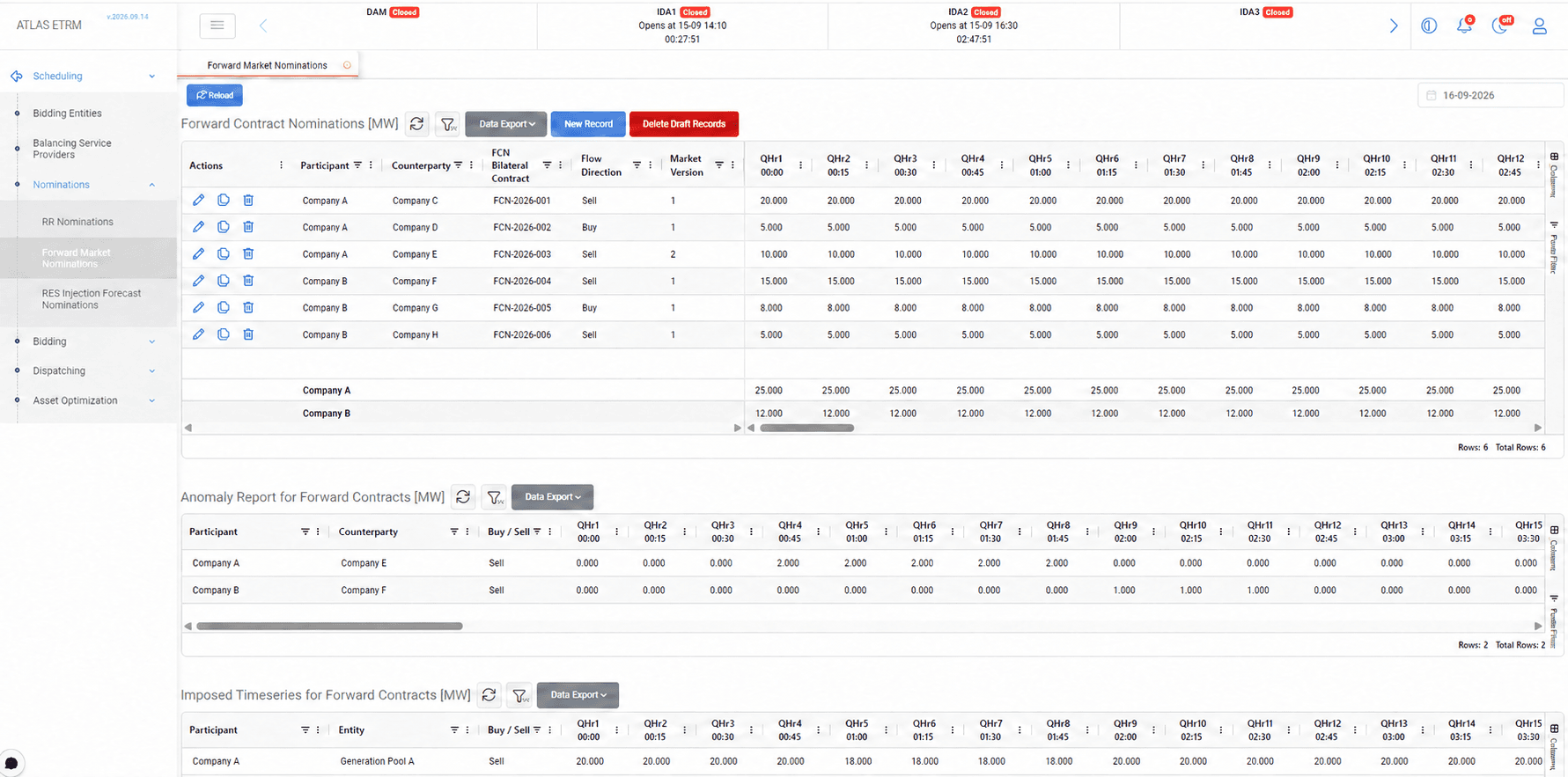
The Forward Market Nominations screen is used to declare bilateral forward contracts and allocate the nominated quantities to the assets or portfolios responsible for physical delivery or offtake.
Users can prepare contract nominations, review discrepancies between counterparties’ declarations and monitor the accepted quantities returned by the market operator. The screen also provides checks to ensure that the physical allocations reconcile with the participant’s nominated contractual position.
To begin, open Scheduling → Nominations → Forward Market Nominations and select the delivery date.
Forward Contract Nominations
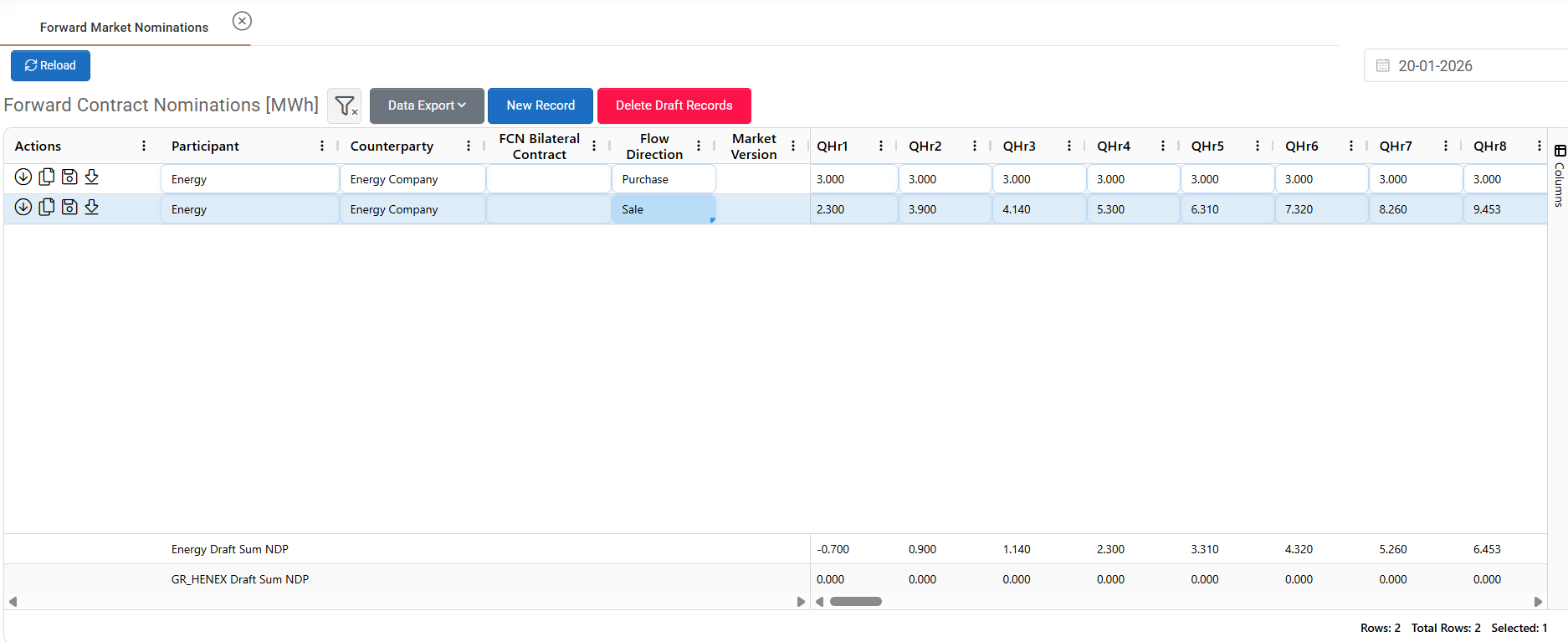
Each record in Forward Contract Nominations represents a contractual energy exchange between two market participants that must be registered in the market system.
Select New Record to add a nomination. Specify the participant, counterparty, flow direction and FCN Bilateral Contract identifier, then enter the nominated quantities for each trading interval. Quantities can be entered directly or pasted from Excel.
The FCN Bilateral Contract identifier is used by the market operator to match the nominations submitted by the two counterparties. Both parties must enter it consistently for the same contract so that their declarations can be linked and validated.
As quantities are entered, the summary rows at the bottom of the grid calculate each participant’s net position from the draft contracts. These totals support nomination preparation; the position returned by the market operator is displayed separately in NDP from Market.
Available Actions
Actions are performed per contract row through the Actions column.
Action | Description |
|---|---|
Fetch Expected Quantities | Populates nomination quantities using forecast data from the participant’s assets and portfolios. |
Create Opposite Contract | Creates a record with the same participant, counterparty and quantities, but the opposite flow direction. |
Save (Submit) | Sends the nomination to the market system. |
Export Market Files | Downloads the nomination as a structured XML file for record-keeping or external processing. |
All actions are performed per contract line, allowing fine control and fast processing of nominations.
After successful submission, the assigned Market Version is displayed in the grid. This value is returned by the market and is not entered manually.
Updating and Deleting Records
To update a nomination, select the relevant delivery date, edit the required values and use Save (Submit) to submit the revised record within the permitted nomination window. Review the resulting market version and market feedback after submission.
To remove a draft contract, select the relevant record and click Delete Draft Records. This action removes draft entries; it does not cancel nominations already submitted to the market.
Anomaly Report for Forward Contracts

After nominations are submitted, the market system compares the declarations received from the two counterparties for the same bilateral contract.
The Anomaly Report for Forward Contracts displays unmatched quantities for the affected trading intervals. Differences may arise from inconsistent quantities or other contract details that prevent the declarations from matching.
A non-zero value indicates a discrepancy that should be reviewed. Check the FCN Bilateral Contract identifier, flow direction and quantities against the agreement and the counterparty’s declaration. Both parties can correct their nominations within the permitted nomination window.
The report is retrieved automatically from the market system and updated as market data is synchronized.
If a discrepancy remains unresolved after the allowed timeframe, the market operator applies the relevant reconciliation rule. In many cases, the lower quantity declared by the two counterparties is accepted as the final nominated value.
Imposed Timeseries for Forward Contracts

The Imposed Timeseries for Forward Contracts grid displays the effective quantities determined by the market operator following nomination matching and validation.
Where counterparties’ declarations differ, the applicable market rules determine the accepted quantities. For markets applying the minimum-quantity rule, the lower of the two nominated values is used for each affected trading interval.
These quantities represent the effective schedule returned by the market. If corrected nominations are subsequently accepted, the imposed time series is updated when the revised market results are retrieved.
Users should review the accepted quantities before finalizing physical allocations, as they may differ from the quantities originally nominated.
NDP from Market

The NDP from Market grid displays the participant’s Net Delivery Position, calculated and published by the market operator following the matching and validation of forward contract nominations.
It consolidates the accepted contractual quantities into a net position for each trading interval of the selected delivery day. This position represents the participant’s net obligation to deliver or receive energy.
The corresponding quantities must be allocated to the relevant assets or portfolios in Physical Delivery / Offtake Nominations. Where available, the Fetch quantities from NDP action can populate a physical nomination using the position returned by the market.
Failure to align the NDP with accurate physical nominations may result in imbalance charges or rejected schedules.
Physical Delivery / Offtake Nominations
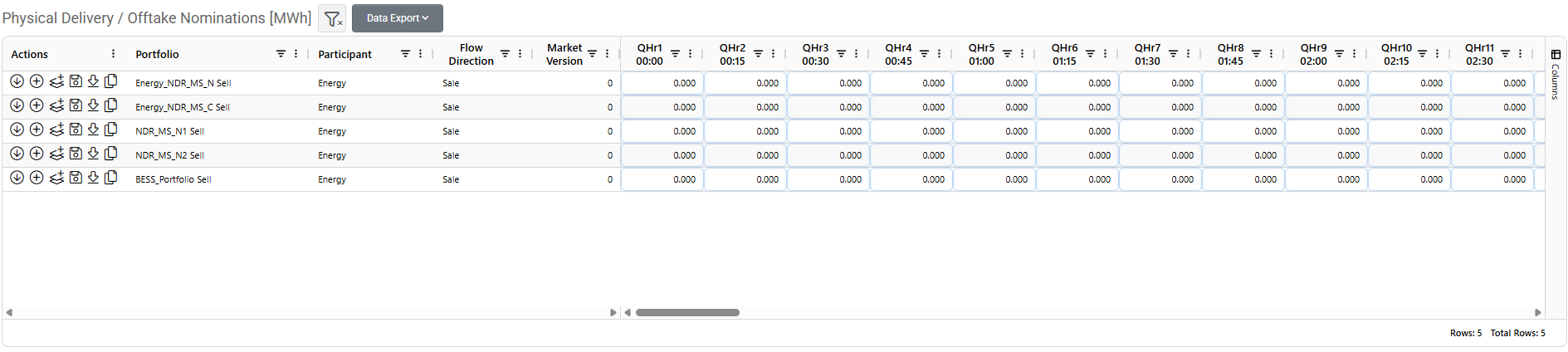
Once forward contract quantities have been declared, the nominated volume must be allocated to the underlying assets or portfolios that will physically deliver or consume the energy.
The Physical Delivery / Offtake Nominations grid links the participant’s contractual commitments to the operational entities responsible for fulfilling them. Enter delivery quantities against the relevant generation entities and offtake quantities against the entities responsible for receiving or consuming the energy.
Quantities can be entered directly or populated using the available row actions.
Available Actions
Action | Description |
|---|---|
Fetch Expected Quantities | Populates quantities using the forecast data of the relevant asset or portfolio. |
Sum Quantities from FCN | Retrieves the total quantities from the participant’s forward contracts with the same flow direction. |
Fetch Net Quantity from FCN | Retrieves the participant’s net quantity across its forward contracts. |
Fetch quantities from NDP | Retrieves the net position returned by the market operator, where available. |
Save (Submit) | Sends the physical nomination to the market system. |
Export Market Files | Downloads the physical nomination as a structured XML file for record-keeping or external processing. |
The quantity retrieval actions provide different starting points for the allocation. For example, Sum Quantities from FCN retrieves contracts for one direction, while Fetch Net Quantity from FCN accounts for the participant’s purchases and sales.
Review the allocation across all relevant entities before submission, particularly when distributing a participant-level quantity among several assets or portfolios.
Select Save (Submit) in each applicable row. Following successful submission, a market version is assigned and a confirmation message is displayed.
To revise an allocation, update the quantities and submit the affected rows again within the permitted nomination window. If the contractual or accepted market position changes, review the physical nominations and adjust them accordingly.
Mismatch Quantity
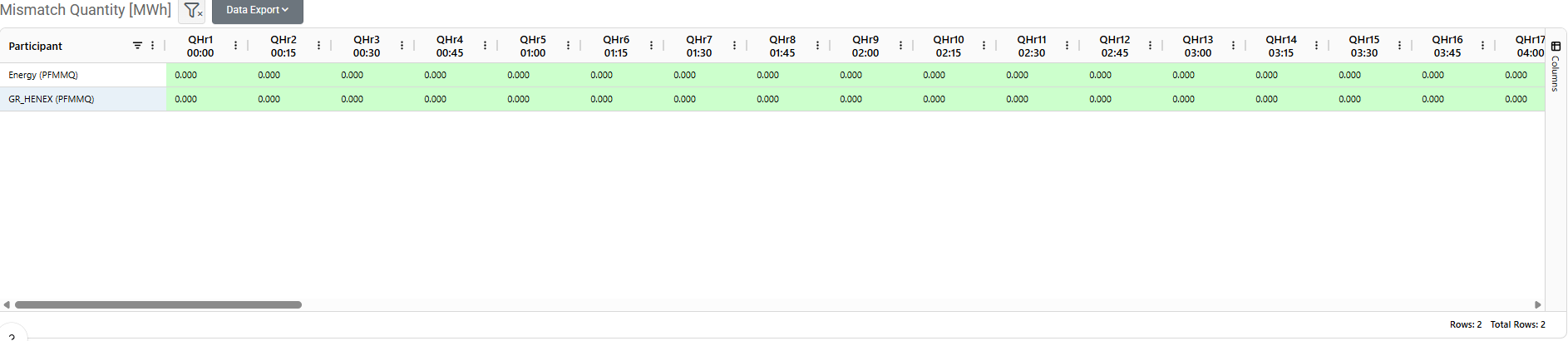
The Mismatch Quantity grid compares the participant’s forward contract quantities with the quantities allocated to physical assets or portfolios, taking into account the net position returned by the market.
The comparison is performed per participant and trading interval. It identifies quantities that remain inconsistent between the contractual position and the physical allocation.
Indicator | Meaning |
|---|---|
Green cell — zero | The quantities reconcile for the relevant participant and interval. |
Red cell — non-zero | A difference remains and requires review. |
When a mismatch appears, check the nominated contract quantities, the latest NDP from Market and the allocation in Physical Delivery / Offtake Nominations. Correct the relevant records and submit any required revisions.
For the allocation to reconcile, the mismatch must be zero for all relevant intervals. A zero mismatch confirms quantity consistency; successful submission should also be checked through the market version and submission feedback.
Example Workflow
When a participant agrees to sell energy through a bilateral forward contract, the agreement must be nominated to the market and the corresponding quantities allocated to the assets or portfolios responsible for delivery.
Open Scheduling → Nominations → Forward Market Nominations and select the delivery date. In Forward Contract Nominations, select New Record, enter the participant and counterparty, choose Flow Direction, and complete the FCN Bilateral Contract identifier and agreed quantities per trading interval. The counterparty should use the same contract identifier for its corresponding nomination.
Select Save (Submit) to submit the nomination and check the returned Market Version. Once market feedback is available, review the Anomaly Report for Forward Contracts. If unmatched quantities appear, check the declarations with the counterparty, correct the relevant nomination and resubmit within the permitted window.
Review Imposed Timeseries for Forward Contracts to see the effective quantities accepted by the market operator. Then check NDP from Market, which reflects the participant’s net position across its accepted forward contracts. If the participant also has purchase contracts, the net delivery obligation may differ from the quantity of this individual sale.
In Physical Delivery / Offtake Nominations, allocate the required net delivery quantities to the responsible assets or portfolios. Enter the values directly or use the available actions to retrieve quantities from forward contracts or the market-reported NDP, reviewing their distribution across entities. Select Save (Submit) for each applicable row and check the submission feedback and market version.
Finally, review Mismatch Quantity. All relevant intervals should show zero, confirming that the physical allocation reconciles with the participant’s position. If differences remain, review the contract quantities, market results and physical allocations, then submit any necessary corrections.
Appendix - Field Details
Field | Applies to | Description |
|---|---|---|
Participant | All grids | The market participant associated with the nomination, schedule or reconciliation result. |
Counterparty | Forward Contract Nominations; Anomaly Report | The other party to the bilateral forward contract. |
FCN Bilateral Contract | Forward Contract Nominations | The identifier used to match the counterparties’ declarations for the same contract. Both parties must enter a consistent value. |
Flow Direction / Buy / Sell | Forward Contract Nominations; Anomaly Report; Imposed Timeseries; Physical Delivery / Offtake Nominations | The purchase or sale direction associated with the nomination or market-returned quantities. In physical nominations, it identifies offtake or delivery respectively. |
Portfolio / Entity | Physical Delivery / Offtake Nominations; Imposed Timeseries | The asset or portfolio to which the physical quantities or market-returned schedule relate. |
Market Version | Forward Contract Nominations; Physical Delivery / Offtake Nominations | The version assigned by the market following successful submission. It is returned automatically and is not entered manually. |
Trading interval quantities | Forward Contract Nominations; Physical Delivery / Offtake Nominations | The contractual quantities nominated between counterparties or the physical quantities allocated to an asset or portfolio for each interval. |
Anomaly values | Anomaly Report | The unmatched quantities reported after comparing counterparties’ declarations. Non-zero values indicate discrepancies requiring review. |
Imposed quantities | Imposed Timeseries | The effective quantities determined by the market operator following matching and validation. |
Net Delivery Position (NDP) | NDP from Market | The participant’s net delivery or offtake position across accepted forward contract nominations for each interval. |
Mismatch values | Mismatch Quantity | Differences between the participant’s contractual position and physical allocation, taking into account the market-reported net position. Zero indicates that the quantities reconcile. |
Quantities are displayed using the units and trading intervals indicated in each grid.