Accounting Integration Guide
1. Introduction
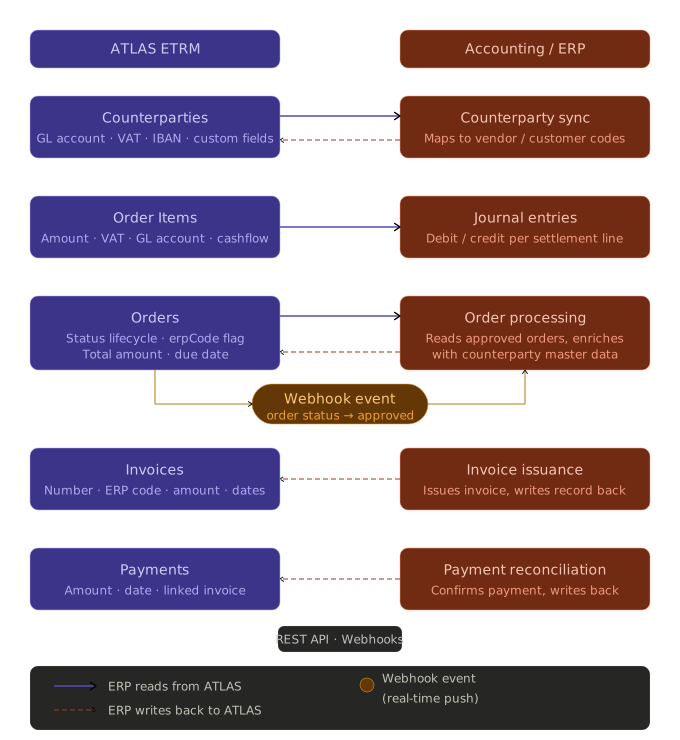
This document provides a step-by-step guide for integrating a general ledger or ERP system with the ATLAS ETRM platform. It covers:
Understanding the data that ATLAS ETRM makes available for accounting purposes
Pulling counterparty master data — including GL accounts, VAT numbers, banking details, and business-specific custom fields — needed to enrich accounting entries
Pulling settlement data (orders, order items), billing documents (invoices), and payment records from ATLAS into the accounting system
Writing invoice numbers, ERP document codes, and payment confirmations back to ATLAS to keep both systems in sync
Key Principle: ATLAS as the Settlement Source of Truth
ATLAS ETRM is the system of record for trade economics and shadow settlement. The accounting system is the system of record for issued invoices, journal entries, and confirmed payments. The integration is a handshake between the two — neither system duplicates the other's role.
The recommended approach is:
ETRM traders capture deals and manage positions through the Deals module. The accounting system does not interact with this layer.
ATLAS calculates shadow settlement and ETRM operations review and approve the output through the Orders module. Once an order reaches a ready status, it becomes available to the accounting system.
The accounting system reads approved orders and their line items (order items), and enriches them with counterparty master data (GL account, VAT, IBAN, and custom fields) to build complete accounting entries.
The accounting system writes back the issued invoice number, ERP document code, and payment confirmation to ATLAS via the API.
This way, settlement calculation remains in ATLAS, and invoice issuance and payment reconciliation remain in the accounting system.
Relevant Entities
Counterparties | Master data for all trading parties. Carries GL account, VAT number, IBAN, self-billing flag, and any business-specific custom fields configured during ETRM setup. Bidirectional — both read and written by the accounting integration.
Deals | Source of trade records. The accounting system reads deal data for reference and cross-checking only — it does not create or modify deals.
Orders | Groups settlement lines into billing batches per counterparty and period. The primary trigger for accounting entries.
Order Items | Individual settlement lines within an order. Carry the net amount, VAT, cashflow direction, and GL account per line.
Invoices | Billing documents linked to orders. The accounting system creates these in ATLAS after issuing the invoice in the ERP.
Payments | Payment records linked to invoices and orders. Written back to ATLAS when a payment is confirmed in the ERP or bank.
Custom Fields | Business-specific metadata fields configured during ETRM setup. Can be attached to counterparties, master agreements, and assets. Surfaced in API responses under customFieldValues.
Prerequisites
A service account with valid credentials for obtaining JWT bearer tokens from the ATLAS ETRM API.
Network connectivity to the ATLAS ETRM API endpoint over HTTPS (port 443).
A counterparty mapping table linking ATLAS counterparty IDs to vendor/customer codes in the accounting system. This is built on the first run and maintained thereafter.
Familiarity with any custom fields configured in your ATLAS instance. Retrieve the full list via
POST /api/CustomFields/GetTypesandPOST /api/CustomFields/Counterparties/GetByCounterpartyTypeIds.
2. Authentication
All API requests require a JWT bearer token obtained via the service account endpoint. Tokens are valid for 1 hour. Implement automatic re-authentication before expiry. A 401 Unauthorized response at any point means the token has expired — re-authenticate and retry the request.
Rate limit: 100 requests per minute per client. Exceeding this returns HTTP 429. Back off for at least 60 seconds before retrying.
POST /api/tokenContent-Type: application/json
{ "username": "<service_account>", "password": "<service_account_password>" }
Use the returned token in all subsequent requests:
Authorization: Bearer <token>
3. General Request Pattern
All ATLAS ETRM API endpoints use POST with a JSON body, regardless of whether they are read or write operations. Read endpoints follow two patterns:
Fetch all records — pass an empty array to retrieve everything:
{ "data": [] }
Fetch by specific IDs — pass an array of integer IDs:
{ "data": [101, 102, 103] }
Fetch by single ID:
{ "data": 42 }
All responses use a standard envelope:
{ "success": true, "recordCount": 3, "data": [ ... ] }
4. Counterparty Synchronisation
Counterparty records are bidirectional — the accounting system both reads from and writes to ATLAS. On the read side, ATLAS is the enrichment source for GL accounts, VAT numbers, and custom fields. On the write side, the ERP keeps ATLAS up to date with vendor/customer codes and any master data it manages authoritatively (e.g. GL account assignments, IBAN updates).
4.1 Reading Counterparties from ATLAS
Every order and settlement line references a counterparty by its ATLAS internal ID. Counterparty records carry the master data the ERP needs to book entries correctly — GL account codes, VAT numbers, banking details, self-billing flags, and any business-specific custom fields configured during ETRM setup.
Pull the full counterparty list on first run to build a mapping to your ERP vendor/customer codes, and refresh it periodically to catch new counterparties or updated fields.
POST /api/Counterparty/GetByIds
{ "data": [] }
GL account fallback: The
glAccountfield exists on both the order item and the counterparty. The order item value is more specific — it reflects the GL account for that particular settlement line. If it is null, fall back to the counterparty'sglAccount.Tip: Store the ERP vendor/customer code in
externalIdon the counterparty record in ATLAS. This makes the mapping permanent and avoids maintaining a separate lookup table.
4.2 Writing Counterparties to ATLAS
The ERP can also create new counterparties in ATLAS or update existing ones — for example, to populate externalId with the ERP vendor/customer code, correct a GL account, or update banking details. This uses the same upsert endpoint as creation: provide id to update an existing record, or omit it (or set it to 0) to create a new one.
POST /api/Counterparty/Post
{ "data": [ { "id": 42, "externalId": "VENDOR-0042", "glAccount": "4001", "iban": "DE89370400440532013000", "swiftBic": "COBADEFFXXX", "legalName": "Energy Trader GmbH" } ] }
Typical write-back pattern: On first run, pull all counterparties from ATLAS, match them to your ERP vendor/customer records by legal name or VAT number, then push the
externalIdback to ATLAS for each matched counterparty. From then on, useexternalIdas the stable cross-system key.
4.3 Custom Fields
ATLAS ETRM supports configurable custom fields that can be attached to counterparties, master agreements, and assets. These are defined during the initial ETRM setup by administrators and represent business-specific metadata — for example, a credit rating category, a regulatory classification, a cost centre code, or a reporting segment.
Custom field values are returned inline within the relevant entity's response under customFieldValues. Each entry in the array has the following structure:
To discover which custom fields are defined for counterparties in your ATLAS instance, call:
POST /api/CustomFields/Counterparties/GetByCounterpartyTypeIds
{ "data": [] }
This returns the full list of custom field definitions — their IDs, names, types, whether they are required, and any predefined option values. Use this response to build a mapping between customFieldId and the corresponding ERP field or enrichment logic.
Example use case: If your ATLAS administrator has configured a custom field called
"ERP Cost Centre"on counterparties, its value will appear incustomFieldValuesfor every counterparty response. Your integration can read this value and use it directly when booking the accounting entry — without needing a separate lookup table.
You can also retrieve custom field definitions for master agreements if needed:
4.4 Orders
Orders are settlement batches that group one or more settlement lines for the same counterparty and period. They are the primary trigger for creating a payable or receivable entry in the accounting system. Each order carries the total amount, due date, counterparty, and document reference.
POST /api/Order/GetByIds
{ "data": [] }
Processing trigger: Only process orders whose
statusindicates approval or readiness for billing. New orders without anerpCode(i.e.erpCodeis null) have not yet been processed by the accounting system and are candidates for a new entry.
4.4a Order Status and Approval Flow
Every Back Office order in ATLAS ETRM carries a dynamic status that reflects where it sits in the settlement and approval workflow. Understanding these statuses is critical for your integration — your accounting system should only pick up orders that have reached a status indicating the settlement data is finalised and ready for processing.
The standard order status lifecycle is as follows:
Status | Description |
|---|---|
Draft order by ETRM | Default status when a new order is created. The order is still under construction and should not be processed by the accounting system. |
Approved order by ETRM | ETRM operations have reviewed and approved the order. This is typically the earliest status at which the accounting system may begin processing, depending on your configured workflow. |
Forwarded to accounting | The order has been forwarded to the accounting system. |
Received code by accounting | The accounting system has acknowledged receipt and written back an ERP document code. |
Rejected by accounting | The accounting system has rejected the order. |
Received invoice by accounting | The accounting system has issued the invoice and written it back to ATLAS. |
Approved Payment by ETRM | ETRM operations have approved the payment. |
Settled | The order has been fully paid and reconciled. |
Partially Settled | The order has been partially paid. |
Important — configurable statuses: The exact status names and the workflow steps available in your ATLAS instance depend on the configuration set up during onboarding. Your ATLAS administrator can customise which statuses are available and what transitions are permitted. Before deploying your integration, verify the status values in use in your environment and confirm which status (or statuses) should act as the trigger for your accounting system to pick up an order.
To configure or review your order statuses, refer to the ATLAS administration documentation: Administration → Statuses
Filtering orders by status in the API
When polling for orders ready to process, filter by the status value that represents "ready for accounting" in your configured workflow — for example, the status that corresponds to ETRM approval. Orders that have already been processed will have a non-null erpCode, so combine both filters to avoid reprocessing:
POST /api/Order/GetByIds
{ "data": [] }
Then, in your integration logic, apply both conditions:
statusequals the agreed "ready" status value (e.g."Approved order by ETRM"or a numeric code — confirm with your administrator)erpCodeisnull(not yet processed by the accounting system)
4.5 Order Items
Order Items are the individual settlement lines within an order. Each line carries the calculated amount, VAT, volume, period, cashflow direction, and GL account. Where the order item's own GL account or IBAN is not set, fall back to the counterparty record retrieved in Section 4.1.
Fetch by order IDs (recommended — pull line items only for the orders you have already retrieved):
POST /api/OrderItem/GetByOrderIds
{ "data": [210, 211, 212] }
Fetch all (for a full sync):
POST /api/OrderItem/GetByIds
{ "data": [] }
Journal entry logic:
cashflow = 0(Active) → debit receivables, credit revenue.cashflow = 1(Passive) → debit expense, credit payables. UseglAccountfrom the order item if populated, otherwise fall back to the counterparty'sglAccount.Important: Only process order items with
status = 2(In Order). Items with status0(Calculated) or1(Edited) are still under review by ETRM operations and should not yet be picked up by the accounting system.
4.6 Invoices
If invoices have already been created in ATLAS (either manually or from a prior integration run), retrieve them before creating new ones to avoid duplicates.
POST /api/Invoice/GetByIds
{ "data": [] }
By your ERP invoice reference:
POST /api/Invoice/GetByExternalIds
{ "data": ["INV-2026-0042", "INV-2026-0043"] }
By order:
POST /api/Invoice/GetByOrderId
{ "data": 210 }
4.7 Payments
Retrieve existing payment records to reconcile against your bank statements or ERP payment runs.
POST /api/Payment/GetByInvoiceIds
{ "data": [88, 89, 90] }
POST /api/Payment/GetByOrderIds
{ "data": [210, 211] }
5. Writing Settlement Data Back to ATLAS
Counterparty write-backs are covered in Section 4.2. This section covers settlement write-backs — once the accounting system has acted on an order — issuing an invoice or confirming a payment — those facts are written back to ATLAS to keep both systems in sync.
5.1 Write Back the ERP Code to the Order
After creating the accounting entry in the ERP for an order, write the ERP document code back to ATLAS using the erpCode field. This also serves as a processed flag — orders with erpCode populated will not be picked up again on the next run.
POST /api/Order/Post
{ "data": [{ "id": 210, "erpCode": "ERP-DOC-20260401-0042", "registrationDate": "2026-04-01T00:00:00", "dueDate": "2026-04-15T00:00:00", "totalAmount": 85500.00 }] }
Providing the
idof an existing order updates it in place.registrationDate,dueDate, andtotalAmountare required in the body even for updates.
5.2 Create or Update an Invoice in ATLAS
After generating the invoice in the accounting system, create the corresponding record in ATLAS and link it to the order.
POST /api/Invoice/Post
{ "data": [{ "orderId": 210, "externalId": "INV-2026-0042", "invoiceNumber": "SB-2026-042", "amount": 85500.00, "invoiceDate": "2026-04-01T00:00:00", "dueDate": "2026-04-15T00:00:00", "isPaid": false }] }
Set
idto0or omit it for creation. Provide the ATLASidto update an existing invoice record.
5.3 Register a Payment
When a payment is made or received and confirmed in the accounting system or bank, write it back to ATLAS.
POST /api/Payment/Post
{ "data": [{ "invoiceId": 88, "orderId": 210, "externalId": "PAY-2026-0042", "amount": 85500.00, "paymentDate": "2026-04-14T00:00:00" }] }
For partial payments, create one payment record per payment event with the corresponding partial amount. Once fully settled, update the invoice's
isPaidflag totrueviaPOST /api/Invoice/Post.
6. Integration Pattern
A typical accounting integration follows this pattern:
ATLAS ETRM (Counterparties + Orders + Order Items) → (read) → Accounting System → (ERP code + Invoice + Payment) → (write back) → ATLAS ETRM
Outbound run — ATLAS to Accounting (daily or on-trigger)
Authenticate via
POST /api/tokenand cache the token.Pull custom field definitions via
POST /api/CustomFields/Counterparties/GetByCounterpartyTypeIdsto build a field name → ERP mapping. This only needs to run once or when the ATLAS configuration changes.Pull counterparties via
POST /api/Counterparty/GetByIdsand refresh the ATLAS ID ↔ ERP vendor/customer mapping. ExtractglAccount,vat,iban, and any relevantcustomFieldValuesfor each counterparty. Push any new or updated counterparty master data back to ATLAS viaPOST /api/Counterparty/Post(e.g.externalId, GL account corrections, IBAN updates).Pull all orders via
POST /api/Order/GetByIds. Filter to orders in a ready/approved status whereerpCodeis null (not yet processed).Pull order items for those orders via
POST /api/OrderItem/GetByOrderIds. Filter tostatus = 2(In Order) only. For each item, resolve GL account and IBAN from the item itself, falling back to the counterparty record if null.For each order and its items, create the payable or receivable entry in the ERP and generate the invoice if applicable.
Write back the ERP document code to the order via
POST /api/Order/Post(field:erpCode).Create the invoice record in ATLAS via
POST /api/Invoice/Postand link it to the order.
6.1 Webhooks — Event-Driven Order Processing
ATLAS ETRM supports outbound webhooks, allowing ATLAS to push real-time notifications to your integration endpoint when relevant events occur. This removes the need to poll on a fixed schedule and makes the integration event-driven — your accounting system can react immediately when an order reaches the status that signals it is ready for processing.
How it works
When a configured event occurs in ATLAS — such as an order status changing to the agreed "ready for accounting" value — ATLAS sends an HTTP POST to your registered endpoint. The webhook payload identifies the entity type (e.g. Order) and its ID. Your integration then calls the ATLAS REST API to fetch the full record and proceeds with the accounting entry.
Typical trigger for the accounting integration
The most important event to subscribe to is an order status change — specifically, when the order transitions to the status that indicates its settlement data is finalised and ready to pass to your accounting system (for example, Approved order by ETRM or an equivalent status configured in your instance). When your endpoint receives this event, it can immediately pull the order and its line items and begin creating the accounting entry without waiting for the next scheduled polling run.
Prerequisite — set up your order statuses first. Before configuring webhooks, ensure that your ATLAS administrator has defined and activated the order statuses that match your settlement workflow. The webhook trigger depends on a specific status transition being correctly configured. See the administration documentation for statuses: Administration → Statuses
Webhook setup
Webhook configuration is managed through the ATLAS administration interface. Contact your ATLAS administrator to:
Register your integration's receiving HTTPS endpoint.
Select the event types to subscribe to — at minimum, order status changes.
Confirm which status value represents "ready for accounting" in your workflow, so your endpoint can filter events accordingly.
Webhook payload structure
The payload delivered to your endpoint will contain the entity type and ID. Your integration should respond with HTTP 200 promptly (before performing any processing) and then call the API asynchronously to fetch the full record:
{
  "event": "order.status_changed",
  "entityType": "Order",
  "entityId": 210,
  "newStatus": "Approved order by ETRM",
  "timestamp": "2026-04-01T08:30:00Z"
}
Note: The exact payload structure may vary depending on your ATLAS version and webhook configuration. Confirm the schema with your ATLAS administrator during onboarding.
Recommended handling logic
On receiving a webhook event for an order status change:
Verify the
newStatusmatches the agreed trigger status for your workflow.Call
POST /api/Order/GetByIdswith theentityIdto fetch the full order record.Confirm
erpCodeis null (not yet processed).Proceed with pulling order items and creating the accounting entry as described in the outbound run (Section 6 above).
Inbound run — Accounting to ATLAS (on payment event)
Whether triggered by a webhook event or a scheduled poll, the inbound write-back steps are the same:
Authenticate via
POST /api/token.On payment confirmed in ERP or bank: create a payment record via
POST /api/Payment/Post.If the invoice is now fully settled: update
isPaid = trueviaPOST /api/Invoice/Post.
Appendix: Onboarding Checklist
Obtain service account credentials from the ATLAS ETRM administrator.
Verify network connectivity to the API endpoint (HTTPS, port 443).
Confirm order statuses with your ATLAS administrator. Review the order statuses configured in your ATLAS instance and agree on which status value represents "ready for accounting" (i.e. the trigger for your integration to pick up an order). Refer to Administration → Statuses for setup guidance. Document the agreed trigger status and its numeric/string value as returned by the API.
Register your webhook endpoint. Work with your ATLAS administrator to register your integration's receiving HTTPS endpoint and subscribe to order status change events. Confirm the webhook payload structure and test delivery before going live.
Call
POST /api/CustomFields/Counterparties/GetByCounterpartyTypeIdsto discover all custom fields configured in your ATLAS instance and identify which ones are relevant for accounting enrichment.Perform a first-run counterparty sync via
POST /api/Counterparty/GetByIds. Match each ATLAS counterparty to your ERP vendor/customer record (by legal name or VAT number), then write the ERP code back viaPOST /api/Counterparty/Post(field:externalId). Verify thatglAccount,vat, andibanare correctly set in ATLAS; update any that are missing or stale.Pull all existing orders via
POST /api/Order/GetByIdsand establish the baseline — mark already-processed orders with theirerpCode.Deploy the integration middleware with the service account credentials.
Test the outbound flow: pull a single order in the agreed trigger status, retrieve its order items, verify that GL accounts and IBANs resolve correctly (from item or counterparty fallback), and confirm custom field values are present.
Test the webhook flow: trigger a status change on a test order in ATLAS and verify your endpoint receives the event, fetches the order, and processes it correctly.
Test the inbound flow: write back a test
erpCodeto an order and verify it appears in ATLAS.Create a test invoice via
POST /api/Invoice/Postand verify it is linked to the correct order in ATLAS.Register a test payment via
POST /api/Payment/Postand verify it appears under the correct invoice.Enable the scheduled outbound run and the event-driven (webhook-triggered) inbound run in production.
Was this helpful?