Part 1 - Structural Setup
Companies - Assets - Portfolio Structure
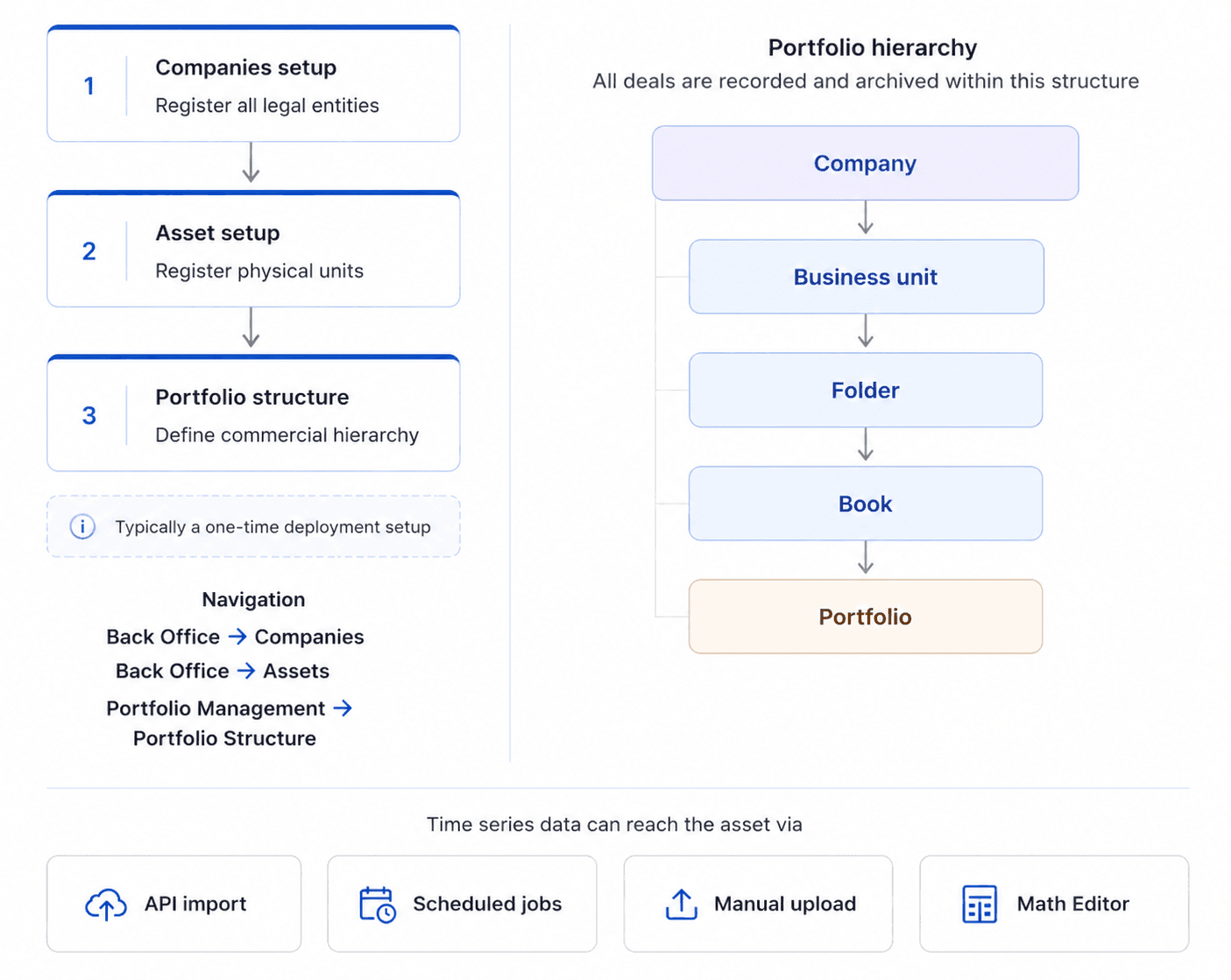
The Setup section covers the foundational configuration that must be in place before any operational activity begins. This includes registering the companies that form the commercial environment, configuring the assets that will participate in trading and settlement, and defining the portfolio hierarchy within which all deal activity is organised.
This setup is typically performed once during initial deployment and serves as the structural basis for both the Market Participation and Asset Representation workflows. It may however be updated over time as the business evolves — new assets are onboarded, entities are added and the portfolio structure is adjusted to reflect organisational changes.
1. Companies Setup
Companies represent the legal entities recorded in the system, including the aggregator's own legal entity, subsidiaries, the TSO, credit institutions, the energy exchange and any other system-level participant.
This is typically a one-time setup performed during initial deployment. Once registered, these companies are available across the contractual and settlement configuration steps throughout the system.
Main Action Steps
Create a new Company in Back Office → Companies.
Enter the required legal and identification details.
Define the Counterparty Type and activation status.
Save the Company record.
2. Asset Setup
Asset registration is the foundation of the operational setup. In ATLAS ETRM, an Asset represents the physical or contractual unit that participates in trading and settlement (e.g. PV plants, Wind parks, Thermal Units, BESS, Load meters etc.).
The Asset record establishes the structural identity of the unit within the system and defines the parameters under which it operates. This includes not only basic identification data, like its name and location, but also technoeconomic characteristics that describe the operational profile of the unit. Typical parameters may include installed and licensed capacity (MW), minimum operating capacity, and whether the unit is dispatchable.
In addition to structural data, relevant time series may optionally be associated where applicable. These may include production/consumption forecasts, certified generation/consumption, dynamic pricing schemes or other quantitative inputs that support forecasting, valuation and settlement logic. Without appropriate time series linkage, the Asset may exist structurally but remain disconnected from operational processes.
Such data series may be:
Automatically imported by the client’s internal tool via the ETRM’s API (implemented by the client’s IT),
Automatically imported through ad-hoc system integrations and scheduled jobs (upon request - implemented by StellarBlue),
Manually uploaded by the users where required,
Or generated by the users internally through transformation logic (e.g. aggregations or calculated outputs using the Math Editor).
Main Action Steps
Create the Asset in Back Office → Assets.
Define identification and classification details (e.g. type, location, plant code).
Configure technoeconomic parameters.
Associate the relevant time series where required.
Save the Asset.
3. Portfolio Structure
Before any deal activity begins, it is necessary to define the commercial hierarchy of your organisation within ATLAS ETRM. This is done through the Portfolio Management module, built around four levels: Business Units, Folders, Books and Portfolios.
This hierarchy serves as the organisational backbone of the system. All deals — whether generated through market participation or through asset representation agreements — are recorded and archived within it.
Main Action Steps
Navigate to Portfolio Management → Portfolio Structure.
Click Add Company and select the entity from the list of registered companies.
Create one or more Business Units under the Company.
Add Folders within each Business Unit to group related activity.
Create Books within each Folder to capture specific deal flows.
Add Portfolios within each Book where required.
Was this helpful?