Part 4 - Operational Changes
Pricing Updates - Asset Changes Owner - Asset Changes Portfolio
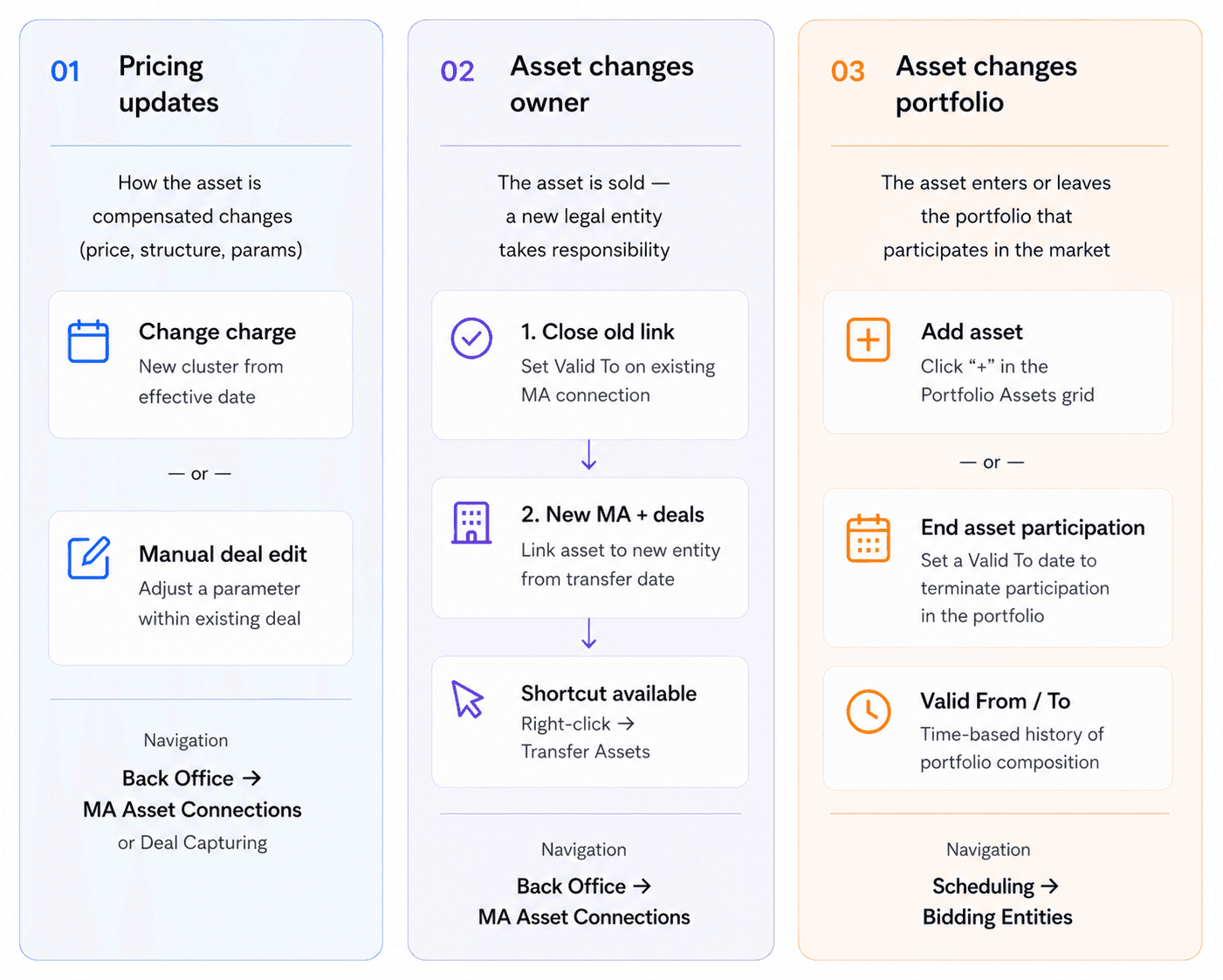
Operational changes arise naturally over the course of a portfolio's lifecycle. Pricing terms are renegotiated, assets change ownership and portfolio composition shifts as units are added or withdrawn. This section describes how these changes are reflected in ATLAS ETRM in a controlled and auditable way, ensuring continuity in settlement and market participation without disrupting the existing commercial structure.
1. Pricing Updates
Over the course of a contract's life, commercial terms may be renegotiated or tariffs may change. When this happens, the pricing configuration applied to an Asset must be updated to reflect the new agreed terms.
In ATLAS ETRM, pricing can be updated through two methods:
Change Charge (Cluster Reassignment at Asset Level)
Manual Deal Modification (Direct or Mass Update)
Change Charge is executed at Master Agreement level and reassigns the Asset to a new Cluster from a defined Effective Date. Manual Deal Modification achieves the same outcome by directly editing the relevant Deals, either individually or through a Mass Update when multiple Deals are affected.
Change Charge
The Change Charge functionality is available through:
Back Office → Master Agreement Asset Connections.
After selecting the relevant Asset and right-click, the system provides the Change Charge option.
The process introduces a new Cluster from the defined Effective Date onward. The Change Charge option is available only if active Deals exist for the selected Asset under the respective Master Agreement.
Main Action Steps
Navigate to Master Agreement Asset Connections.
Select the relevant Asset.
Choose Change Charge.
Select the new Cluster.
Define the Effective Date.
Confirm and save.
Manual Editing of Deals
Pricing can be updated either directly at Deal level or through Mass Update when multiple Deals are affected.
Main Action Steps
Navigate to Deal Capturing.
Select the relevant Deal(s).
Modify the pricing configuration directly or execute Mass Update and select the relevant pricing-related option (e.g. Leg parameters).
Define the effective delivery period of the modification.
Confirm and save.
2. Asset Changes Owner
An Asset ownership change reflects the transfer of commercial and financial responsibility from one legal entity to another. In a RES Aggregator model, this typically means that the production unit is sold to a new owner while representation may either continue under the same Aggregator or terminate.
If the Aggregator continues to represent the Asset under the new ownership, the contractual relationship in the system must be updated accordingly. The Master Agreement with the previous owner shall be terminated as of the agreed transfer date. If the previous owner has additional Assets represented by the Aggregator, only the transferred Asset's connection shall be terminated, leaving the remaining Assets in the Master Agreement unaffected. Finally, a new Master Agreement must be established with the new owner — or, if one already exists, the Asset may be added to it, with the connection start date set to the transfer date.
The Asset itself remains structurally unchanged. The transition is implemented through controlled management of the Asset–Master Agreement connections and associated Deal validity periods, ensuring clear separation between activity before and after the ownership transfer. When validity periods are correctly aligned and new Deals are created under the appropriate Master Agreement, asset structural changes can be implemented without disrupting settlement continuity.
If the Asset is no longer represented by the Aggregator, the process is limited to terminating the existing contractual linkage and ensuring that no further trading activity occurs beyond the transfer date.
Main Action Steps
Update the Asset–Master Agreement linkage
Set a Valid To date on the existing Asset–Master Agreement connection corresponding to the ownership transfer date.
Create a new Master Agreement with the new legal entity.
Create a new Asset–Master Agreement connection with the appropriate Valid From date.
Create new Deals under the new contractual framework
Generate new Deals under the new Master Agreement effective from the transfer date.
Additional System Option – Transfer Assets
As an alternative to manually terminating and recreating the contractual linkage, the system provides an automation called “Transfer Assets”.
This option is available through:
Back Office → Master Agreement Asset Connections.
After selecting the relevant Asset, the user may right-click and choose Transfer Assets.
The system requires the following inputs:
Company
Master Agreement
Valid From date
Upon execution, the system transfers the Asset to the selected Master Agreement from the specified Valid From date, automatically managing the contractual transition at connection level.
This functionality simplifies the ownership transfer process while preserving chronological integrity between the previous and new contractual framework.
3. Asset Changes Portfolio
Within the Scheduling → Bidding Entities, the Portfolio Assets section defines which physical assets are included in the portfolio that participates in the market.
Users can manage the portfolio composition directly from this grid. By selecting the “+” button, a new asset can be added to the portfolio, while the Delete option allows the removal of an existing asset.
Each asset assignment includes Valid From and Valid To dates, allowing the system to maintain a time-based history of portfolio composition. This makes it possible to reflect operational changes over time, such as assets entering or leaving the aggregation portfolio.
The assets linked in this section determine which production units contribute to the portfolio-level forecast aggregation and therefore influence the quantities proposed for market participation through the bidding strategy.
Main Action Steps
Navigate to Scheduling → Bidding Entities and open the relevant Bidding Entity.
Go to the Portfolio Assets section.
To add an asset, click "+" and select the asset from the list. Multiple assets may be selected simultaneously. Define the Valid From date and save the changes.
To remove an asset, set a Valid To date to terminate its participation in the bidding portfolio.
Save the changes.
Was this helpful?