5.5 Deal Limits
Overview of Deal Limits
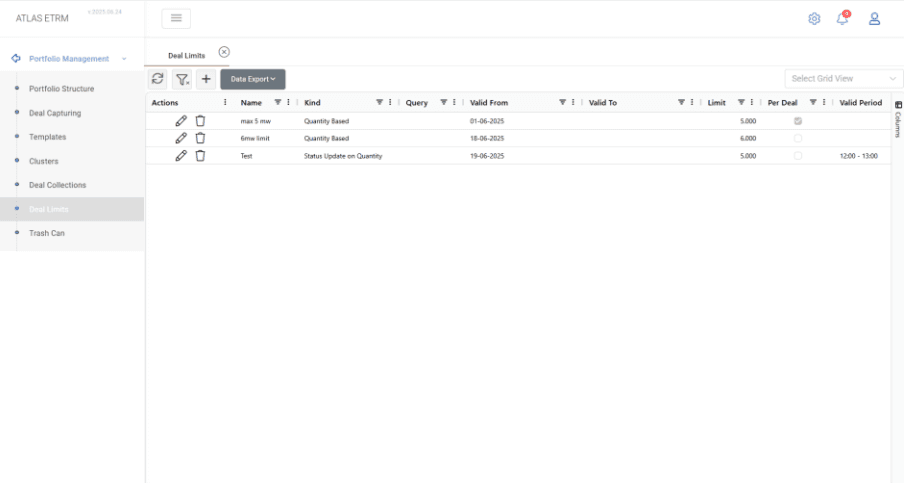
Deal Limits in ATLAS ETRM are a control mechanism that governs the creation and modification of deals that comply with certain criteria. These limits are defined using key metrics such as volume or price value, enabling organizations to apply risk-based controls to their deal capture process. For example, a trader may be allowed to create deals up to a certain financial value; however, any deal exceeding that threshold requires additional approval.
This feature is designed to:
Prevent unauthorized or excessive trades
Enforce internal risk controls
Support advanced segregation of duties across different roles within a company.
Deal Limits are particularly important for sensitive transactions, such as BUY-side deals during high-impact market conditions, ensuring that they receive the necessary oversight prior to execution.
From this view, users can:
Create new deal limits
Edit or update existing ones
Delete obsolete or invalid limits
Review all active rules and their parameters at a glance
The Deal Limits grid provides a concise overview of each limit, including its name, type, whether it is applied to a specific query, its validity period, the defined threshold, and whether the rule applies per individual deal or cumulatively over time. It also displays the applicable time window for each limit.
This centralized interface enables clear oversight and allows for rapid adjustments, ensuring that deal authorization policies remain aligned with business and risk requirements.
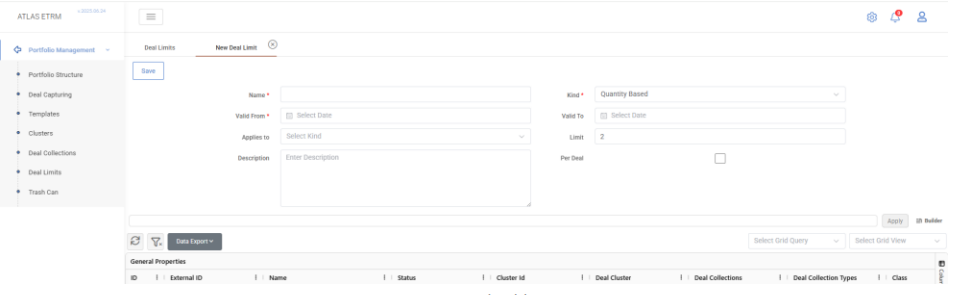
To create a new deal limit, users must click the “+” button at the top of the Deal Limits grid. This action opens a new tab titled “New Deal Limit”, where the configuration form is displayed.
At a minimum, the user must provide a “Name” for the limit and a “Valid From” date, which defines when the limit becomes active. The “Kind” field is also required and specifies the type of restriction being applied (e.g., Quantity-Based, Status Update-Based, etc.). Depending on the selected value in the “Kind” field, additional fields may appear that correspond to the specific limit type.
Other fields are optional, but provide additional flexibility and clarity. The “Valid To” date allows the user to define when the limit expires. A “Description” field is available for internal documentation or clarification of the rule’s purpose. In the “Applies to” field, the user can restrict the limit to specific system users or roles, enabling precise enforcement at the organizational level.
Additionally, the user may apply the limit to a specific query, enabling fine-grained targeting of the rule to a subset of deals—such as those associated with a specific portfolio, commodity, or counterparty. Finally, selecting the “Per Deal” option changes the logic so that the threshold applies to each individual deal rather than cumulatively across multiple deals.
Kinds of Deal Limits
ATLAS ETRM offers a flexible set of deal limit types that can be applied independently or in combination. These limits control either the creation or modification (status updates) of deals, based on key parameters such as quantity, price, count, or time.
Quantity Based
Restricts deal creation when the quantity of an individual deal exceeds a specified threshold. The user must define this threshold in the “Limit” field, which represents the maximum allowed quantity. When the “Per Deal” option is enabled, the limit is applied to each individual deal.
For example, as shown in the figure, if the limit is set to 2 MW, traders cannot create deals with a quantity greater than 2 MW per deal. If the “Per Deal” option is not selected, the limit is applied cumulatively across all deals within the selected query.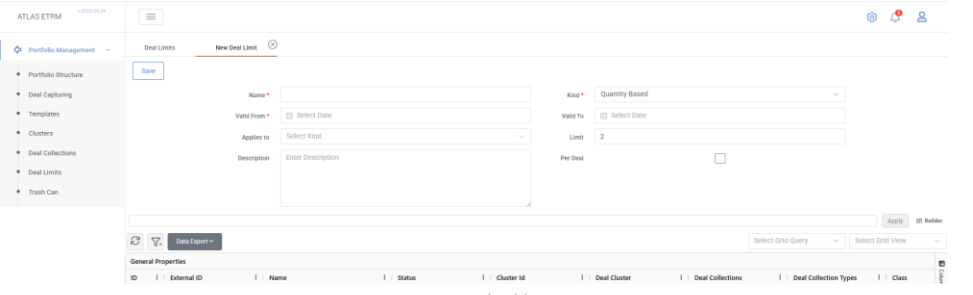
Volume Based
Restricts deal creation based on the total traded volume. The user defines the maximum allowed volume in the “Limit” field. The limit can be applied per deal or cumulatively, depending on whether the “Per Deal” option is enabled.Price Range Based
Restricts deal creation when the deal price falls outside a defined acceptable range. This helps prevent pricing errors and ensures compliance with predefined pricing rules.Deal Count Based
Limits the number of deals a user is allowed to create. The maximum number of deals must be defined in the “Limit” field. This is typically used to control trading activity per user, session, or strategy.Time Based
Restricts deal creation to a specific time window during the day (e.g., only between 12:00 and 13:00). The user must define the applicable time range and time-zone in the “Valid Period” field.Status Update Based
Controls whether a deal’s status can be changed, regardless of its attributes. This ensures that only authorized users can promote deals to critical stages and supports segregation of duties.
When configuring this type of limit, the user must define one or both of the following fields:Source Deal Status: The current status of the deal (e.g., “Pending”)
Target Deal Status: The new status (e.g., “Approved”)
Example Scenarios
The behaviour of the limit depends on how the “Source Deal Status” and “Target Deal Status” fields are configured:
Both Source and Target statuses defined
If both Source and Target statuses are specified (e.g., from “Pending” to “Approved”), the restriction applies only to that specific transition.
Example: A trader is restricted from moving a deal from “Pending” to “Approved”, but may still move it to another intermediate status (if permitted).Only Target status defined
If only the Target status is defined (e.g., “Approved”), the system blocks any transition to that status, regardless of the deal’s current status.
Example: A user is completely restricted from changing any deal’s status to “Approved”, whether the current status is “Draft”, “Pending”, or any other state.Only Source status defined
If only the Source status is defined (e.g., “Rejected”), the user is blocked from changing the status of any deal currently in that state, regardless of the target status.
Example: Any deal in “Rejected” status remains locked, and no further status changes are permitted by the restricted user.
This configuration enables granular control over deal status transitions and can be applied to specific users or roles using the “Applies To” field. It is particularly effective for implementing layered approval workflows, where each user group is allowed to promote deals only up to a certain stage.
Status Update on Quantity
Restricts status changes when the deal quantity exceeds a predefined threshold. This is useful in scenarios where larger deals require additional approval or review before progressing to critical stages.The user must define the threshold in the “Limit” field. The rule is triggered only when the deal’s quantity exceeds this value. If the quantity is equal to or below the threshold, the status change is allowed (unless restricted by other limits).
This limit extends the standard Status Update-Based logic by introducing a quantity condition. Users may define source and/or target statuses, as in a standard status update limit. The rule can also be applied per deal or cumulatively, depending on the “Per Deal” setting.
Example Scenario:
If a limit of 0.5 MW is defined, with target status set to “Approved” and applied to the trader role, then traders will be blocked from setting any deal to “Approved” if its quantity exceeds 0.5 MW. If the deal quantity is equal to or below 0.5 MW, the status change is allowed.
This enables organizations to allow more flexibility for low-quantity deals while enforcing stricter controls on higher-risk transactions.Status Update on Volume
Restricts status changes based on the deal’s volume. Status transitions are allowed only if the volume meets the defined threshold criteria.Restricts status changes based on the total volume of a deal. This provides additional control for large-volume or aggregated deals.
This limit functions similarly to the Status Update on Quantity limit, but instead of evaluating the deal’s quantity, it evaluates the total volume (typically measured in MWh).
The rule is triggered only when the deal’s total volume exceeds the defined threshold. Users may define source and/or target statuses and restrict specific roles accordingly. If the volume is equal to or below the threshold, the status change is allowed.
Example Scenario:
If a volume limit of 10 MWh is defined, with target status set to “Approved” and applied to the trader role, then traders will be blocked from changing the status of any deal to “Approved” if the total volume exceeds 10 MWh. If the deal volume is equal to or below 10 MWh, the status change is allowed.
This ensures that high-impact deals undergo additional approval, even when individual trade steps appear small.
Query-Based Limits
Deal limits can be applied to a specific group of deals using query-based filtering. This allows organizations to define targeted restrictions for subsets of deals based on criteria such as counterparty, portfolio, commodity, or delivery attributes.
Example Scenario
The middle office wants to ensure that large AXPO deals cannot be approved by traders without senior review.
To achieve this, the following configuration can be applied:
Define a Status Update on Volume limit
Set the threshold to 5,000 MWh
Specify Target Deal Status = “Approved”
Apply a query filtering deals with Counterparty = AXPO
Restrict the rule to the Trader role
Result:
AXPO deals exceeding 5,000 MWh can still be created; however, traders are not allowed to change their status to “Approved”. Approval must be performed by a senior user or risk manager.
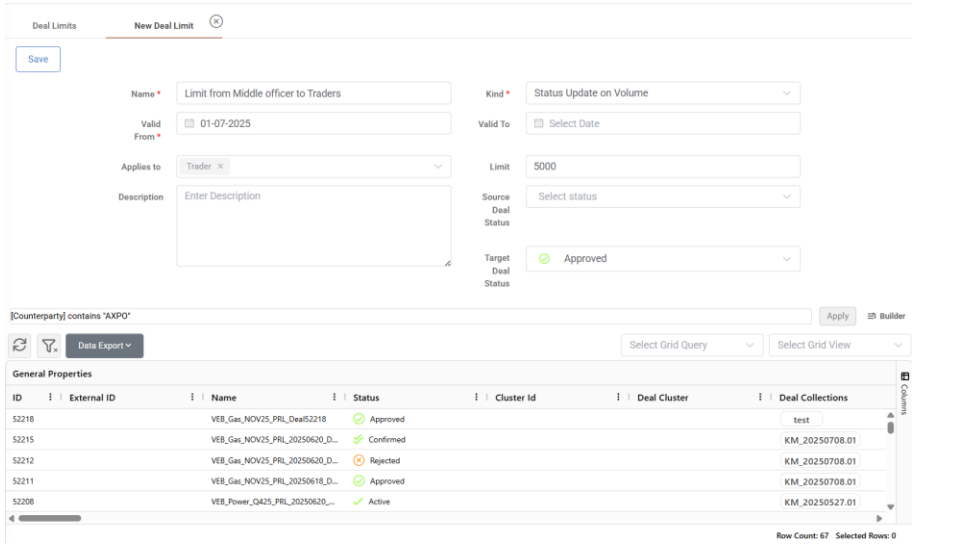
By using saved queries (e.g., filtering by master agreement type, commodity, or delivery dates), deal limits can be applied with high precision. This enables organizations to enforce stricter controls on high-impact or sensitive deal categories without imposing unnecessary restrictions on all users.
Combining Multiple Deal Limits
Deal Limits in ATLAS ETRM are not mutually exclusive and can operate in combination, enabling complex and highly targeted trade restrictions. When multiple limits apply, the system evaluates all active conditions, and a deal is allowed to proceed only if it satisfies all applicable rules.
Example Scenario
Consider a scenario where the trader role is restricted to creating deals with a maximum quantity of 5 MW, while all trading activity is blocked between 14:00 and 16:00 CET.
This can be achieved by configuring:
A Quantity-Based Limit with a threshold of 5 MW, applied to the trader role
A Time-Based Limit restricting deal creation between 14:00 and 16:00 CET, applied either globally or to the same role
Result:
Traders are allowed to create deals only if both conditions are met:
The deal quantity does not exceed 5 MW
The deal is created outside the restricted time window (14:00–16:00 CET)
As a result, traders are simultaneously constrained by both quantity and time restrictions.
This approach enables nuanced governance strategies that adapt to trading behaviour, operational hours, risk exposure, and user roles, while maintaining flexibility and control.
Was this helpful?