6.2 Balancing Service providers
Overview of Balancing Service Providers
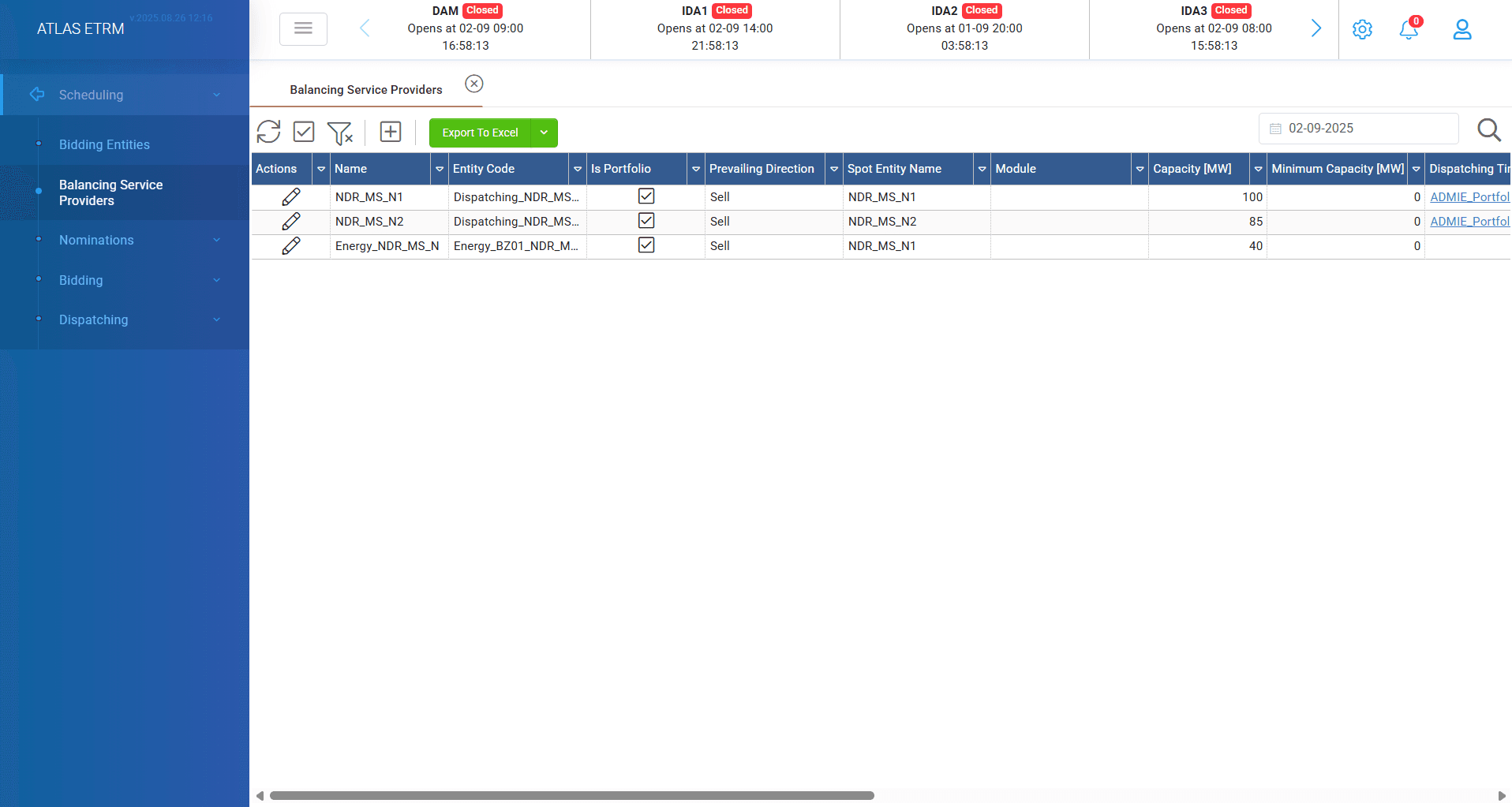
In this screen the user can declare the entities that will act as Balancing Service Providers (BSPs) in the Balancing Market. In the same screen the user can declare for each BSP the offers / declarations it will be able to submit to the Balancing Market, i.e. Non-Availability Declarations, Techno-Economic Declarations, Balancing Energy Offers and Reserve Offers, along with data needed for the submission of orders in "Dispatching" menu.
All types of orders/offers/declarations available in the market for the BSPs are supported by the Scheduling Module, as follows:
Integrated Scheduling Process:
i. total or partial Non-Availability Declarations (for Cypriot market),
ii. Techno-Economic Declarations (for Cypriot market),
iii. Balancing Energy Offers,
iv. Reserve Offers,
Create new Balancing Service Provider (BSP)
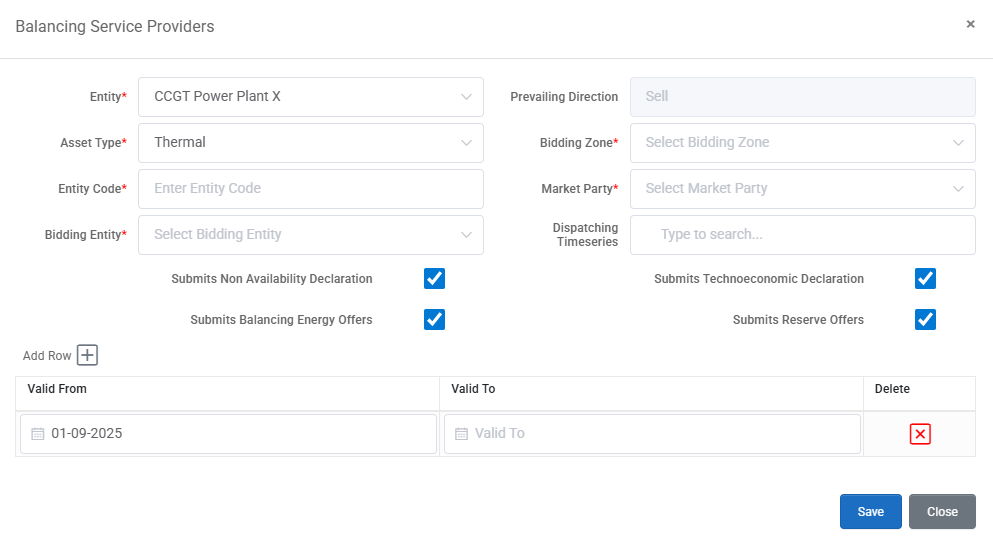
User can insert a new BSP entity by pressing “+” icon to top left of screen. A new pop-up windows opens with the fields that are explained below and need to be filled by user. It should be noted that required fields are marked with an asterisk (*).
Entity: A dropdown list containing all available entities within the system.
Asset Type: This field automatically is filled by the information of the selected entity, but user can also select from the list if needed.
Entity Code: The EAC code assigned for this specific bsp.
Prevailing Direction: Auto-filled based on the selected asset type (e.g., buy/sell).
Bidding Zone: Geographic market zone for bidding, e.g. Greece, Cyprus.
Market Party: Refers to the party that owns the entity. The companies that have portfolio structure are available for selection here.
Forecasting Timeseries: A smart search field where users can begin typing and select the forecast timeseries relevant to the asset. From this point user can input a forecast from external sources for use in bidding (first the forecasting data series should be declared in data room).
Availability Timeseries: Like the forecasting field; allows linking to the appropriate availability data source.
Submits Non Availability Declaration: A checkbox that needs to be filled if the value is true.
Submits Technoeconomic Declaration: A checkbox that needs to be filled if the value is true.
Submits Balancing Energy Offers: A checkbox that needs to be filled if the value is true.
Submits Reserve Offers: A checkbox that needs to be filled if the value is true.
Users must define the validity period of the asset entry by clicking "Add Row" and entering the corresponding start and (optionally) end date. This feature supports multiple entity records, which is particularly useful for keeping a history track.
Edit / Delete Balancing Service Provider
To modify a BSP user can do it by double clicking on it or by selecting the "pencil" icon in actions area. After changes have been made user should click on "Save" button.
The logic to terminate a BSP is to do it by using the valid to date field. For example by selecting a yesterday's valid to date user can terminate an asset/portfolio. The same logic applies when user wants to delete assets from portfolios by choosing a past valid to date. This happens for traceability and reporting reasons for the whole changes that have been made in bidding entities.
Was this helpful?