6.3 Nominations-Forward Market Nominations
Overview of Forward Market Nominations
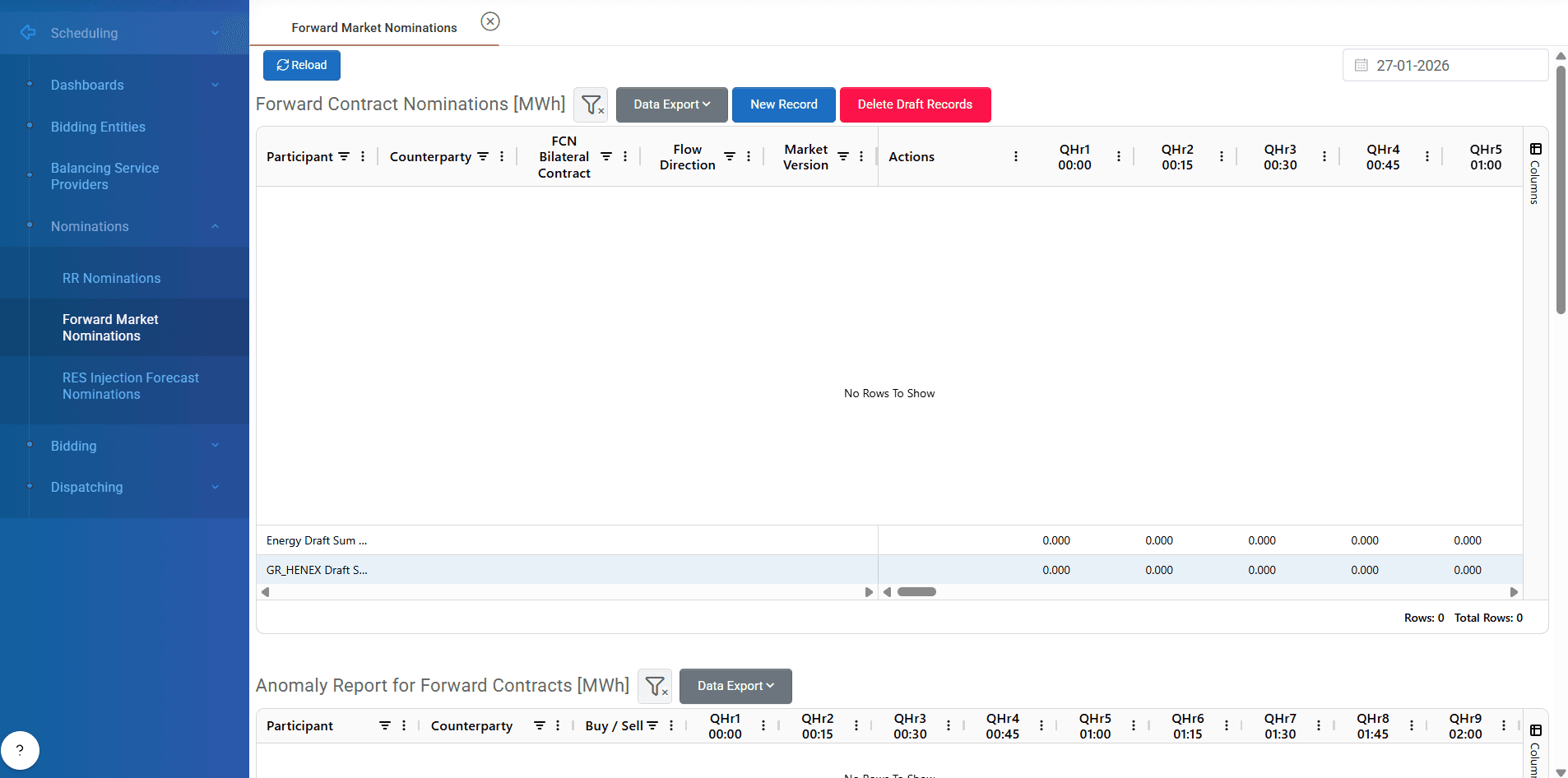
The Forward Market Nominations submodule in ATLAS ETRM is designed to facilitate the seamless submission, monitoring, and reconciliation of forward electricity contracts. This functionality ensures accurate communication with the Market Management System (MMS) and supports automated retrieval of nomination-related market data. These contracts are over the counter.
This module streamlines forward market operations by enabling:
Entry of forward contract nominations (buy/sell quantities per counterparty).
Specification of physical delivery/offtake nominations from the participant’s assets.
Monitoring of:
Anomaly Reports for nominated forward contracts.
Imposed Timeseries (effective scheduled nominations).
NDP (Net Delivery Position) from the market.
Mismatch quantities (errors between counterparties).
Forward Market Nominations
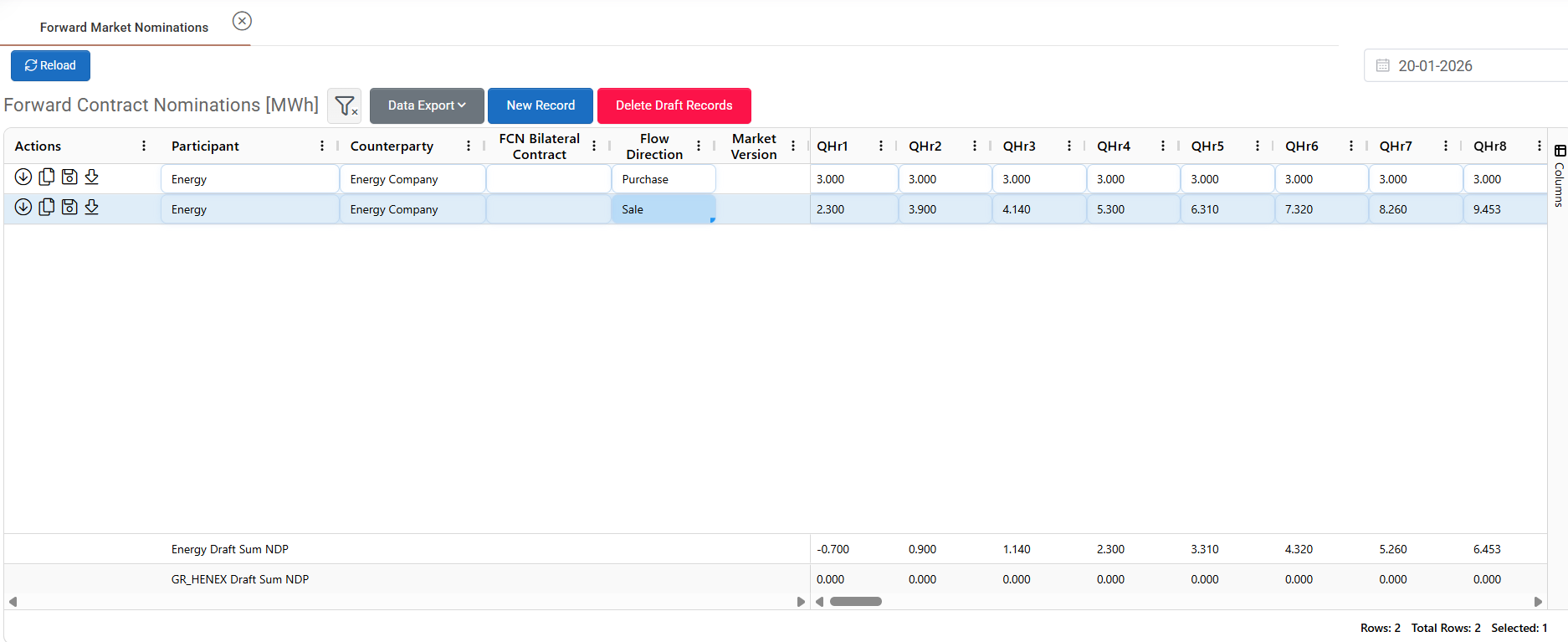
User can enter a new forward contract by pressing “New Record” button on of screen. A new line appears in the grid below where user chooses the participant company and the counterparty company for the contract . Additionally, the FCN of bilateral contract should be filled and the direction (Purchase, Sale). Lastly, user fills the grid with the quantities of the contract for the relevant trading periods (these values can be copy-pasted into grid from an excel file) and by pressing save button from the left side of grid the contracts are sent to market. After successful submission the contract receives a market version and will be shown in the relevant field. User can delete a draft contract by left clicking the relevant line and pressing the “Delete Draft Records” button.
By entering values the system automatically at the bottom of grid calculates the net delivery position for each participant by making the necessary calculations from the draft contracts.
Actions Column
Each row includes a set of action icons enabling fast, contextual operations on a forward nomination record:
Fetch Expected Quantities | Automatically populates the nomination fields using forecast data from all assets/portfolios of the participant. |
|---|---|
Create Opposite Contract | Instantly creates a mirrored contract with the same participant, counterparty, and quantities, but with the opposite flow direction. |
Save (Submit) | Submits the nomination to the Market Management System. |
Export Market Files | Downloads a structured XML file of the submitted forward contract to the user’s local system, suitable for record-keeping or external processing. |
ℹ️ All actions are performed per contract line, allowing fine control and fast processing of nominations.
Anomaly Report for Forward Contracts

According to the ENTSO-E business process for forward market nominations, when two market participants submit nominations for the same bilateral contract, the MMS performs a validation and matching process. If any discrepancies are found between the submitted quantities, the MMS generates an anomaly report with the difference between the contracts.
The “Anomaly Report for Forward Contracts” section in the Forward Market Nominations displays detailed data regarding mismatched or unmatched contract quantities between counterparties, as reported by the Market Management System. It is a timeseries with the quantity that is unmatched.
The anomaly values are automatically retrieved from the MMS following its verification and matching process. The system updates this report in real time or upon successful market data synchronization.
⚠️ A non-zero value in any cell indicates a quantity mismatch that should be reviewed and, if possible, corrected before final nomination confirmation.
Imposed Timeseries for Forward Contracts

The “Imposed Timeseries for Forward Contracts” represents the final accepted and scheduled quantities as determined by the Market Management System (MMS) following the nomination matching and validation process. When an anomaly (i.e., a mismatch between counterparties’ nominations) is detected, the MMS applies market rules to ensure operational feasibility and system balance. In such cases, the MMS automatically imposes quantities based on the minimum nominated values between the two counterparties for each relevant time interval.
If a discrepancy exists, the MMS:
Compares the nominated quantities from both sides.
Selects the minimum quantity per market timestep.
Uses this value as the effective scheduled quantity.
This imposed quantity remains in effect until the discrepancy is corrected through updated nominations by one or both counterparties. The imposed timeseries data is automatically retrieved from the MMS and displayed within ATLAS ETRM, ensuring users always have access to the latest market-validated schedule.
Once anomalies are resolved and nominations are successfully matched, the imposed timeseries is updated accordingly to reflect the corrected and fully accepted quantities.
NDP from Market

The Net Delivery Position (NDP) from Market is a timeseries that reflects the participant’s net scheduled energy position resulting from all forward contract nominations submitted to the Market Management System (MMS).
This value is calculated and published by the MMS after the nomination matching and validation process. It represents the total quantity that the participant is expected to deliver or receive based on the final accepted nominations across all bilateral forward contracts.
Key Characteristics:
Aggregated Value: The NDP consolidates all active forward contracts linked to the participant for a specific delivery day.
Directional:
A positive NDP indicates a net offtake (participant is scheduled to receive energy).
A negative NDP indicates a net delivery (participant is scheduled to supply energy).
This NDP must be fully covered by physical nominations in the subsequent grid titled "Physical Delivery/Offtake Nominations". These nominations specify from which units the net position will be fulfilled.
⚠️ Failure to align the NDP with accurate physical nominations may result in imbalance charges or rejected schedules.
Physical Delivery / Offtake Nominations
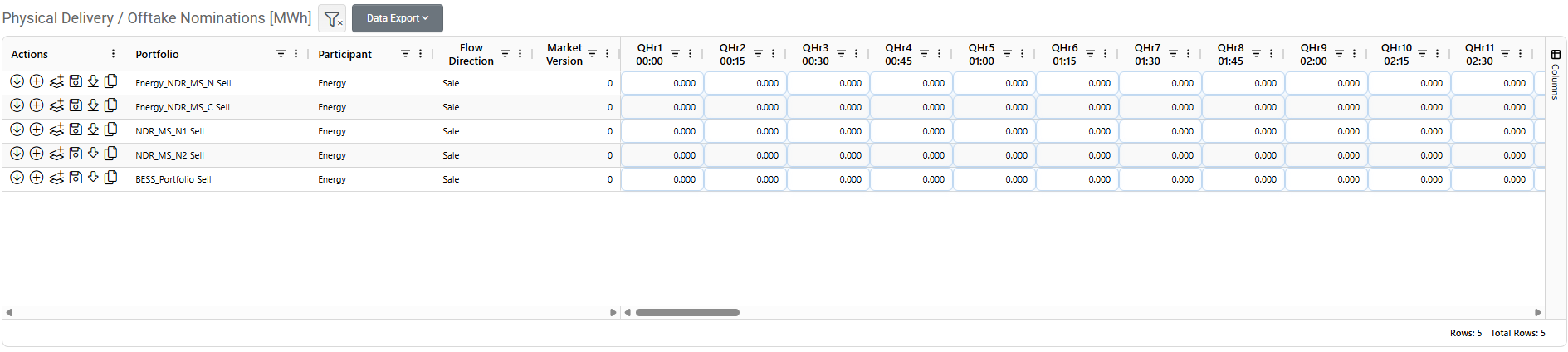
The Physical Delivery / Offtake Nominations table enables participants to specify how the energy from forward contracts will be physically executed—either delivered to or received from the power system—through their registered units or bidding entities. This step translates the net delivery position (NDP) into a concrete operational schedule, assigning the actual source or sink for the energy.
Participants must declare which of their own physical assets will:
Deliver the energy in case of a net sell position (negative NDP)
Consume the energy in case of a net buy position (positive NDP)
Users define:
The unit (each asset has a flow direction purchase/sale).
The energy quantity per market timestep.
Actions Column
Each row includes a set of action icons enabling fast, contextual operations on a forward nomination record:
Fetch Expected Quantities | Automatically populates the nomination fields using forecast data from the specific asset. |
|---|---|
Sum Quantities from FCN | Sums the quantities from all the forward contracts of the participant using the same flow direction (purchase/sale). For example, if a participant has 5 MWh sales at 15 time market step, this button fetches the total quantity of 5 MWh in the relevant timestep. |
Fetch Net Quantity from FCN | Automatically populates the nominations fields with the net quantity from the forward contracts of the participant. |
Save (Submit) | Submits the nomination to the Market Management System. |
Export Market Files | Downloads a structured XML file of the submitted physical delivery/offtake nomination to the user’s local system, suitable for record-keeping or external processing. |
Fetch quantities from NDP | Automatically populates the nominations fields with the net delivery position that comes from the MMS (when exists). |
After pressing the save button the system sends them to the MMS and upon successful submission, the following occurs:
A market version number (e.g.,
Version 1) is assigned and displayed in the table.A confirmation message is shown to the user, indicating that the physical nomination has been accepted and stored by the market.
Mismatch Quantity
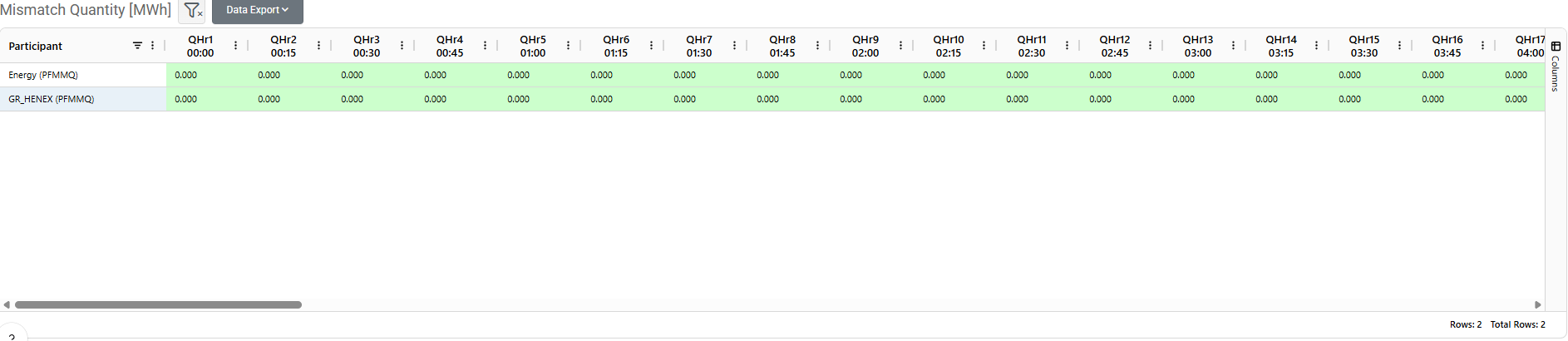
The Mismatch Quantity is a system-generated validity check that automatically identifies and highlights any discrepancies between a participant’s submitted contract nominations, physical delivery/offtake nominations, and the Net Delivery Position (NDP) received from the market. This field plays a key role in ensuring data consistency across all nomination layers before final submission to the Market Management System (MMS).
The system compares:
Forward Contract Nominations
NDP from Market
Physical Delivery/Offtake Nominations
It calculates the net difference per market timestep between what was contractually nominated and what is physically scheduled.
This difference is displayed as the Mismatch Quantity.
Visual Indicators:
✅ Green Cell (Value = 0 MWh)
Indicates full consistency. All required nominations match and are correctly submitted.❌ Red Cell (Value ≠ 0 MWh)
Signals a discrepancy between submitted nominations. The red cell highlights the exposed quantity that is not currently covered and may lead to market imbalance.These mismatches must be corrected to avoid rejected schedules or imbalance penalties.
Was this helpful?