6.6 Bidding Hybrid/Stepwise Orders
Overview of Bidding Hybrid/Stepwise Orders
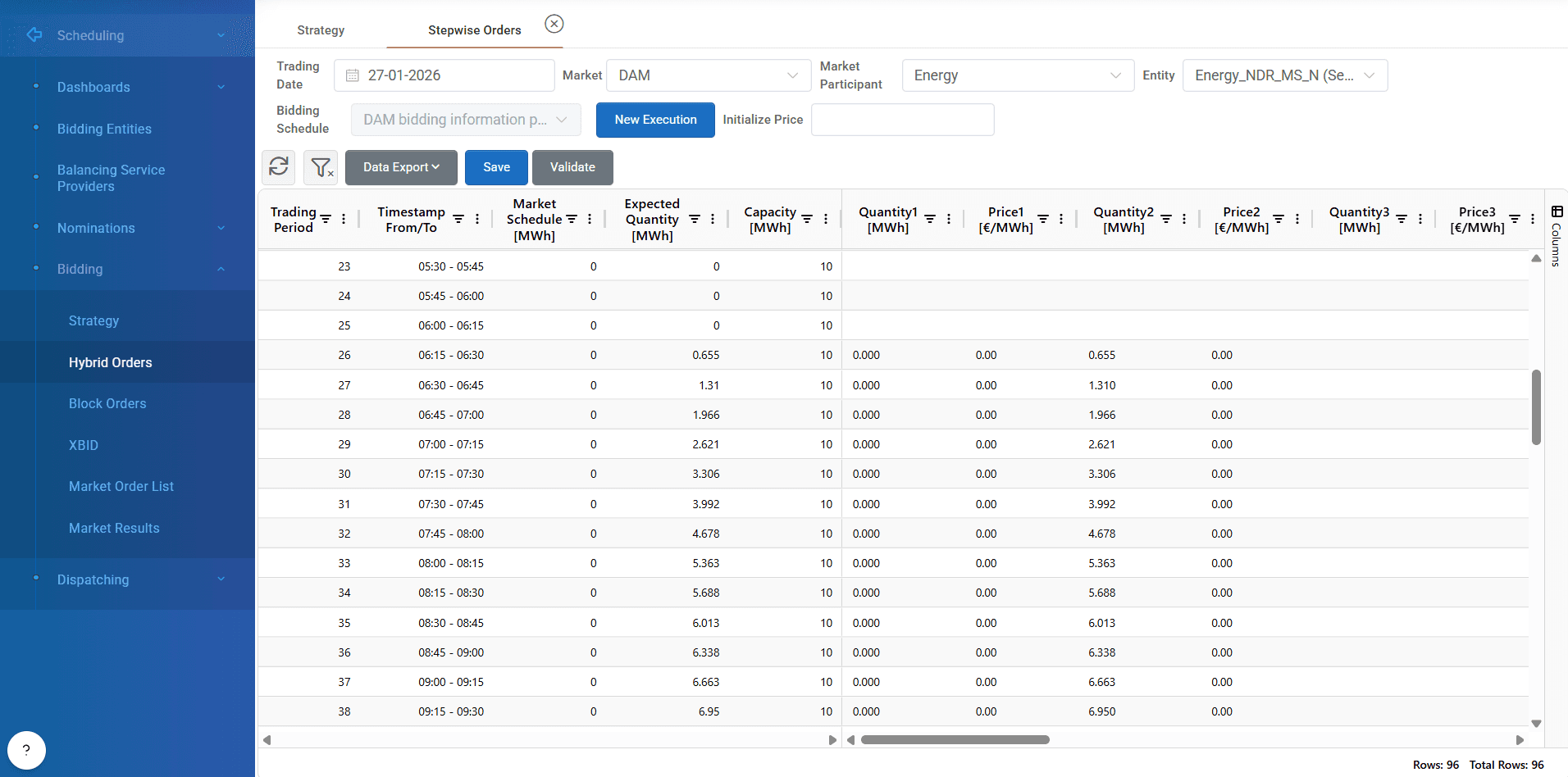
The Hybrid/Stepwise Orders screen in ATLAS ETRM enables users to efficiently manage and configure spot market orders using hybrid/step-based bidding, in line with market rules and participant strategies.
This feature provides a flexible and user-friendly interface for building detailed orders allowing traders to define multiple price/quantity steps per market interval and submit them seamlessly for approval and market transmission.
Step 1: Market & Participant Selection
To begin using the Stepwise Orders screen:
Select the target trading date (by default the next day is selected).
Choose the market (e.g., DAM, IDM).
Select the market participant.
Choose a specific bidding entity (unit or portfolio).
The above mentioned fields can be automatically filled from strategy screen by pressing “hybrid/stepwise” orders, as described in article 6.5.
Step 2: Add Orders
Click the “New Execution” button to launch the order initialization dialog. You will be prompted to choose one of two options:
Create Hybrid/Stepwise Orders Without Bidding Execution
Start with a blank order form, entering quantities and prices manually or by copy pasting from an external file.Create Hybrid Orders With Bidding Execution
Automatically initialize the grid using pre-defined energy quantities from the Bidding Strategy, allowing for quick and consistent transition from strategy to execution.
This flexibility supports both manual and strategy-driven workflows. As mentioned before this step can be skipped by pressing the “Stepwise” button from strategy screen.
Step 3: Populate the Stepwise Order Grid
Once initialized, a grid is displayed for the selected entity and trading day. Each row corresponds to a specific market time interval (e.g., quarter-hour), and allows definition of multiple quantity-price pairs, based on the spot market’s allowed step granularity.
Key Grid Fields:
Trading Period.
Timestamp From/To.
Market Schedule.
Expected Quantity (Forecast).
Quantity & Price Steps (e.g., Step 1, Step 2, ..., Step N).
Users can:
Input quantities and prices manually.
Copy/paste data from Excel directly into the grid.
Use keyboard shortcuts (e.g.,
Ctrl + ↓) to autofill a column with repeated values.
Step 4: Save & Submit
Once the user has populated or updated the grid:
Click “Save” to store the orders within the system
The saved orders are transferred to the Spot Market Order List, where they:
Appear for review.
Can be approved and submitted to the market by authorized users.
Built-in Validations
The system performs automated validations to ensure regulatory compliance and data integrity based on each market rules:
Price Validation
Ensures that all prices fall within the allowed price caps and floors set by the bidding zone for the selected market.Quantity Format Checks
Confirms that quantities are numerically valid and consistent with unit constraints.Hybrid/Step Logic Validation
Validates the correct ordering of price steps (e.g., ascending for sales, descending for purchases, depending on market logic).
By pressing “Validate” button if any field fails validation, the system highlights the issue and prevents submission until resolved.

Initialize Price
User can input a number in this field and press enter, so automatically this price fills all the trading periods with this value.
Was this helpful?