6.8 Market Order List
Overview of Market Order List
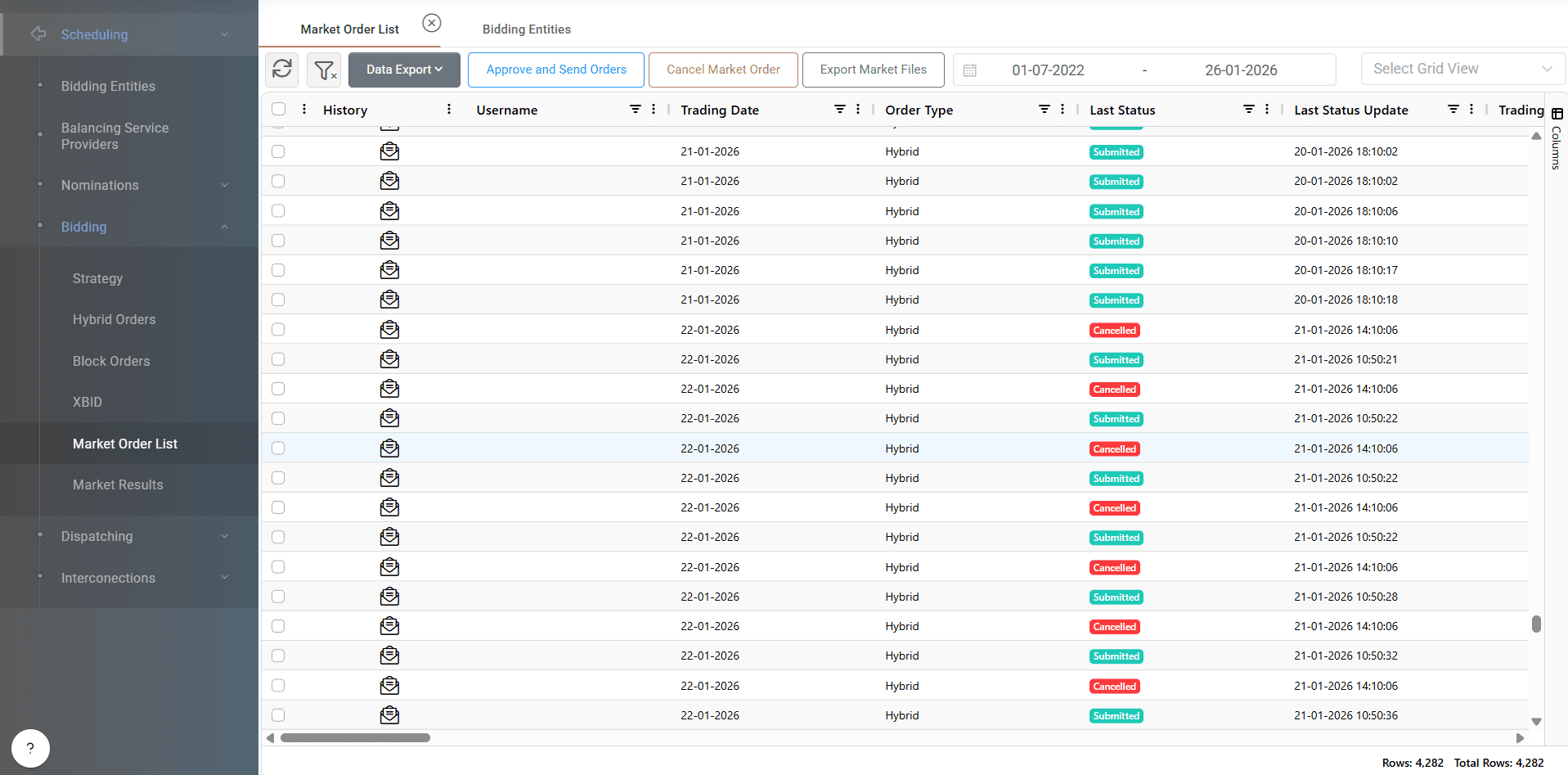
The Market Order List tab in ATLAS ETRM provides a centralized overview of all created spot market orders, including those from the Day-Ahead Market (DAM) and Intraday Markets (IDM1, IDM2,XBID etc.). This tab is essential for reviewing, managing, approving, and submitting orders to the Market Management System.
Overview and Structure
Once orders (res injection forecast, hybrid/stepwise or block) have been created, they appear in the Market Order List with complete details and current status. Users can:
Select one or more rows.
Right-click and choose “Approve and Send Orders”.
A pop-up window will appear, showing the submission progress to the market.
Alternatively, user can select all the orders together from the top left checkbox and press “Approve and Send Orders” button from the top of grid.

Other actions that can be performed are:
Cancel Market order, if supported by the market. User selects the orders and can cancel them by pressing this button.
Export Market Files: User can select the orders that needs and by pressing the “export market files” button an excel (or xml) file is downloaded in user’s system so it can be used to be submitted directly in the market management platform.
Fields Displayed
The Market Order List grid includes the following fields:
History: User can press the button in history column to view the full log history of the selected order.
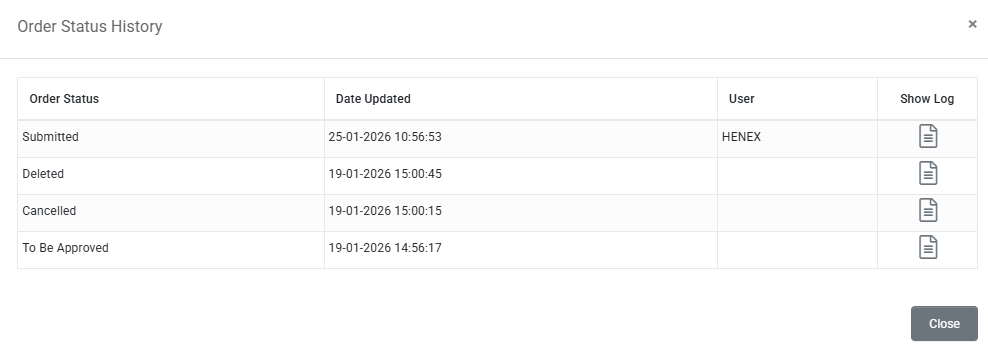
Username: The user that created the specific order.
Trading Date
Order Type: Hybrid/Stepwise, Res injection Forecast etc.
Last Status
Last Status Update: Timestamp of the last status update.
Trading Period From
Trading Period To
Timestamp From
Timestamp To
Entity
Entity Code
Market Party
Market Party Code
Bidding Zone
Bidding Zone Code
Side (Sell/Buy)
Direction
Market (DAM, IDM1, IDM2, etc.)
Counterparty
Counterparty Code
FCN Bilateral Contract
Exchange Order id
Exchange Batch id
All Statuses History
Submitted Externally: A checkbox if the order is not submitted within ATLAS system.
Average Price [€/MWh]
Executed Price [€/MWh]
Weighted Average Offer Price [€/MWh]
Minimum Price [€/MWh]
Maximum Price [€/MWh]
Cleared Quantity
Quantity
Minimum Quantity
Maximum Quantity
Number of Steps
version
Custom Block Order ID
Linked Order ID
Exclusive Group
Order Approval and Submission
Users can approve and submit orders by selecting them and using the context menu (right-click) or the “Approve and Send Orders” button above the grid.
This action sends the selected orders to the Market Management System (MMS).
The system will display real-time submission feedback in a pop-up window.
Only authorized users can perform the above actions!
Gate Opening & Closing Times
Gate opening and closing times are displayed in the interface.
Orders cannot be submitted before gate opening.
Submission after gate closure is possible in case of a gate extension, but the system will display a warning message based on the default gate close time.
🛡️ Approval by authorized users is required before submission, ensuring compliance with internal governance protocols.
Order Statuses
Each order can have one of the following statuses:
No. | Status Name | Description |
|---|---|---|
1 | Scheduled | Order is saved, but market gate is not yet open. |
2 | To be Approved | Gate is open; order saved but not yet submitted. |
3 | Submitted | Order sent to MMS; awaiting market processing. |
4 | Revoked | Order canceled by the user or replaced by a newer version. |
5 | Rejected | Order was submitted, but MMS rejected it due to validation errors. |
6 | Cleared | Order has been fully cleared by the market. |
7 | Partially Cleared | Order has been partially accepted and cleared by the market. |
Post-Clearing Updates
Cleared orders automatically update relevant timeseries in the Dataseries module. These updated datasets are used in:
📉 Portfolio Management
⚖️ Risk Management
📑 Settlement Processes
Auditing
For auditing purposes, the Market Order List in ATLAS ETRM provides a complete historical record of all spot market order activities, including submissions, approvals, revocations, and rejections. Users can filter the list by date range from the top of grid, allowing auditors and operators to trace actions over specific periods and verify compliance with internal procedures and regulatory requirements. Each entry is timestamped and associated with the responsible user, ensuring full traceability and accountability throughout the bidding lifecycle.