3.2 Standing Data
Overview
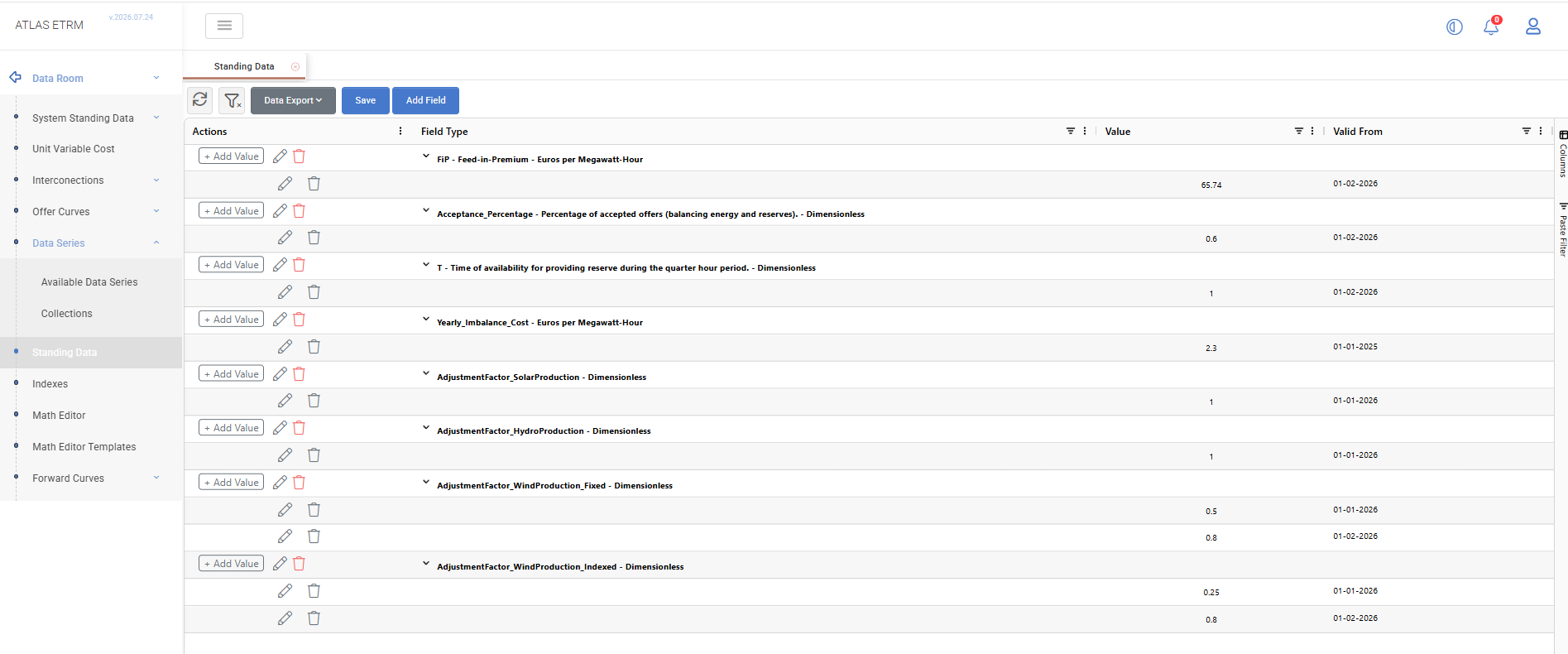
The Standing Data section allows users to define and maintain reusable parameters, such as business rules, regulatory values, tariffs, and operational constraints.
Each parameter can have multiple values with different Valid From dates, allowing the applicable value to change over time while retaining previous entries.
Standing Data can be used as reusable input in calculations created through the Math Editor and Math Editor Templates. This allows centrally maintained parameters to be applied consistently across different calculations.
Creating a Standing Data Field
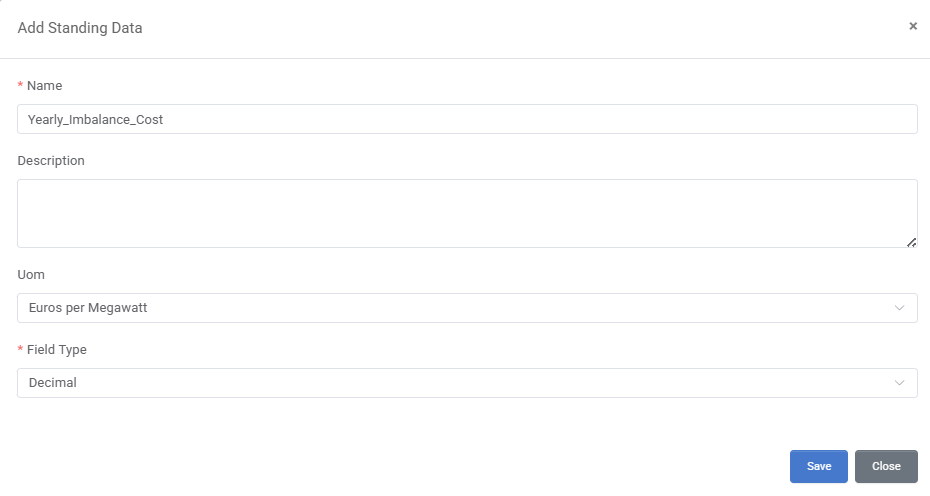
Standing Data Fields define the parameters for which values can be maintained. They are normally configured under Administration – Standing Data Fields, but can also be created directly from the Data Room.
Select Add Field to open the Standing Data Field configuration window. Enter the required details and select Save.
Adding a Standing Data Value
Select Add Value next to the required field and enter Value and Valid From.
Multiple values with different validity dates can be added under the same field. Select Save to apply the changes.
The value with the applicable Valid From date is used for the relevant calculation period.

Editing Standing Data
The edit icon is available at both levels of the grid:
On the field row, it opens the Standing Data Field configuration.
On a value row, it allows the selected value and its Valid From date to be updated.
Select Save after making the required changes.
Deleting Standing Data
The delete icon (red) on a field row deletes the Standing Data Field. The delete icon (grey) on a value row removes only the selected value.
Deleting a field or value may affect calculations that reference it. The item should therefore be deleted only when it is no longer required.
Example Workflows
Tolerance Thresholds
Acceptable deviation limits for delivery obligations (e.g., ±5% volume tolerance for bilateral contracts, ±2% for imbalance positions) are defined and maintained as Standing Data. When market conditions or regulatory requirements change, the tolerance value is updated with a new Valid From date, and all relevant Math Editor formulas apply the new threshold.
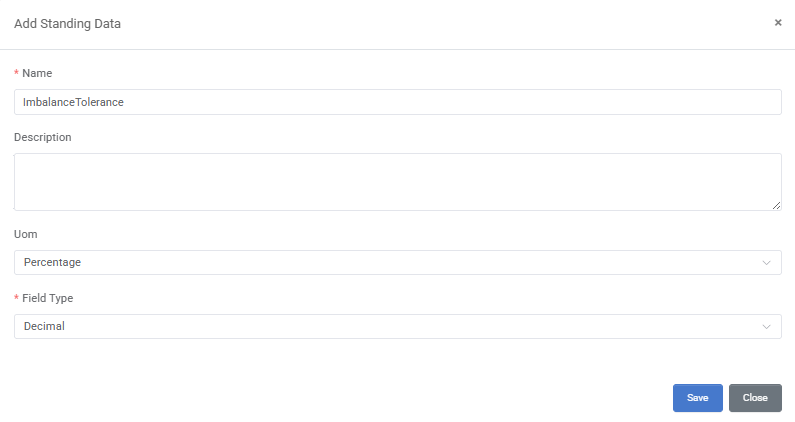
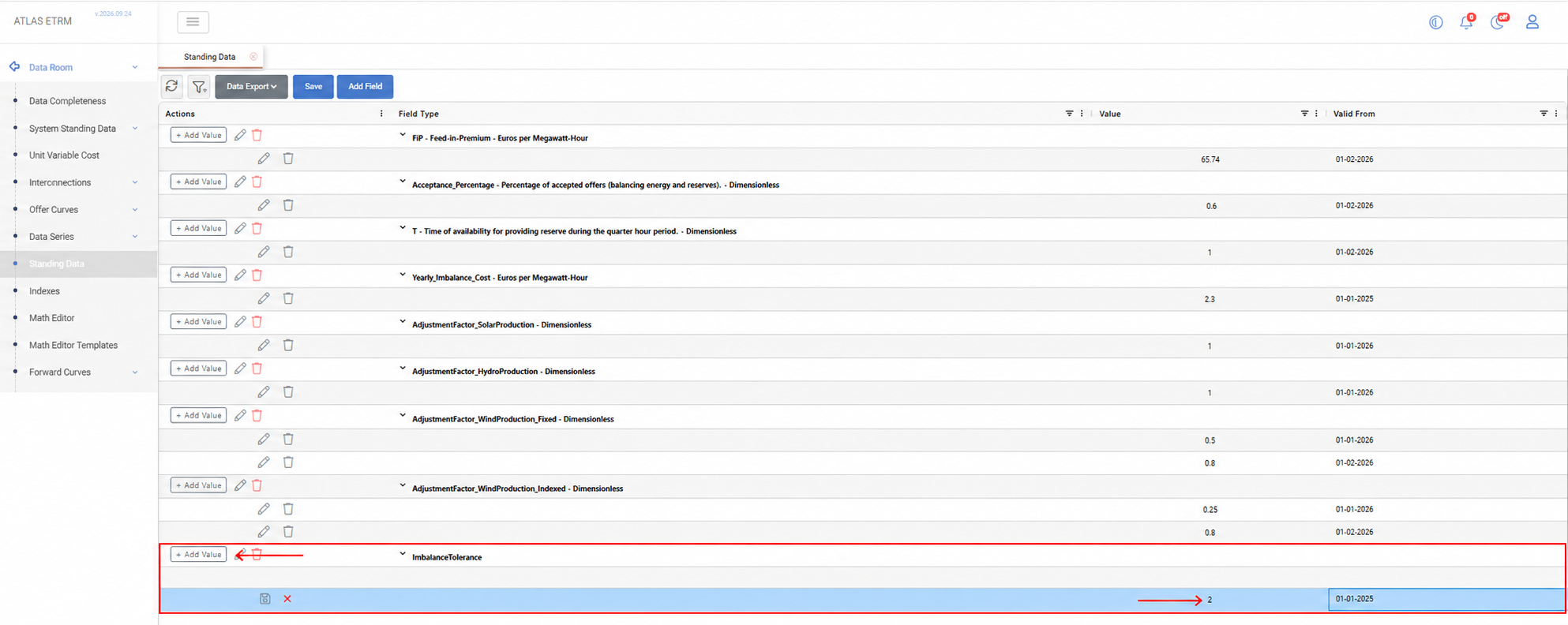
In Data Room → Standing Data, select Add Field and create a field named ImbalanceTolerance (UoM: Percentage, Field Type: Decimal).
Select Add Value and enter 2% with Valid From 01-01-2025.
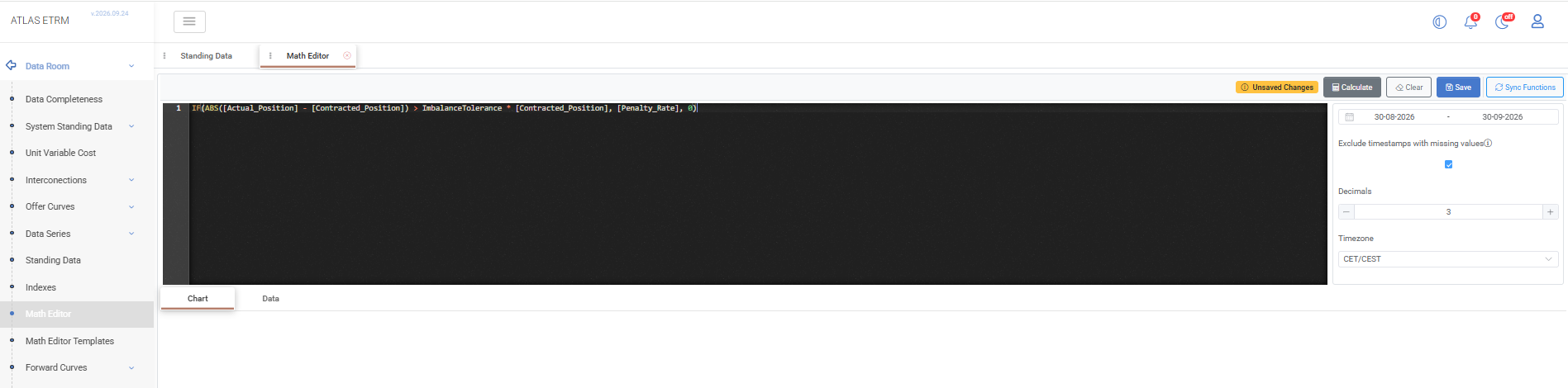
In the Math Editor, reference the field in the penalty formula. Timeseries are enclosed in square brackets, while the Standing Data field is referenced directly by name:
IF(ABS([Actual_Position] - [Contracted_Position]) > ImbalanceTolerance * [Contracted_Position], [Penalty_Rate], 0)When the regulator revises the threshold, select Add Value again on the same field and enter 3% with Valid From 01-07-2026. The formula above applies the new threshold automatically from that date, with no changes required.

Tariff Structures
Grid access tariffs, transmission fees, or capacity charges that vary by time period are maintained as Standing Data. For example, a "Network Use of System Charge" parameter changes quarterly based on regulatory decisions - all cost calculation formulas referencing this parameter automatically reflect the current tariff.
In Data Room → Standing Data, select Add Field and create a field named NUoSCharge (Uom: Euros per Megawatt-Hour, Field Type: Decimal).
Select Add Value and enter the first known charge, e.g. 4.20 with Valid From 01-01-2026.
In the Math Editor, reference the field in the cost calculation formula:
[Volume_MWh] * NUoSChargeEach time the regulator publishes a new quarterly charge, select Add Value again with the new amount and Valid From date, e.g. 4.45 from 01-04-2026. Every cost report using the formula above reflects the tariff in effect for the period being calculated.
Production Adjustment Factors
Wind production forecasts are corrected against actual output using an adjustment factor, but the forecast model's bias is not constant throughout the year — wind patterns, and therefore forecast error, differ between seasons. The correction factor is periodically recalibrated to reflect the bias observed for the current time of year.
In Data Room → Standing Data, select Add Field and create a field named WindAdjustmentFactor (UoM: Dimensionless, Field Type: Decimal).
Select Add Value and enter the factor derived from the winter months, e.g. 0.7 with Valid From 01-01-2026.
In the Math Editor, reference the field in the production forecast formula:
[Wind_Forecast_Raw] * WindAdjustmentFactorWhen the seasonal pattern shifts and the observed bias changes, select Add Value again with the recalibrated factor and Valid From date, e.g. 0.8 from 01-02-2026. The forecast formula applies the updated factor automatically from that date.
Feed-in Premium (FiP)
Producers under a feed-in premium support scheme are paid the market price plus a premium set or reviewed periodically by the regulator. The premium is maintained as Standing Data and referenced in a Math Editor formula, which is saved as a data series and used as the deal's price reference, so the price applied to the deal always reflects the premium in effect for the delivery period.
In Data Room → Standing Data, select Add Field and create a field named FiP (Uom: Euros per Megawatt-Hour, Field Type: Decimal).
Select Add Value and enter the current premium, e.g. 91.74 with Valid From 01-02-2026.
In the Math Editor, build the price formula by combining the index price with the field:
[DAM_Price] + FiPPress Save to store the result as a named data series (e.g. RES_FiP_Price), then link this data series to the relevant deal as its price reference.
When the regulator revises the premium, select Add Value again with the new figure and Valid From date. The saved data series reflects the updated premium automatically from that date, and the linked deal price updates with it, with no need to rebuild or re-link anything.
Appendix - Field Details
Field / Element | Required | Description |
|---|---|---|
Name | Yes | Unique name of the Standing Data Field. |
Description | No | Optional description explaining the purpose of the field. |
UoM | Yes | Unit of measurement associated with the field. |
Field Type | Yes | Determines the format of the values maintained for the field. For the available types, see Data Options. |
Value | Yes | Value assigned to the Standing Data Field. Its format depends on the selected Field Type. |
Valid From | Yes | Date from which the value becomes effective. |