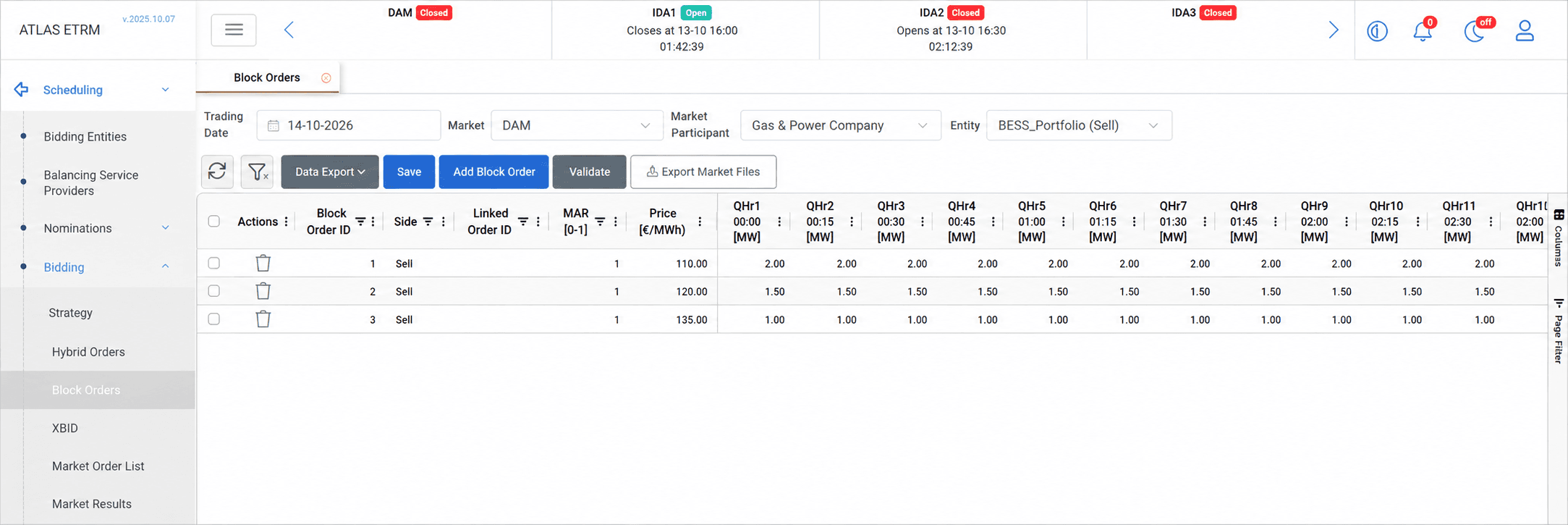
The Block Orders screen allows users to prepare spot market orders covering multiple delivery periods under a common price and acceptance condition. This supports trading decisions where the commercial value of an order depends on its execution across a period of time.
Users can create block orders manually or initialize quantities from a Bidding Strategy execution, define acceptance conditions and link related orders. Saved orders are transferred to the Market Order List for review, approval and submission.
Block orders can support thermal generation schedules spanning multiple periods and battery trading strategies involving electricity purchases for charging and sales during discharge. Available block types and acceptance conditions depend on the selected market.
Market, Participant and Entity Selection

The Trading Date defaults to the next delivery day and can be modified by the user. Select the relevant Market, Market Participant and Entity, corresponding to the unit or portfolio for which orders are prepared.
The selected bidding entity must have Submits Block Orders enabled in the Info tab of its Bidding Entities configuration. The entity selection also identifies the order direction (buy or sell).
The block order grid displays the orders associated with the selected context. Each row represents a separate block order.
Adding and Editing Block Orders
Select Add Block Order to add a new row directly to the grid. The row includes the Block Order ID, Side, optional Linked Order ID, MAR, Price and quantity fields for the delivery periods.
Enter the common price for the block and its quantities in the relevant trading-interval columns. Quantities are expressed in MW and can be specified separately for each period, allowing the block to represent a delivery profile.
Users can edit values directly in the grid or copy and paste data from an external spreadsheet. Additional blocks can be created by selecting Add Block Order again. To remove a block, use the trash icon in its Actions column.
See Appendix – Field Details for descriptions of the individual fields.
Acceptance Conditions and Linked Orders
The Minimum Acceptance Ratio (MAR) specifies the minimum proportion of the block that must be accepted if the market selects the order.
A MAR of 1.0 requires full acceptance. A lower value permits partial acceptance down to the specified ratio, subject to the applicable market rules.
The optional Linked Order ID identifies a related block order. The execution conditions associated with linked orders depend on the selected market’s rules.
Validation and Saving
Select Validate to check the entered block orders before proceeding. Review and resolve any reported validation issues, then select Save to store the orders.
Saved orders are transferred to the Market Order List, where authorized users can review, approve and submit them to the Market Operator.
Saving orders does not itself submit them to the market.
See Market Order List for the approval and submission workflow.
Exporting Data
The Data Export menu provides export options for the grid data. The separate Export Market Files action exports the prepared orders as market files.
If the connection to the market is unavailable, Export Market Files can be used as a fallback to export the prepared orders for manual submission to the market.
Appendix – Field Details
Screen Selectors
Field | Description |
|---|---|
Trading Date | The delivery date for which block orders are prepared. Defaults to the next delivery day. |
Market | The market for which the orders are prepared and whose block order rules apply. |
Market Participant | The market participant for which orders are prepared. |
Entity | The selected bidding unit or portfolio, including the order direction shown in the selection. Submits Block Orders must be enabled in its configuration. |
Block Order Grid
Field | Description |
|---|---|
Actions | Contains the trash icon used to remove the corresponding block order. |
Block Order ID | The identifier assigned to the block order when it is added. |
Side | The direction of the order: Buy or Sell. |
Linked Order ID | Optional identifier of a related block order. Linking and acceptance conditions follow the applicable market rules. |
MAR [0–1] | The minimum acceptance ratio for the block. A value of 1 requires full acceptance; lower values allow partial acceptance according to market rules. |
Price [€/MWh] | The common bid price applying to the block across its delivery periods. |
Trading-interval quantities [MW] | The quantity specified for each delivery period. In the illustrated example, these columns are labelled QHr1, QHr2, and so on, and display the period’s start time. Together, the values define the block’s quantity profile. |
Available Actions
Action | Description |
|---|---|
Add Block Order | Adds a new block order row directly to the grid. |
Validate | Checks the entered block orders and reports validation issues. |
Save | Stores the orders and makes them available in the Market Order List. |
Data Export | Provides export options for the grid data. |
Export Market Files | Exports the prepared orders as market files. |