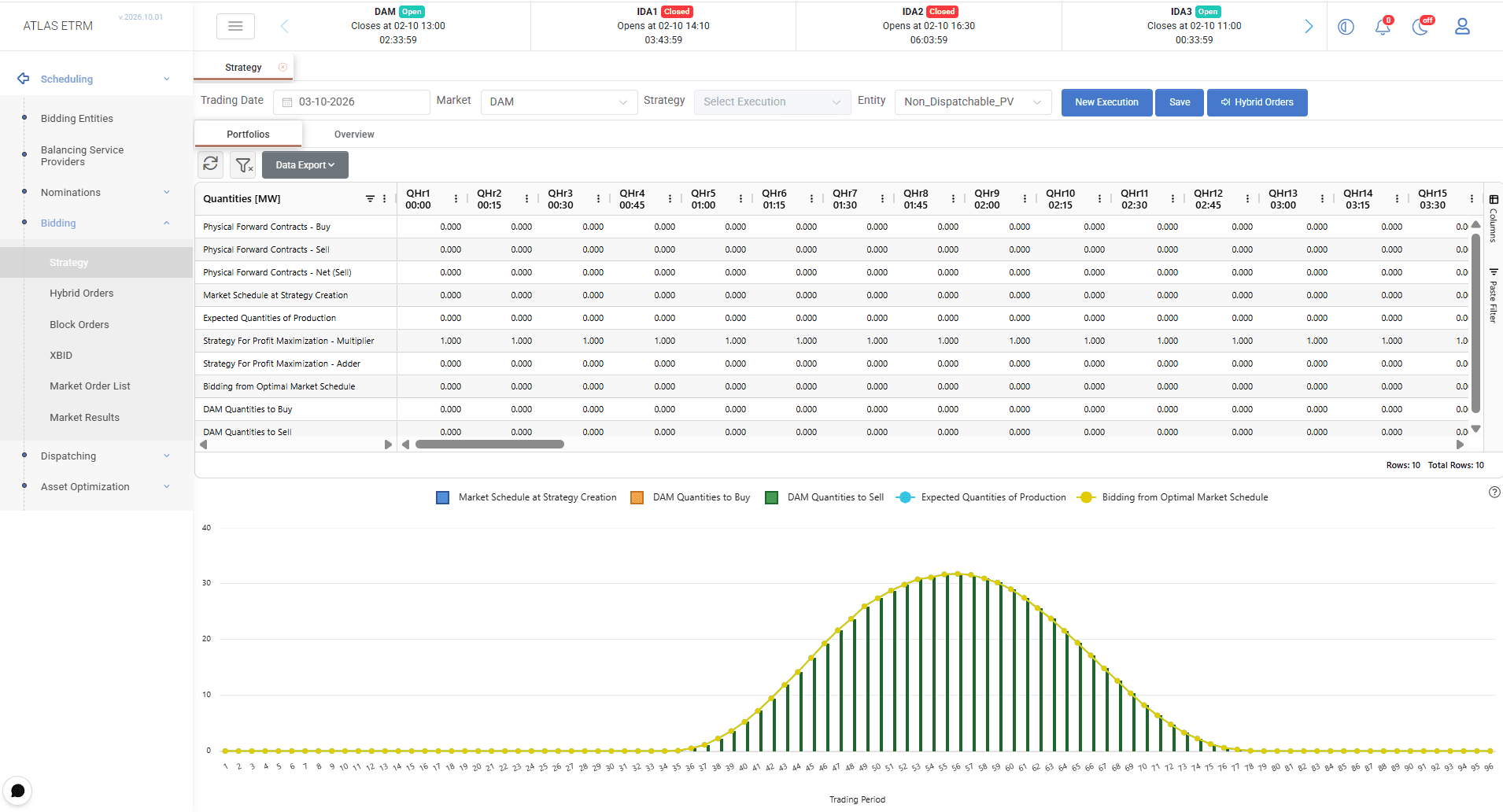
The Bidding Strategy screen supports the preparation of buy and sell quantities for participation in spot markets. It combines the bidding entity’s existing market position, expected production or consumption, and user-defined adjustments to calculate the quantities required for each trading interval.
Users can review the underlying data, adjust their strategy, assess the resulting quantities through the grid and chart, and save the execution for use in order preparation.
Strategy and Relation to the Bidding Entity
The Trading Date defaults to the next delivery day and can be modified by the user. The user selects the relevant Market and Entity, which corresponds to a portfolio previously configured in Bidding Entities.
Available entities are filtered according to their participation in the selected market, as defined in their Bidding Entity configuration. The selected portfolio determines the operational data and forecasts used in the strategy.
Select New Execution to create a strategy execution and retrieve the associated data, including the latest forecasts for the included entities. Alternatively, select a saved execution from the Strategy dropdown to review or modify an existing strategy.
The screen contains two tabs:
Portfolios: Displays the strategy for the selected portfolio, including its existing position, forecast quantities, editable adjustments and calculated buy and sell quantities.
Overview: Provides an aggregated view of the included assets or portfolios, allowing users to review their strategies together and check consistency across the included entities.
See Bidding Entities for information on configuring portfolios and their market participation.
Existing Position and Forecast Quantities
When a new execution is created, the system retrieves the physical forward contract quantities, the current market schedule and the expected production or consumption associated with the portfolio.
Physical forward contracts are displayed as separate purchase and sale quantities, together with their net sell position. These quantities and the market schedule at strategy creation represent the portfolio’s existing position and provide the starting point for calculating further market transactions.
Forward contract quantities and the current market schedule are retrieved through the exchange integration. For example, when preparing participation in an Intraday Auction (IDA), the existing position may include quantities from the Forward Market, Day-Ahead Market and XBID. The strategy therefore takes quantities already contracted or traded into account when determining the additional quantities to buy or sell.
Expected production or consumption quantities are retrieved from the forecast time series connected to the portfolio or, where applicable, from the aggregated forecasts of its underlying assets. The corresponding field is labelled Expected Quantities of Production for production portfolios and Expected Quantities of Consumption for consumption portfolios.
The grid presents quantities in MW for each trading interval. In the illustrated example, the delivery day contains 96 quarter-hourly periods.
Defining the Strategy
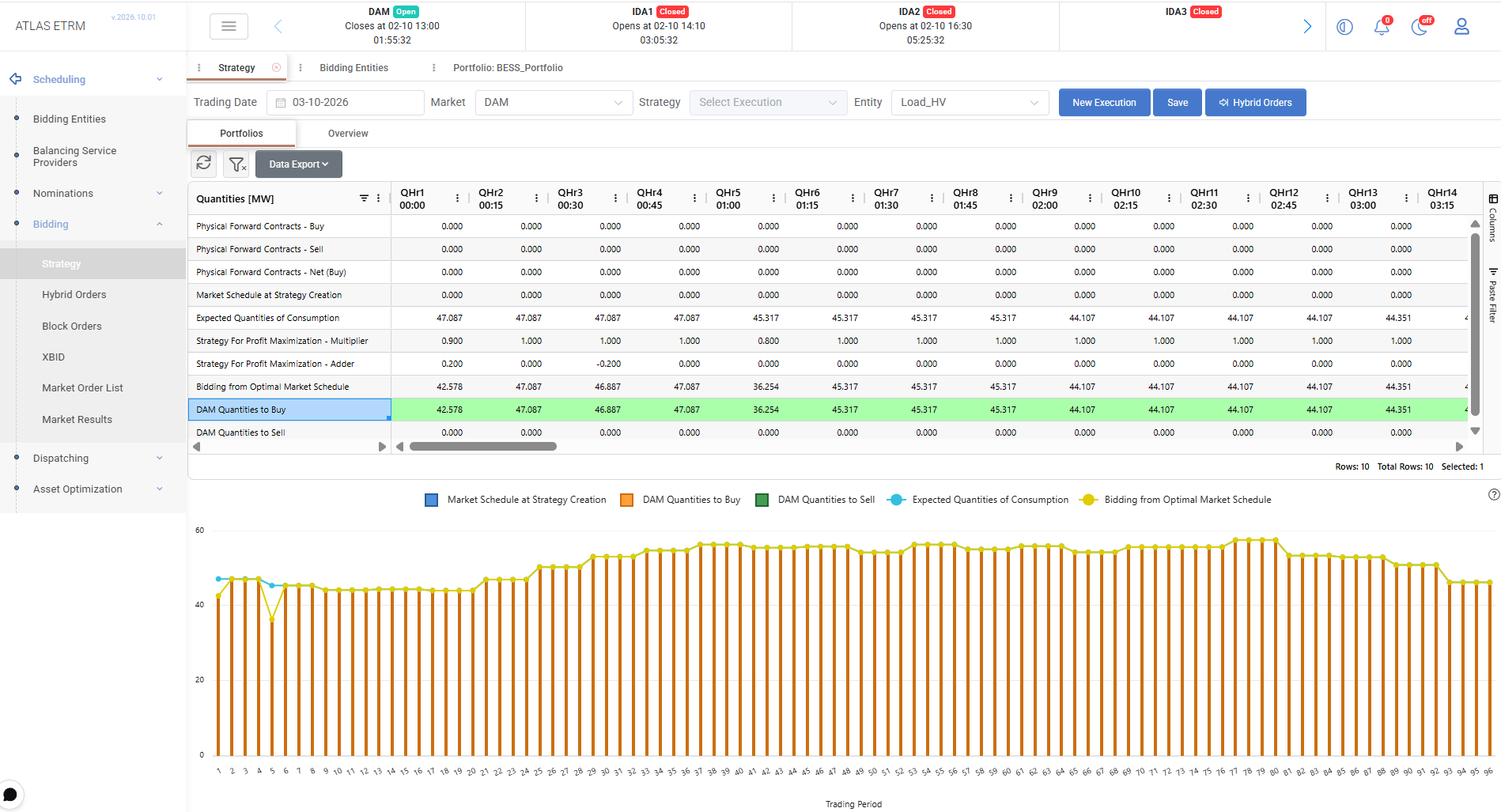
Users define their strategy by applying a Multiplier and an Adder to the forecast quantity for each trading interval:
Strategy Quantity = α × Forecast + β
Here, α is the Multiplier and β is the Adder. The Multiplier scales the forecast, while the Adder increases or decreases the resulting quantity by a fixed amount.
For example, a forecast of 100 MW, a Multiplier of 0.9 and an Adder of 5 MW produce an adjusted strategy quantity of 95 MW, before accounting for the existing market position.
These adjustments allow users to reflect their trading decisions, portfolio constraints, risk appetite and market expectations in the proposed quantities.
The resulting target schedule is displayed in Bidding from Optimal Market Schedule. Based on this schedule and the existing market position, the system calculates the quantities to buy or sell for each trading interval. These appear in market-specific rows, such as DAM Quantities to Buy and DAM Quantities to Sell.
Editing and Reviewing Quantities
Users can double-click editable cells to change individual values or copy and paste values from an external file across multiple trading intervals. This allows adjustments to be applied to individual periods or across the delivery day.
The calculated bidding quantities update to reflect changes to the strategy parameters. Users can review the results directly in the grid and in the chart below it before saving the execution.
The Data Export menu provides access to the grid’s export options.
See Appendix – Field Details for descriptions of the screen selectors, input quantities, strategy parameters and calculated outputs.
Managing Strategy Executions
New Execution creates a new strategy execution and loads the latest forecasts for the included entities. It allows users to prepare a new strategy using updated input data.
Save stores the current execution, including the strategy adjustments, and makes the saved quantities available for subsequent order preparation. Users should save after completing or modifying their strategy.
Previously saved executions are available through the Strategy dropdown. Selecting an execution loads it for review and further editing.
The Delete action removes an existing execution.
Graphical View and Portfolio Overview
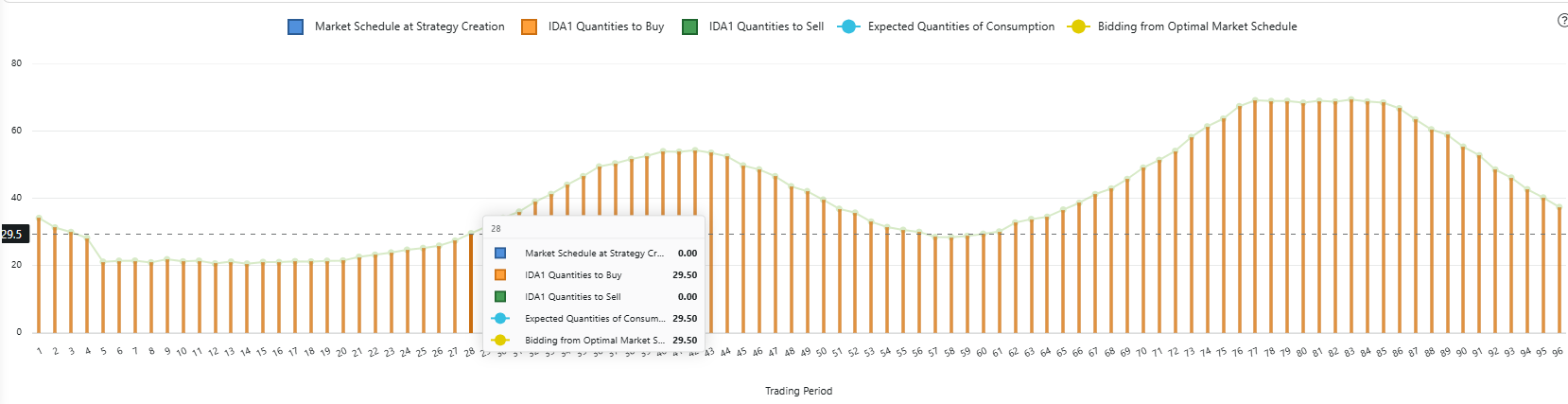
The chart below the grid combines lines and bars to display the market schedule at strategy creation, expected production or consumption, the adjusted bidding schedule, and the calculated buy and sell quantities.
It allows users to compare the target schedule with the existing position, assess the effect of their adjustments and review how bidding quantities are distributed across the trading intervals.
The Overview tab complements the individual portfolio view by displaying aggregated information for the included assets or portfolios. Users can review the combined strategy and check how individual contributions affect the overall position.
Using the Strategy in Orders
The quantities defined in the Bidding Strategy screen can be used to prepare Hybrid Orders and Block Orders, reducing the need to enter the same quantities again during order preparation.
Select Hybrid Orders at the top of the screen to open the corresponding order-entry screen. The suggested buy and sell quantities are made available for the relevant entity, allowing users to continue preparing their orders.

Saving a strategy stores the quantity-planning results. Order preparation, approval and submission are handled in the corresponding market-order screens.
Appendix – Field Details
Screen Selectors
Field | Description |
|---|---|
Trading Date | The delivery date for which the strategy is prepared. Defaults to the next delivery day and can be changed by the user. |
Market | The market for which bidding quantities are calculated. This selection determines which bidding entities are available, according to their market participation configuration. |
Strategy | Selects a previously saved execution to load, review or edit. |
Entity | The portfolio configured in Bidding Entities for which the strategy is displayed. Its associated position data and forecasts are used in the strategy calculation. |
Existing Position and Forecasts
Field | Description |
|---|---|
Physical Forward Contracts - Buy | Purchase quantities from physical forward contracts, retrieved through the exchange integration. |
Physical Forward Contracts - Sell | Sale quantities from physical forward contracts, retrieved through the exchange integration. |
Physical Forward Contracts - Net (Sell) | The net physical forward position, calculated as sale quantities minus purchase quantities. |
Market Schedule at Strategy Creation | The existing market schedule captured when the execution is created. It provides the reference position for determining additional buy or sell quantities. For an IDA strategy, the existing position may include quantities from the Forward Market, Day-Ahead Market and XBID. |
Expected Quantities of Production / Consumption | Forecast production or consumption quantities for the selected portfolio, obtained from its connected forecast time series or aggregated asset forecasts. The field is labelled Expected Quantities of Production for production portfolios and Expected Quantities of Consumption for consumption portfolios. |
Strategy Parameters
Field | Description |
|---|---|
Strategy For Profit Maximization - Multiplier | User-defined factor (α) applied to the forecast quantity for each interval. A value of 1 leaves the forecast unchanged before applying the Adder. Values between 0 and 1 reduce its magnitude, while values above 1 increase it. The Multiplier is dimensionless. |
Strategy For Profit Maximization - Adder | User-defined quantity (β), in MW, applied after the Multiplier. Positive values increase the adjusted quantity, while negative values decrease it. A value of 0 applies no additional adjustment. |
Calculation: Strategy Quantity = Multiplier × Forecast + Adder.
With a Multiplier of 1 and an Adder of 0, the strategy quantity equals the forecast quantity before the existing market position is taken into account.
Calculated Outputs
Field | Description |
|---|---|
Bidding from Optimal Market Schedule | The target schedule resulting from the forecast quantities and the user-defined Multiplier and Adder. It is used together with the existing market position to determine the quantities required for trading. |
[Market] Quantities to Buy | The calculated purchase quantity for each trading interval, taking the adjusted strategy and existing market position into account. The label includes the selected market, for example DAM Quantities to Buy. |
[Market] Quantities to Sell | The calculated sale quantity for each trading interval, taking the adjusted strategy and existing market position into account. The label includes the selected market, for example DAM Quantities to Sell. |