Overview
The XBID screen supports continuous intraday trading on the connected exchange. It combines the live market picture of every XBID contract, the creation and management of orders, and decision support based on the entity's market schedule and forecast in a single workspace. Unlike the auction markets (DAM, IDA), XBID orders are submitted directly to the market and do not go through the approval workflow of the Market Order List.
The header of the screen displays the gate status of the spot markets (DAM, IDA1, IDA2 and IDA3), including the next opening or closing time and a countdown.
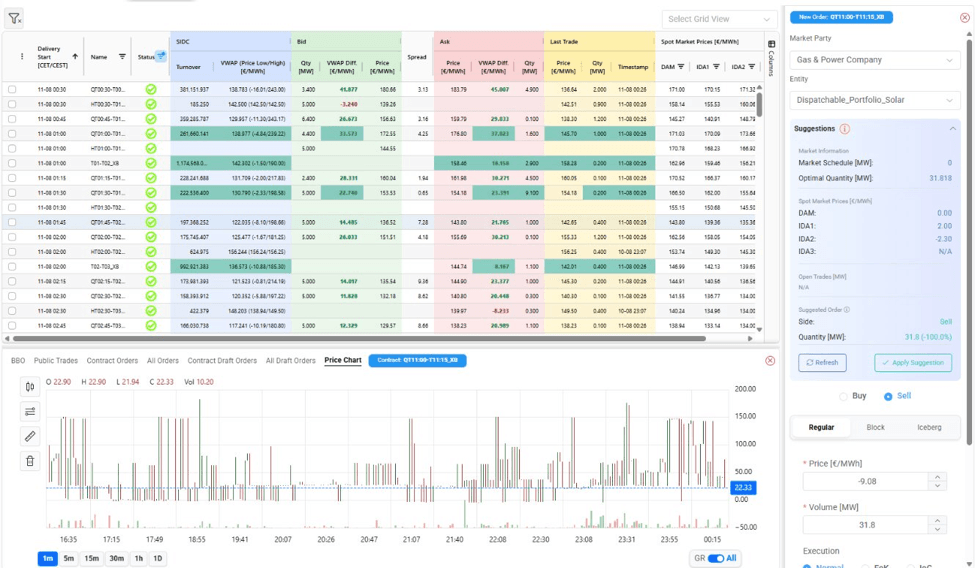
The main grid lists the XBID contracts, one row per contract and delivery period. For each contract it shows the market-wide trading statistics (turnover and VWAP), the best bid and ask, the last trade, and the reference prices of the spot markets (DAM and IDA1–IDA3) for the same delivery period, which helps traders compare the XBID price with the other markets. Values are updated in real time and a cell is briefly highlighted when its value changes. The sections of the grid are colour-coded to make the information easier to scan, and the selected row is highlighted. A detailed description of the columns is provided in the Appendix - Field Details section.
Above the grid, the screen provides tools that allow the user to organize the list of contracts according to personal trading preferences. The grid columns can be filtered, for example the Status column, so that the list is narrowed down to the contracts that are relevant at a given moment. The filter icon removes all active filters at once and returns the grid to the full list of contracts.
The Columns panel on the right edge of the grid allows the user to display only the information needed for trading decisions. A trader who focuses on market depth may keep the bid, ask and spread columns in view, while a trader who compares XBID with the other markets may display the spot market prices (DAM and IDA1–IDA3) next to the XBID prices.
Once the columns and filters have been set, the layout can be saved as a personal view through the Select Grid View list. The saved view can be reloaded at any time, which avoids reconfiguring the screen at every session. Views can also be shared between users, so that a trading desk can work with a common layout, and a view can be set as default, so that the screen always opens with the preferred configuration.
If the displayed data appears out of date, the refresh icon re-establishes the connection with the exchange feeds and reloads the screen, ensuring that trading decisions are based on current market information.
Selecting a contract opens the contract details area below the grid. It provides the best bid/offer order book (BBO), the public trades, the orders and draft orders of the selected contract or of all contracts, and a price chart. The orders of the selected contract are loaded and then updated in real time. The price chart displays the trades of the contract as candlesticks together with the traded volume. The period can be changed from one minute to one day, and the chart can show the current country only or all countries. The contract details area can be resized or collapsed to give more room to the grid.
Creating an Order
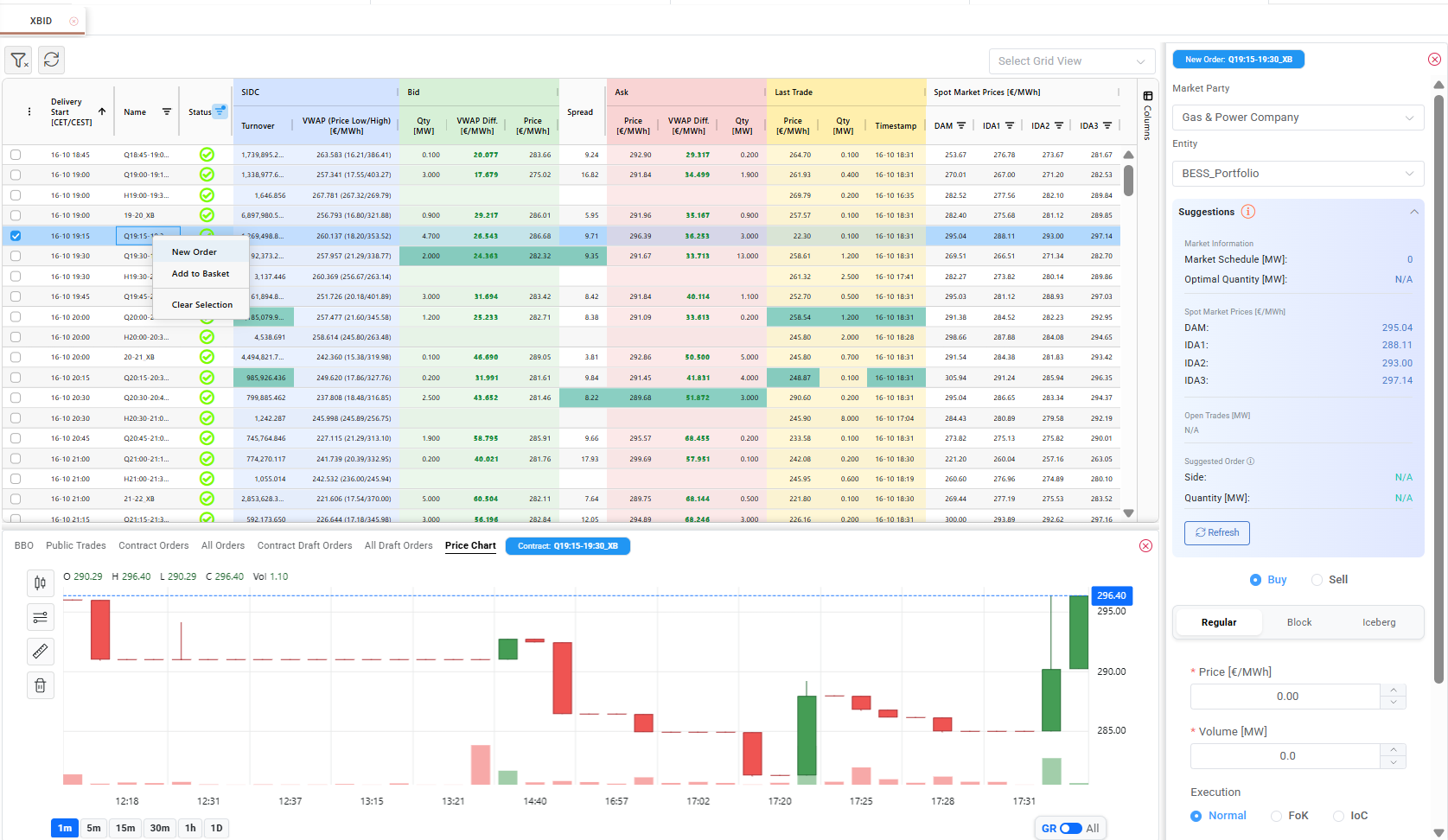
To create an order, select the relevant contract in the grid, right-click it and choose New Order. The New Order area opens on the right side of the screen and is labelled with the selected contract. The user selects the Market Party and the Entity for which the order is placed, chooses Buy or Sell, and selects the order type: Regular, Block or Iceberg. The price and volume are then entered, together with the execution and validity conditions that fit the trading objective. Once all required information has been entered, click Submit to send the order to the market, or Save Draft to keep it for later. The available fields and options are described in the Appendix - Field Details section.
At the top of the New Order area, the Suggestions panel supports the trading decision. It presents the current Market Schedule of the entity, the Optimal Quantity derived from the entity's forecast configuration and the spot market prices of the contract. Based on these values the system proposes a Suggested Order, indicating the recommended side and quantity for the selected delivery period. The suggestion also takes into account the quantities already submitted in other spot markets that have not been cleared yet, such as an open IDA1 order, and assumes that they will be cleared. This prevents the same position from being traded twice. If the user chooses to follow the recommendation, the Apply Suggestion option populates the order fields with the suggested values, while the Refresh button recalculates the suggestion based on the latest available data.
Before an order is sent, the system validates the entered values against the exchange rules, and an order that does not pass the validation cannot be submitted. Orders that are saved as drafts are not sent to the market. They are listed in the draft orders tabs and can be submitted later, individually or together as a basket. The right-click menu of the grid also provides the Add to Basket and Clear Selection options. Submitted orders are displayed in the Contract Orders tab and their status is updated in real time.
Editing and Deleting Orders
The orders of the selected contract are listed in the Contract Orders tab of the contract details area. The All Orders tab lists the active orders of all XBID contracts of today and tomorrow, so that the trader can monitor and manage the whole order book of the entity from a single place. The Contract Draft Orders and All Draft Orders tabs provide the same views for the orders that have been saved as drafts. In all four tabs, orders can be edited or cancelled in the same way, regardless of the contract they belong to.
When an order is edited, the order area is displayed in edit mode with the current values of the order, and the contract of the order cannot be changed. For Iceberg orders, the total initial volume of the order is displayed, and the price of the order is updated automatically when the iceberg moves in the market.
Orders that have not been executed can be cancelled directly from the screen, and they are removed from the order book of the exchange. Executed orders cannot be edited or cancelled. The executed price of each order is available in the order lists.
Appendix - Field Details
Contracts grid
Section | Field / Element | Description |
General | Delivery Start [CET/CEST] | Start of the delivery period of the contract. |
General | Name | Name of the contract. It indicates the delivery period and the duration of the product (quarter-hourly, half-hourly or hourly). |
General | Status | Indicates the state of the contract. The column can be filtered. |
SIDC | Turnover | Total turnover traded on the contract. |
SIDC | VWAP (Price Low/High) [€/MWh] | Volume-weighted average price of the trades of the contract, calculated from the public trades. The lowest and highest traded prices are displayed in brackets. |
Bid | Qty [MW] | Quantity of the best bid. |
Bid | VWAP Diff. [€/MWh] | Difference between the best bid price and the VWAP of the contract. |
Bid | Price [€/MWh] | Price of the best bid. |
Spread | Spread [€/MWh] | Difference between the best ask price and the best bid price. |
Ask | Price [€/MWh] | Price of the best ask. |
Ask | VWAP Diff. [€/MWh] | Difference between the best ask price and the VWAP of the contract. |
Ask | Qty [MW] | Quantity of the best ask. |
Last Trade | Price [€/MWh] | Price of the last trade executed on the contract. |
Last Trade | Qty [MW] | Quantity of the last trade executed on the contract. |
Last Trade | Timestamp | Date and time of the last trade. |
Spot Market Prices [€/MWh] | DAM, IDA1, IDA2, IDA3 | Time-weighted average clearing price of each spot market over the delivery period of the contract. When a market has a different granularity than the contract, the price is resampled accordingly. The cell is empty when no price is available. |
Contract details tabs
Tab | Description |
BBO | Best bid/offer order book of the selected contract. The Buy and Sell sides are displayed separately, with the quantity, the price and the number of orders at each price level. |
Public Trades | Trades executed on the selected contract, with ID, quantity, price, change and change (%) compared to the previous trade, execution time, and the buy and sell delivery areas. |
Contract Orders | Orders of the user for the selected contract. |
All Orders | Orders of the user for all XBID contracts of today and tomorrow. |
Contract Draft Orders | Draft orders for the selected contract. |
All Draft Orders | Draft orders for all XBID contracts of today and tomorrow. |
Price Chart | Candlestick chart of the trades of the contract with traded volume. The period can be set to 1m, 5m, 15m, 30m, 1h or 1D, and the GR / All switch limits the chart to the current country or shows all countries. The latest value is displayed on the price axis. |
New Order
Field / Element | Required | Description |
Market Party | Yes | Market party through which the order is submitted. |
Entity | Yes | Bidding entity (asset or portfolio) for which the order is placed. The Suggestions panel is calculated for this entity. |
Buy / Sell | Yes | Direction of the order. |
Order type (Regular, Block, Iceberg) | Yes | Type of the order. The available fields depend on the selected type. |
Price [€/MWh] | Yes | Price of the order. |
Volume [MW] | Yes | Quantity of the order. For Iceberg orders, the total volume of the order. |
Execution | Yes | Execution condition of the order (see Execution and Validity options). |
Contract ID | No | Identifier of the exchange contract the order refers to. Displayed for Block orders. |
XBID Block Total Contracts | Yes (Block) | Total number of contracts included in the Block order. |
XBID Ice Peak Price Delta [€/MWh] | Yes (Iceberg) | Price difference applied to each new peak of the Iceberg order. |
XBID Ice Volume Display [MW] | Yes (Iceberg) | Volume of each peak that is visible in the order book. |
Validity | Yes | Period for which the order remains valid (see Execution and Validity options). For Good till date, the date and time must also be entered. |
Order state | Yes | State of the order. The default value is Active. |
Save Draft / Submit | — | Save Draft keeps the order as a draft without sending it to the market. Submit sends the order to the market. |
Execution and Validity options
Option | Applies to | Description |
Normal | Regular, Iceberg | The order is executed immediately if possible. Otherwise it remains in the order book and may be partially executed against multiple counter orders. |
Fill-or-Kill (FoK) | Regular | The order must be executed immediately and in full. Otherwise it is cancelled without entering the order book. |
Immediate-or-Cancel (IoC) | Regular | The order is executed immediately for any available quantity, and the unfilled volume is cancelled. |
All or Nothing (AoN) | Block | The order is executed only in full. |
No restriction (NON) | All | The order has no validity restriction. |
Good for trading (GFS) | All | The order remains active for the duration of the trading session. |
Good till date (GTD) | All | The order remains valid until a user-defined date and time. |
Validation rules
Field | Rule |
Volume | Must be greater than 0, with a maximum of 1 decimal place. |
Price | Must be greater than 0, with a maximum of 2 decimal places. |
Validity | For FoK and IoC orders, the validity must be No restriction (NON). |
Good till date | The date and time are required, must be in the future, and the minutes must be a multiple of 5. |
Iceberg | XBID Ice Peak Price Delta and XBID Ice Volume Display are required and must be greater than 0. |
Block | XBID Block Total Contracts is required and must be greater than 0. |
Suggestions panel
Field / Element | Description |
Market Schedule [MW] | Current market schedule of the selected entity for the delivery period of the contract, which represents its existing market position. |
Optimal Quantity [MW] | Quantity derived from the forecasting configuration of the entity for the same delivery period. |
Spot Market Prices [€/MWh] | Time-weighted average prices of DAM, IDA1, IDA2 and IDA3 for the delivery period of the contract. |
Open Trades [MW] | Quantities that have been submitted per market and have not been cleared yet. They are assumed to be cleared when the suggestion is calculated. |
Suggested Order — Side | Recommended direction of the order, which follows the sign of the calculated quantity. |
Suggested Order — Quantity [MW] | Optimal Quantity minus Market Schedule minus the open quantities of the other markets. For example, with a Market Schedule of 10 MW, an Optimal Quantity of 20 MW and 5 MW open in IDA1, the suggestion is to sell 5 MW. |
Refresh | Recalculates the suggestion based on the latest available data. |