1. Data Completeness
Overview of Data Completeness
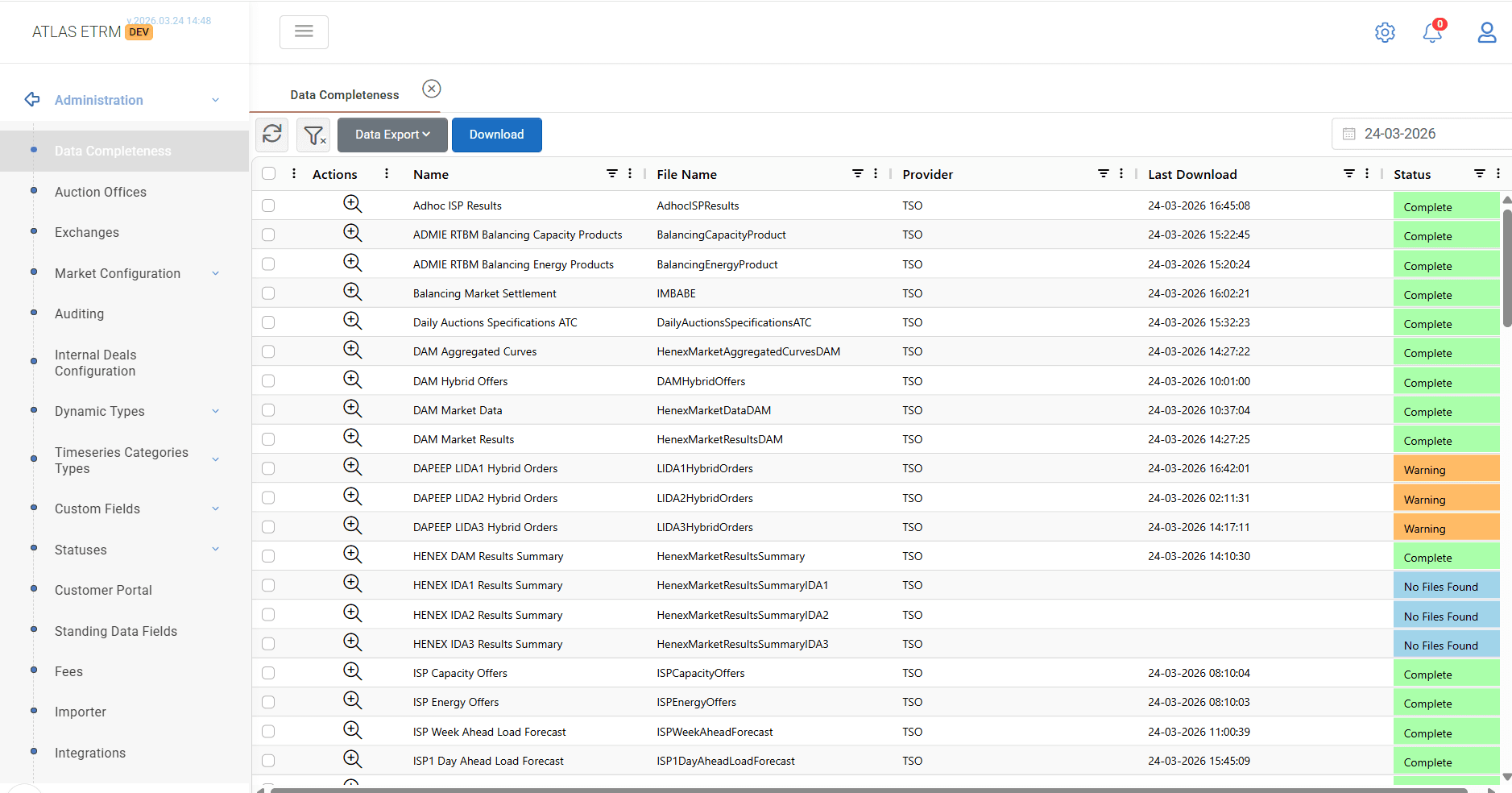
The Data Completeness screen provides visibility over all automated data ingestion processes that populate the ATLAS ETRM database from external sources. It serves as a monitoring and control point for background jobs responsible for retrieving, parsing, and storing market and operational data.
This functionality is critical for ensuring that all required datasets are available, up-to-date, and correctly processed, as downstream modules depend on this data.
The screen displays a list of configured data feeds along with their execution status and metadata, allowing users to quickly identify missing, delayed, or erroneous data loads.
Data Monitoring
Each row in the grid corresponds to a specific automated job. The following information is available:
Name
Descriptive name of the job.File Name
The technical identifier of the imported file or dataset.Provider
The external source of the data (e.g., TSO, exchanges, third-party providers).Last Download
Timestamp indicating the most recent successful or attempted data retrieval.Status
Indicates the current state of the data ingestion process. Typical values include:Complete: Data successfully retrieved and processed
Warning: Partial issues during download or parsing
No Files Found: No data available for the selected period
This structured view enables rapid assessment of data availability and highlights any operational gaps.
Manual Data Actions
In addition to automated processes, the module supports manual intervention for data handling.
Download Data
Users can manually trigger data retrieval for selected datasets.
This action opens a configuration window where the user defines:Date range
Target dataset(s)
After execution, the system attempts to download and process the selected data on demand.
Data Export
Provides the ability to export dataset information or results for external use.
Execution Log
Users can view detailed execution logs for each data ingestion job by selecting the magnifier icon (+) from the Actions column.
This action opens a pop-up window displaying the execution history, which consists of two sections:
Download Log
Displays information about each download attempt, including request date, target date range, execution type (automatic or manual), and overall success status.Parsing Log
Displays details of the file processing stage, including dataset name, file name, and parsing/import success status.
This functionality allows users to trace the full data ingestion process, from download to final import, and identify any failures or inconsistencies.
Was this helpful?