5. Auditing
Overview of Auditing
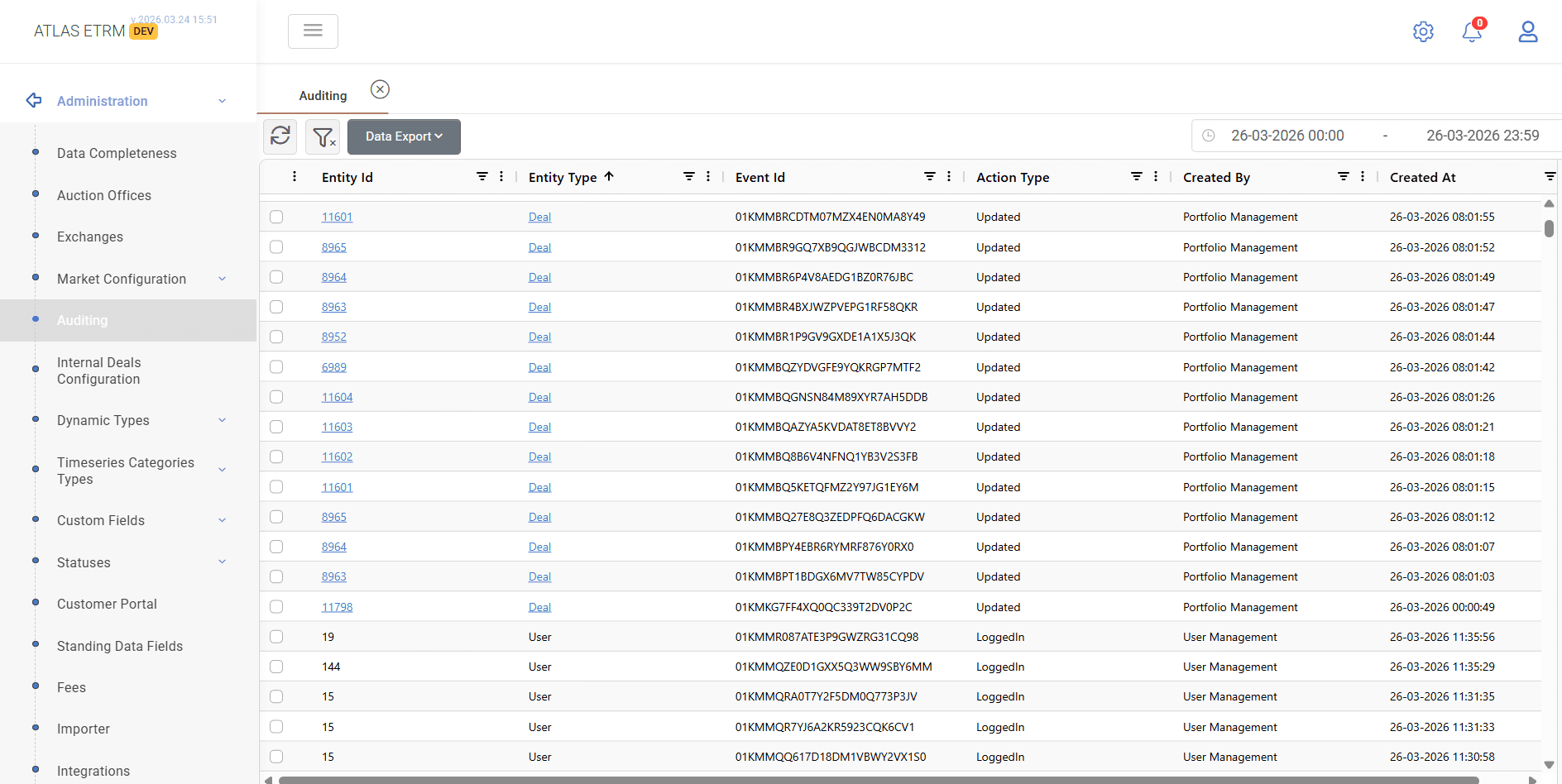
The Auditing screen provides a centralized view of all actions performed within the system, enabling full traceability of changes across key entities.
It allows users to monitor and review modifications related to elements such as Payment Terms, Master Agreements, Deals, Order Items, and Orders.
Data View
The grid displays audit records with detailed information for each action, including:
Entity Id
The unique identifier of the affected entity.Entity Type
The type of entity (e.g., Deal, Order Item, User).Event Id
The unique identifier of the audit event.Action Type
The type of action performed (e.g., Created, Updated, Deleted).Created By
The module or user that performed the action.Created At
The timestamp when the action occurred.
Additional Functionality
Date Range Filter
Users can filter audit records by selecting a specific date range.Entity History View
By selecting a row (checkbox), the system groups and displays the full history of the selected entity.Navigation Links
Entity references (in blue) act as links, allowing users to navigate directly to the corresponding entity in the system.
Was this helpful?