Overview
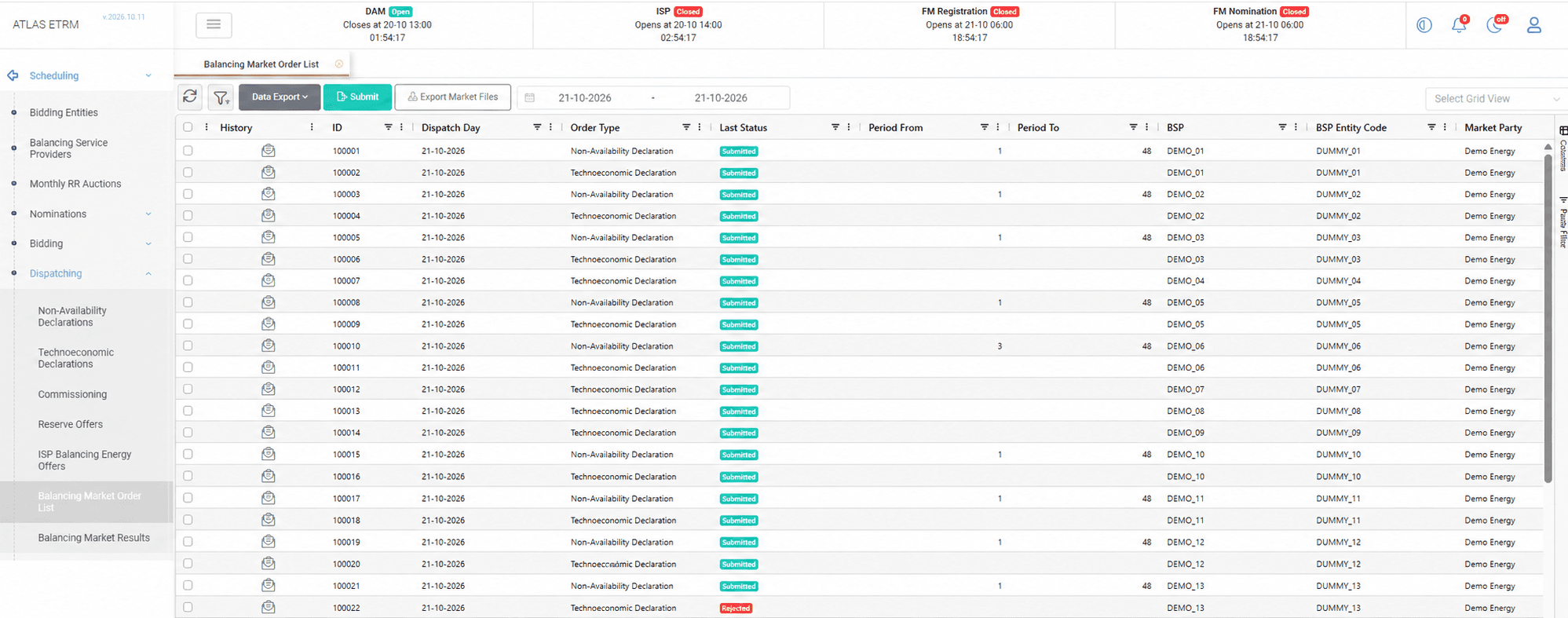
The Balancing Market Order List collects all the declarations and offers that are created in the Dispatching screens: the non-availability and technoeconomic declarations, the commissioning schedules, the reserve offers and the ISP and RTBEM balancing energy offers. It is the supervisory screen where the user reviews the submissions before they are sent to the system operator, and where the status of each submission is tracked. Its operation is similar to the Market Order List of the spot markets.
The screen opens on the next trading day, and the date range can be changed to display other days. The orders can be grouped, filtered and exported, and each user can choose the columns to display and save the layout as a personal view. The screen shows who created and who approved each order, and the history of every order records each status change, including the reason when the market rejects an order.
The status of each order is updated in real time as the system operator responds, without refreshing the screen, so that the trader can follow the progress of a submission and identify immediately any order that was rejected.
Approving and Exporting Orders
To send orders to the system operator, the user selects them and chooses Approve and Send Orders. Approval by an authorized user is required before an order is submitted, in line with the internal governance of the company. A progress window displays the submission, and if an error occurs the process stops, the user is notified and the screen shows the actual status of every order.
The Export Market Files button downloads the selected orders as the files that the system operator requires, so that they can be submitted through its platform when the interface is not available. Large exports are delivered in an organized way, grouped per market and order group.
In markets that do not provide an interface for the automatic submission, such as the Greek Balancing Market, the user submits the files manually to the external platform and receives an acknowledgement file, which confirms whether each order was accepted or rejected and why. The Upload Acknowledgement Document button allows the user to upload this file, so that the status of the orders is updated from it instead of being received automatically.
Mass Actions
Actions can be applied to many orders at once. The user selects the orders through the checkboxes of the grid, or shift-clicks to select a range of rows, and then right-clicks one of the selected rows to open the context menu. The submission and export actions of the menu work in the same way as the corresponding buttons above the grid and are applied to all the selected orders.
The menu also offers the Update Status action, which sets manually the status of all the selected orders. It is meant for the cases in which the response of the market is not received by the platform, for example because of an outage, or in markets without an interface for automatic submission, such as the Greek Balancing Market, when no acknowledgement file is available.
The user selects the new status and enters a log message with the reason for the change. The change is recorded in the history of each order with the date and time, the user and the log message. When the new status is Cleared, the cleared quantity is set automatically to the quantity of the order.
Orders that already have the selected status are skipped. If all the selected orders already have it, no change is made and the user is notified.
Appendix - Field Details
Field / Element | Description |
|---|---|
Date range selector | Selects the dispatch days displayed in the list. |
History | Opens the submission and status history of the order. |
ID | System-assigned identifier of the order. |
Dispatch Day | Day to which the declaration or offer applies. |
Order Type | Type of declaration or offer. |
Last Status* | Latest recorded status of the order. |
Period From | First dispatch period covered by the order, where applicable. |
Period To | Last dispatch period covered by the order, where applicable. |
BSP | Balancing Service Provider associated with the order. |
BSP Entity Code | Identifier of the provider’s entity. |
Market Party | Market participant associated with the order. |
Submit | Submits the selected orders to the market. |
Export Market Files | Exports selected orders in the market file format. |
Update Status (context menu) | Sets manually the status of the selected orders, with a log message. Available from the right-click menu. |
Data Export | Exports grid data. |
Select Grid View | Applies a saved grid layout. |
*The order statuses are the same as in the Market Order List.