Overview
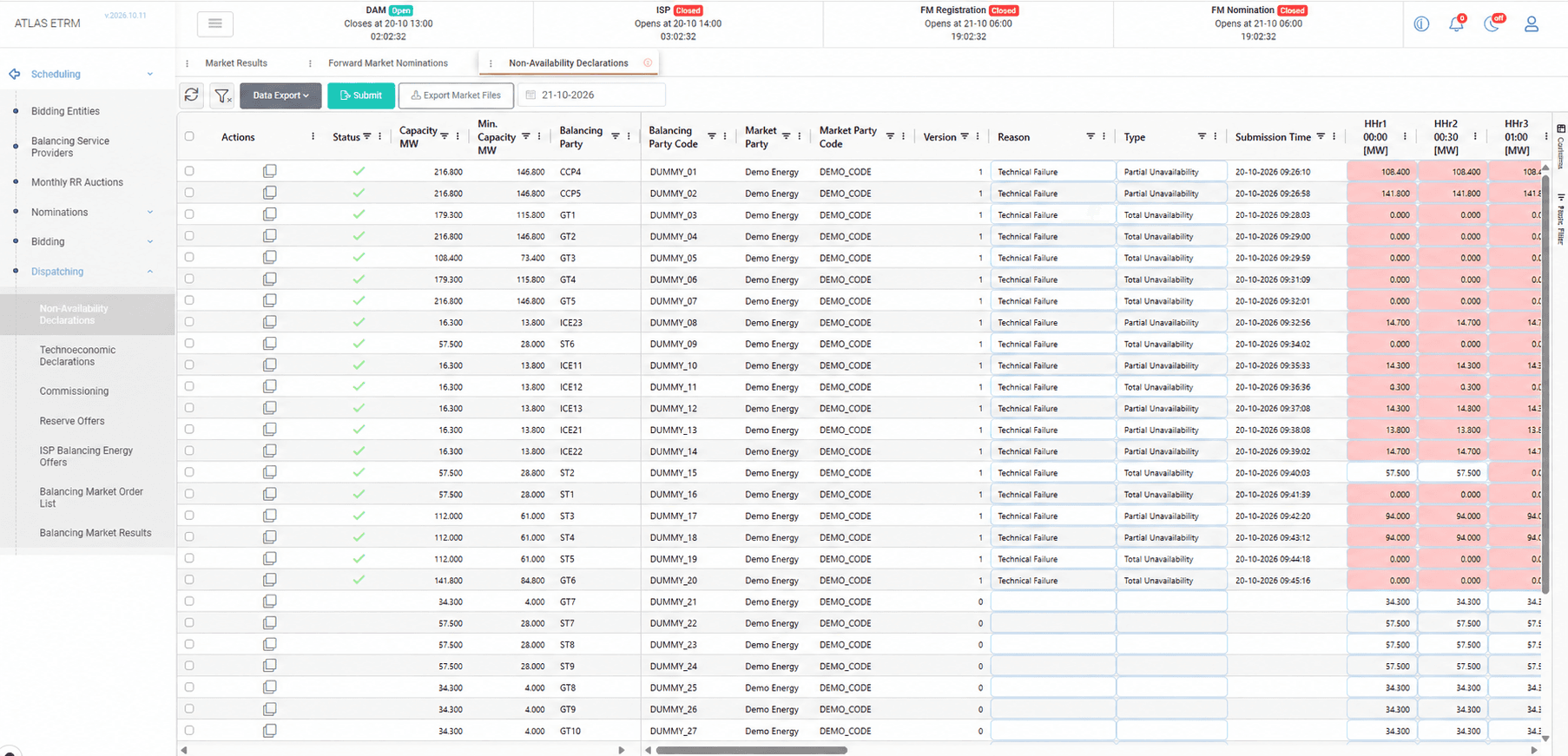
The Non-Availability Declarations screen allows Balancing Service Providers (BSPs) to declare to the system operator the periods during which a generation or consumption unit is fully or partially unavailable. The declarations are used for operational planning and reliability monitoring, so keeping them accurate and up to date ensures that the system operator schedules the unit according to its real capability.
For the selected day, the screen displays the declarations of each balancing service provider, together with the capacity of the unit and the availability that has been declared for each dispatch period, so that the operator has a clear picture of the availability of the units. Declarations of this type are sent directly to the market when the user submits them, without the approval step of the order lists.
After each submission, the screen shows automatically whether the market accepted the declaration. If a declaration is rejected, the message of the market is displayed in full, so that the user can correct it immediately. Every submission is also recorded in the Balancing Market Order List, which provides a complete audit trail.
Creating and Managing Declarations
To declare an unavailability, the user selects the day and the unit, chooses whether the unavailability is total, partial or a cancellation of an earlier declaration, and states the reason. The user then enters the capacity that remains available in the affected periods, either directly or by copying it from a spreadsheet, and submits the declaration to the market.
The screen guides the user towards consistent declarations: a total unavailability implies no available capacity, a partial unavailability stays within the capacity of the unit, and a cancellation requires no values. The periods of reduced availability are highlighted, so that they are easy to identify.
A declaration can be duplicated to cover another period, using the capacity of the unit as the starting point. After the submission, only the values and the validity dates of a declaration can be changed. The declaration can also be exported as a file, so that it can be submitted through the platform of the system operator if the interface is not available.
Appendix - Field Details
Grid fields
Field / Element | Description |
|---|---|
Date selector | Selects the dispatch day. |
Actions | Provides the action for duplicating a declaration. |
Status | Indicates the result of the latest submission. |
Capacity MW | Capacity of the unit. |
Min. Capacity MW | Minimum operating capacity of the unit. |
Balancing Party | Unit or provider to which the declaration refers. |
Balancing Party Code | Identifier of the balancing party. |
Market Party | Market participant associated with the declaration. |
Market Party Code | Identifier of the market participant. |
Version | Version number of the declaration. |
Reason | Reason for the unavailability. |
Type | Type of unavailability, such as total or partial unavailability. |
Submission Time | Date and time of submission. |
Period columns [MW] | Available capacity declared for each dispatch period. Column headers identify the period and its start time. |
Submit | Submits the declarations to the market. |
Export Market Files | Exports declarations in the market file format. |
Data Export | Exports grid data. |
Declaration rules
Declaration type | Rule |
|---|---|
Total | The available capacity is zero in all the periods of the interval. |
Partial | The available capacity is between zero and the maximum capacity of the unit in all the periods of the interval. |
Cancellation | The values cannot be edited. Zero values are sent automatically for the cancelled periods. |
Available reasons
Reason |
|---|
Technical Failure |
Foreseen Maintenance |
Shutdown |
Complementary Information |
Major generation outage |
Operation Inability Declaration |
Rejection due to an audit |
Load change at DSO |
Intention to Suspend Normal Operation Declaration |
Load change at Load representative |