Overview
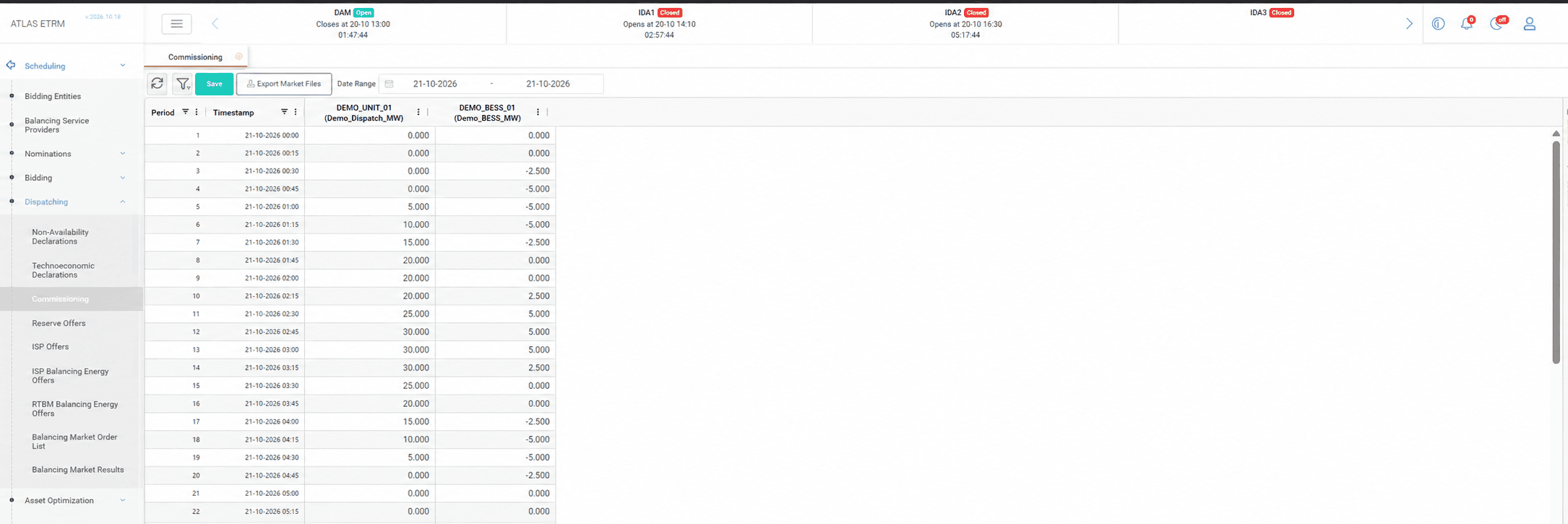
The Commissioning screen supports the commissioning of battery energy storage systems (BESS), by allowing the scheduling team to record the test programme of each unit in one place and to deliver it to the counterparties in the format they expect.
For each day of the selected period, the screen displays the schedule of every unit that has been enabled for commissioning, so that the whole programme can be reviewed at a glance. Every saved schedule is retained and appears in the Balancing Market Order List, which provides a complete record for follow-up and auditing.
Viewing and exporting the schedules, and entering and saving them, are controlled by separate permissions, so that each user has access only to the actions that fit their role.
Entering and Exporting Schedules
The user selects the days of interest, which by default start from tomorrow, and loads the corresponding schedules. The system warns the user before any unsaved values are replaced, so that no work is lost when moving to another period. Each unit is clearly identified, and the days on which a unit is not active are not available for entry.
The commissioning values are entered for each unit and period directly in the grid, or copied from a spreadsheet. A blank cell means that no value has been declared, while zero is a valid declared value. When the user saves, the new schedule becomes the current one for the day, and the earlier versions remain available for auditing.
Once the schedule is ready, the Export Market Files button prepares the documents for the counterparties. For each unit, an XML file in the format required by the market and an Excel file in the format agreed with the participant are generated and delivered together, so that the schedule can be shared without any manual re-formatting. The export reflects the values currently displayed, even before they are saved.
The files can also be sent automatically by e-mail to a designated recipient, if the company wishes to automate this step.
Each time a schedule is saved, a corresponding record is created in the Balancing Market Order List, so that every version is traceable. The values entered are checked against the technical limits of the unit, which helps to prevent erroneous schedules from reaching the counterparty.
The units that take part in commissioning are selected beforehand in the Balancing Service Providers screen, so that only the relevant units appear in the Commissioning screen.
Appendix - Field Details
Field / Element | Description |
|---|---|
Date Range | Selects the range of days displayed in the grid. By default, tomorrow is selected. |
Period | Sequential dispatch period within the day. |
Timestamp | Start date and time of the dispatch period. |
Unit / portfolio columns | One column for each unit or portfolio available for commissioning. The header displays its name and associated identifier. |
Schedule values | Commissioning schedule entered for each unit or portfolio and dispatch period. |
Save | Saves the schedules entered in the grid. |
Export Market Files | Exports commissioning schedules in the configured market file formats. |
Value rules
Rule | Description |
|---|---|
Empty cell | No commissioning value exists. |
Zero | Valid value, which is different from an empty cell. |
Positive and negative values | Allowed, with up to three decimal places. |
Export | A file is generated only for a provider and day with at least one value. An empty grid cannot be exported. |
PPT orders file
Column | Description |
|---|---|
submitUId | Unique identifier of the submission. |
assetId, assetEICCode | Identifier and EIC code of the asset. |
participantId, participantEICCode | Identifier and EIC code of the market participant. |
currency | Currency of the order. |
targetMarket | Market to which the order is addressed. |
orderType | Always PPT. |
side | B (buy) or S (sell). |
clearingSubAccountId | Clearing sub-account of the participant. |
businessProcessKey, externalOrderId | Keys that correlate the order with the saved schedule. |
pptDeliveryStartDT | Start of the delivery period. |
pptDeliveryDuration | Duration of the delivery period in minutes (15). |
pptvolume | Volume of the order. |
notes | Free-text notes. |
*Market files: the file names follow the pattern YYYYMMDD_Name_X, where YYYYMMDD is the day of the test programme, Name is the name of the unit and X is the version number of the ISP. The XML file complies with the ENTSO-E specification and contains the full timeseries of the day, with the periods without a value declared as zero.