Overview
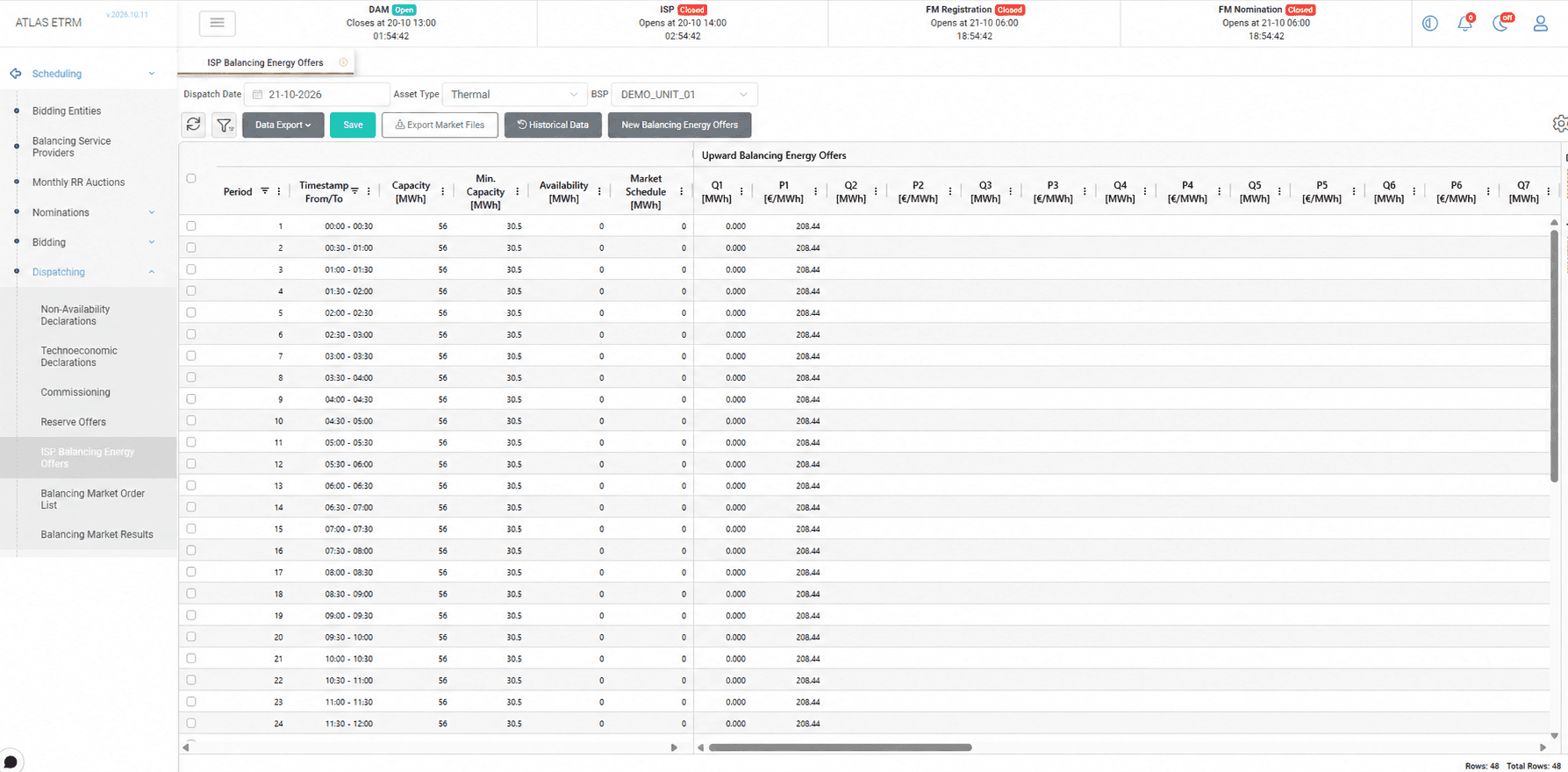
The ISP Balancing Energy Offers screen allows Balancing Service Providers (BSPs) to submit balancing energy offers for the Integrated Scheduling Process (ISP). Offers are defined as price and quantity steps for each dispatch period and direction, and they enable the system operator to activate balancing energy when it is needed to keep the system in balance.
The user selects the day, and the screen displays the offers that are available for it, together with the availability of the unit and its market schedule, which support the pricing of the offers.
When an offer does not comply with the rules of the market, it is highlighted before saving, so that it can be corrected in time.
Creating and Submitting Balancing Energy Offers
The user can start from an empty set of offers or reuse the offers of a previous day, and then adjusts the price and quantity steps of each period in the grid or copies them from a spreadsheet. The number of steps follows the rules of the market.
When the offers are saved, they are transferred to the Balancing Market Order List, where an authorized user approves and sends them to the system operator or exports them as files.
The preparation and the submission of the offers can also be automated.
The screen is operated through the Dispatch Date, Asset Type and Balancing Service Provider selectors. The Historical Data option displays the offers of previous days, and the New Balancing Energy Offers button creates a new set of offers for the selected provider. For each period, the grid shows the capacity, the availability and the market schedule of the unit and the upward and downward offers, each with up to four price and quantity steps.
Appendix - Field Details
Field / Element | Description |
|---|---|
Dispatch Date | Selects the dispatch day of the offers. |
Asset Type | Selects the asset category. |
BSP | Selects the Balancing Service Provider. |
Period | Sequential dispatch period within the day. |
Timestamp From/To | Start and end time of the dispatch period. |
Capacity [MWh] | Capacity expressed as energy for the dispatch period. |
Min. Capacity [MWh] | Minimum operating capacity expressed as energy for the dispatch period. |
Availability [MWh] | Available energy of the unit for the dispatch period. |
Market Schedule [MWh] | Market schedule of the unit for the dispatch period. |
Upward Balancing Energy Offers | Groups the quantity and price steps of upward balancing energy offers. |
Q1, Q2, … [MWh] | Energy quantity offered in each step. |
P1, P2, … [€/MWh] | Price offered in each corresponding step. |
Historical Data | Provides access to offers from previous days. |
New Balancing Energy Offers | Creates a new set of offers for the selected provider. |
Save | Saves the prepared offers. |
Export Market Files | Exports offers in the market file format. |
Data Export | Exports grid data. |
Validation rules for upward offers submitted to the MMS
Rule | Description |
|---|---|
Quantities | Quantities are entered as the segment of each step and not as the cumulative quantity, in MWh. |
Total quantity | In each time step, the sum of the quantities must be equal to (Pmax − Market Schedule) / (60 / time step in minutes). |
First step | If the Market Schedule is lower than Pmin, the quantity of the first step must be equal to (Pmin − Market Schedule) / (60 / time step in minutes). Otherwise, any quantity is allowed. |
Number of steps | Up to 10 steps, or the maximum number defined in the market configuration. |
Prices | The prices must be increasing from step to step. |