4.12 Master Agreement Asset Connections
Overview
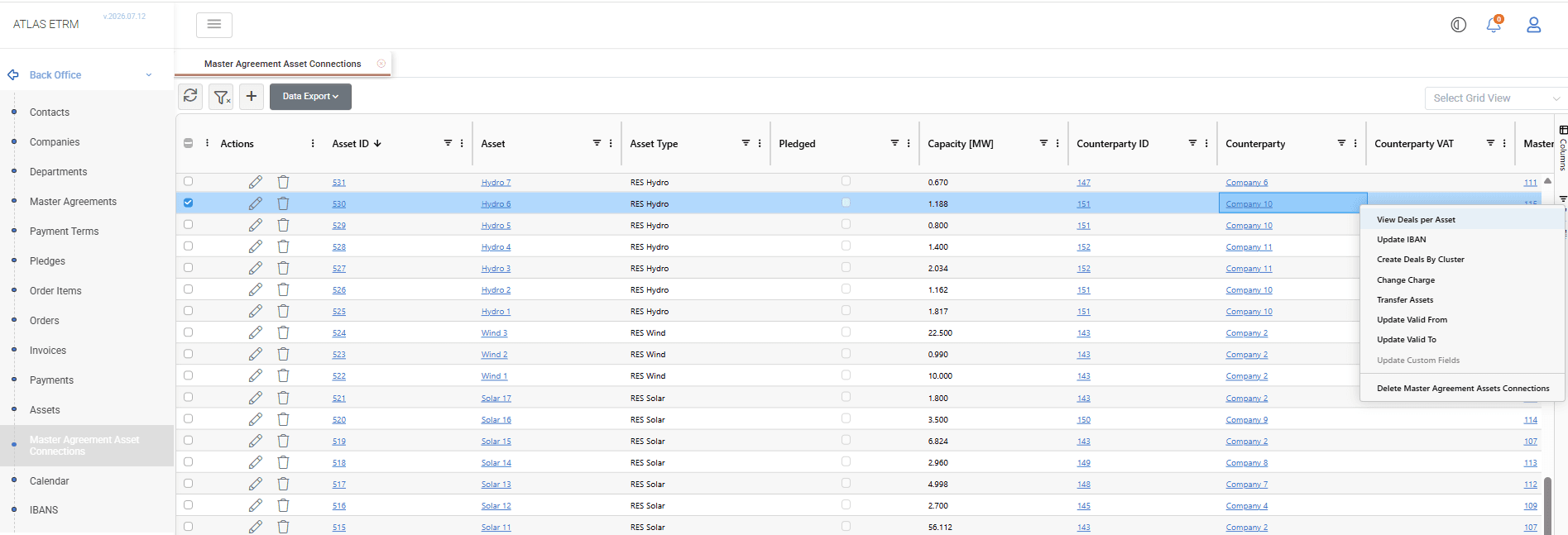
The Master Agreement Asset Connections screen is used to manage the contractual relationship between Assets and Master Agreements. Each connection defines the contractual framework under which an asset operates and the validity period during which the relationship is active.
Asset–Master Agreement connections are the foundation for commercial processes within the ETRM. They determine which contractual terms apply to an asset and provide the basis for deal generation, pricing management, settlement, and other downstream business processes. By maintaining validity periods, the system supports operational changes such as contract amendments or ownership transfers while preserving the historical timeline of the contractual relationship.
The screen provides a centralized view of all Asset–Master Agreement connections, supports many mass actions, and allows the information to be exported to Excel or CSV format.
Creating Asset Connections
Click the + button at the top of the grid to create one or more Asset–Master Agreement connections.
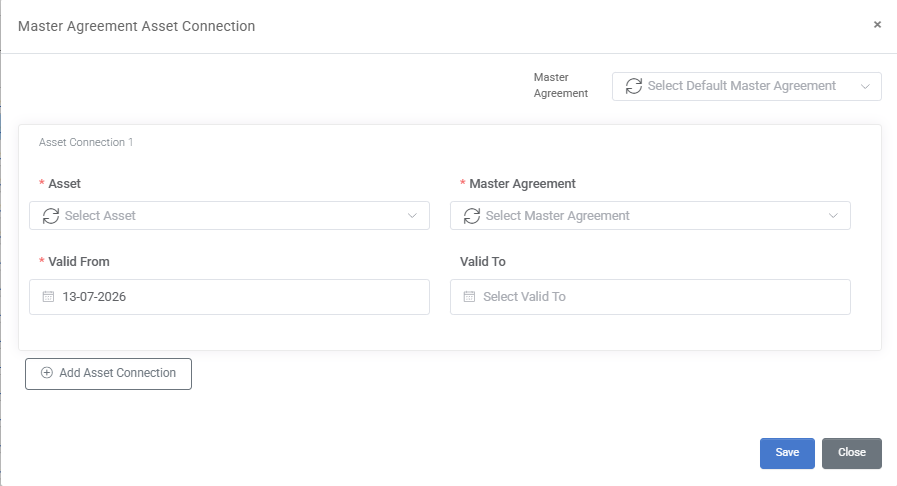
Select the required asset(s), choose the corresponding Master Agreement, and define the connection validity by specifying a Valid From date. Optionally, a Valid To date may also be defined to indicate when the contractual relationship ends.
When multiple assets are connected to the same Master Agreement, a default Master Agreement can be selected and applied to all selected assets. Once all required information has been entered, click Save.
Editing and Deleting Asset Connections
Editing an Asset Connection
To edit an existing connection, double-click the corresponding record in the grid or click the Pencil icon displayed in the Actions column.
Users may update the Master Agreement or validity period of the connection by modifying the Valid From and Valid To dates.
Deleting Asset Connections
Asset–Master Agreement connections may be deleted directly from the grid by using the Trash Can icon displayed in the Actions column or by selecting one or more records and choosing Delete Master Agreement Assets Connections from the right-click menu.
The user must confirm the deletion before the selected connection(s) are permanently removed.
Mass Actions
Mass actions are available from the Master Agreement Asset Connections grid by selecting one or more records and opening the right-click menu.
View Deals per Asset: Redirects the user to the Portfolio Management area and displays the Deals associated with the selected Asset–Master Agreement connection(s), allowing users to review or further maintain the corresponding commercial information.
Update IBAN: Updates the IBAN associated with the selected Asset–Master Agreement connection(s).
Create Deals by Cluster: Automatically generates Deals for the selected Asset–Master Agreement connection(s) based on the selected Deal Cluster and the corresponding contractual configuration.
Change Charge: Reassigns the selected Asset–Master Agreement connection(s) to a different pricing Cluster from a specified Effective Date. The system automatically creates the corresponding Deals under the new pricing configuration while preserving the historical pricing periods. This functionality is typically used when commercial terms change during the lifetime of a contract.
Transfer Assets: Transfers the selected Asset(s) to another Master Agreement from a specified Valid From date. The system automatically manages the contractual transition while preserving the historical validity of both the previous and the new contractual relationship. This functionality is typically used when asset ownership or contractual responsibility changes.
Update Valid From: Updates the Valid From date of the selected Asset–Master Agreement connection(s).
Update Valid To: Updates the Valid To date, defining the end of the contractual relationship between the Asset and the Master Agreement.
Update Custom Fields: Updates configured custom fields for the selected connection(s). If a custom field is configured as time-sliced, the applicable validity date must also be specified.
Delete Master Agreement Asset Connections: Deletes the selected Asset–Master Agreement connection(s). The user must confirm the deletion before the selected records are permanently removed.
Appendix - Field Details
Field / Element | Required | Description |
|---|---|---|
Asset | Yes | Defines the asset associated with the Master Agreement. Available values are retrieved from the Assets maintained in the platform. |
Master Agreement | Yes | Defines the Master Agreement governing the contractual relationship of the selected asset. Available values are retrieved from the Master Agreements maintained in the platform. |
Valid From | Yes | Defines the start date of the contractual relationship between the Asset and the Master Agreement. This date may differ from the Master Agreement validity period, allowing assets to join an agreement after it becomes effective. |
Valid To | No | Defines the end date of the contractual relationship. This date may differ from the Master Agreement validity period, allowing an asset's participation in the agreement to end independently. If left empty, the connection remains active until further notice. |