4.6 Pledges
Overview
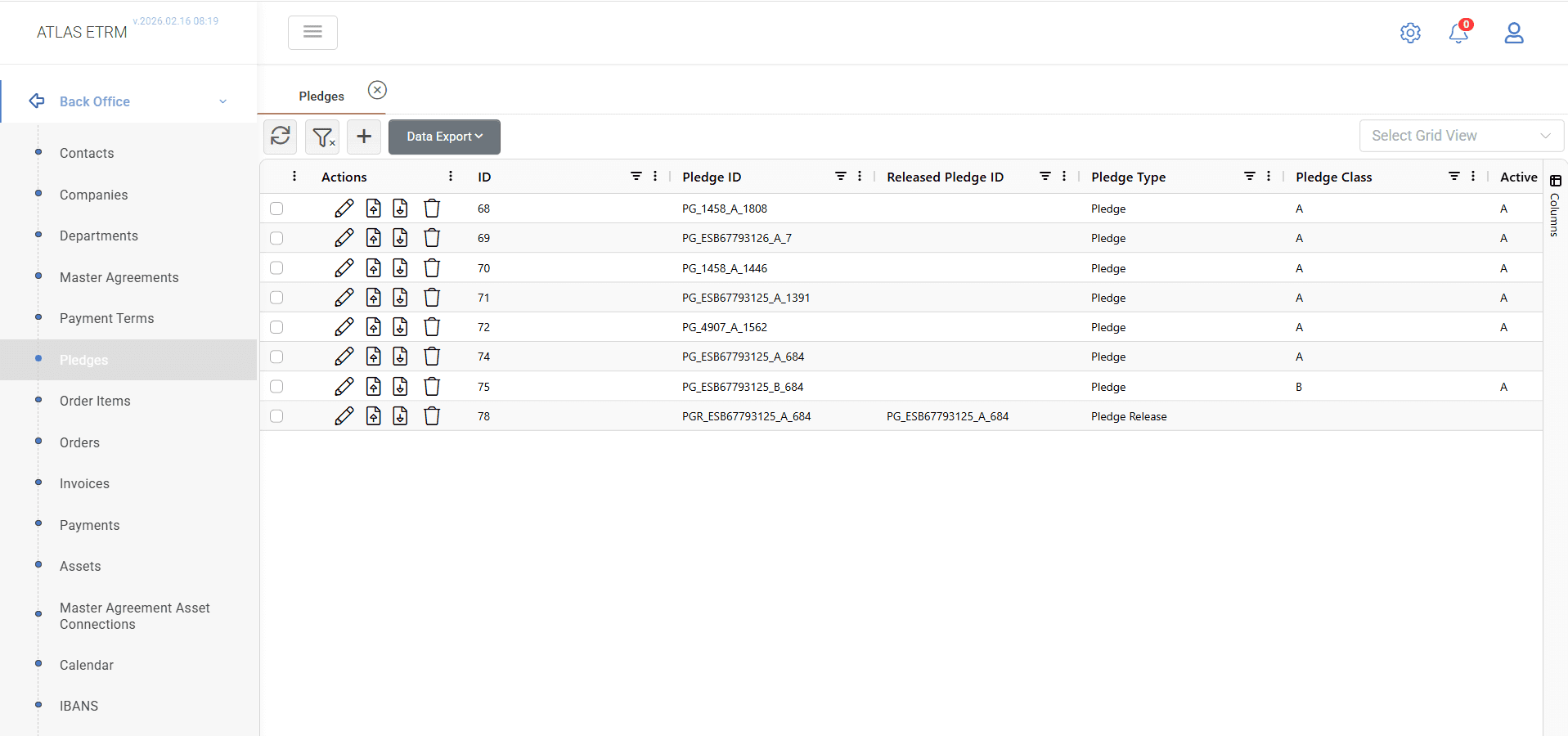
The Pledges screen is used to manage pledge and pledge release records associated with assets and counterparties. Each record represents a specific pledge action and is uniquely identified by a system-generated Pledge ID.
The generated Pledge ID is composed of the pledge type (PG for Pledge, PGR for Pledge Release), the Counterparty VAT number, the Pledge Class, and the asset identifier (Edreth). For example, a Pledge for a company with VAT 462587965, Pledge Class A, and asset Edreth 46523 is generated as PG_462587965_A_46523.
The main grid provides a centralized view of all pledge and pledge release records in the system. Users can search and filter records, review pledge information, create new records, edit existing ones, delete records, manage supporting documents, and export data.
The grid displays information such as the pledge type, associated asset, counterparty, bank details, and action dates. The Counterparty and Asset fields provide navigation links to the corresponding Company and Asset records.
Each pledge record is assigned a Pledge Class (A or B). The system maintains an Active Pledge Status for each asset, representing the currently effective pledge class. If a higher-priority pledge is released or deleted, the next available pledge class is automatically promoted to Active Class A. The system ensures that no gaps exist in the pledge class sequence.
Based on the registered pledge records, the system automatically updates the asset-level pledge indicator. The flag is set to true whenever at least one active pledge exists for the asset.
Pledge records and their associated documents are also visible from the corresponding Company and Master Agreement records.
Creating a Pledge Record
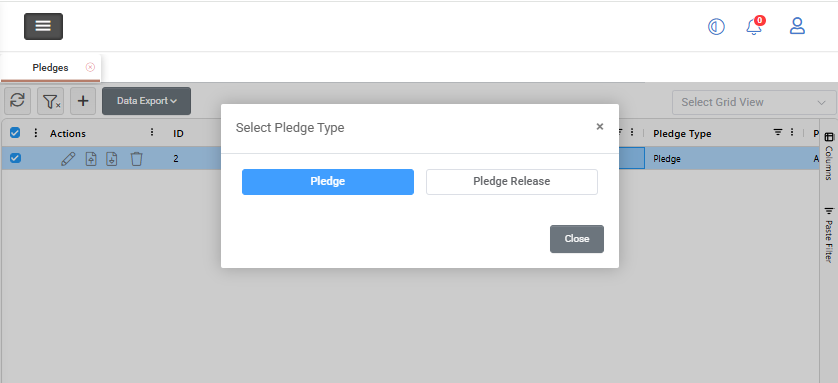
To create a new pledge record, click the + button at the top of the grid.
A Select Pledge Type window opens, where one of the following options must be selected:
Pledge
Pledge Release
The selected option determines the information that must be entered.
Pledge
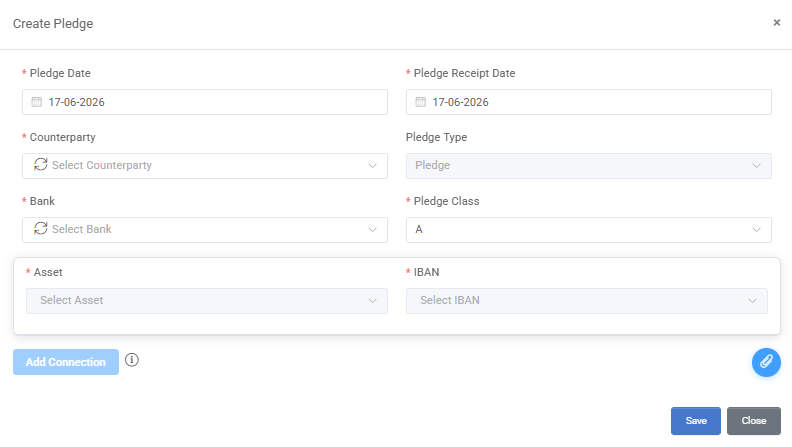
When Pledge is selected, the Create Pledge form is displayed. The user must specify the effective and receipt dates of the pledge, select the relevant Counterparty, Bank, Asset, and IBAN, and assign a Pledge Class. Once all required information has been entered, click Save to create the record.
For detailed information about the available fields, refer to the Appendix — Field Details.
Pledge Release
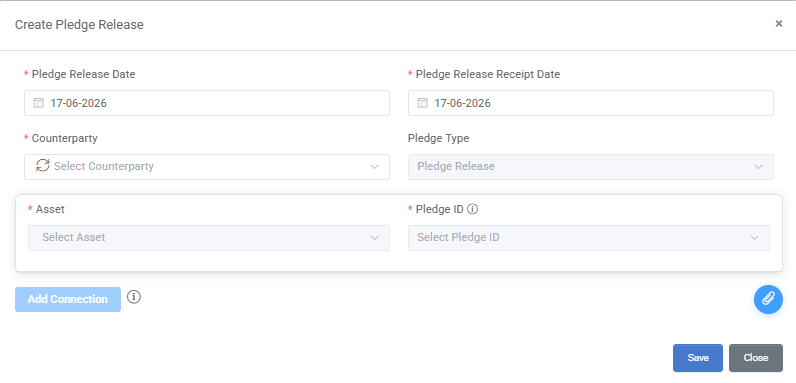
When Pledge Release is selected, the Create Pledge Release form is displayed. The user must specify the effective and receipt dates of the release, select the relevant Counterparty and Asset, and identify the existing Pledge record to be released. Once all required information has been entered, click Save to create the record.
For detailed information about the available fields, refer to the Appendix - Field Details.
Multiple Asset Connections
A single pledge or pledge release action may apply to more than one asset.
By selecting Add Connection, users may define multiple Asset–IBAN combinations within the same transaction. Each connection represents a unique Asset–IBAN pair under the same Counterparty and action date.
Although the information is entered through a single form, the system creates a separate pledge record for each Asset–IBAN combination when the record is saved. This allows a single pledge instruction covering multiple assets to be processed efficiently while maintaining distinct system records for each asset.
Document Handling
Supporting documents may be attached to pledge and pledge release records.
During record creation, users may upload a document using the attachment icon available within the form. The uploaded document is linked to the generated pledge record and can subsequently be downloaded from the main grid.
When multiple Asset connections are created within the same transaction, any uploaded document is automatically associated with all pledge records generated from that transaction.
After record creation, documents may be managed directly from the main grid. Depending on user permissions, users may upload, download, or delete documents through the available action icons or context menu options.
When multiple pledge records are selected simultaneously, users may upload a document to all selected records in a single action by right-clicking and selecting Document Upload. The uploaded file is automatically associated with each selected pledge record individually.
Editing and Deleting Pledges
Editing a Pledge Record
To edit a pledge or pledge release record, double-click the desired record or click the Pencil icon in the Actions area.
Update the required information and click Save.
Deleting a Pledge Record
To delete a pledge or pledge release record, right-click the desired record and select Delete, or click the Trash Can icon in the Actions area.
Confirm the deletion when prompted.
Appendix - Field Details
Field / Element | Required | Description |
|---|---|---|
Pledge Date | Yes | Date on which the pledge becomes effective. |
Pledge Receipt Date | Yes | Date on which the supporting pledge document was received. |
Pledge Release Date | Yes | Date on which the pledge release becomes effective. |
Pledge Release Receipt Date | Yes | Date on which the supporting pledge release document was received. |
Counterparty | Yes | Company associated with the pledge or pledge release. |
Pledge Type | Yes | Indicates whether the record is a Pledge or a Pledge Release. The value is automatically populated based on the selected transaction type. |
Bank | Yes (Pledge) | Bank associated with the pledge. |
Pledge Class | Yes (Pledge) | Classification assigned to the pledge. Available values include Class A and Class B. |
Asset | Yes | Asset associated with the pledge action. For Pledges, only active assets linked to the selected Counterparty through a valid Master Agreement are available. For Pledge Releases, only assets with an active pledge under the selected Counterparty are available. |
IBAN | Yes (Pledge) | Bank account associated with the pledge. The list contains IBANs linked to the selected bank. New IBANs may be added directly from the form and become available for future use. |
Pledge ID | Yes (Pledge Release) | Existing pledge record selected for release. The available values depend on the selected Asset. |