Overview
The Deal Collection Creation job groups deals into deal collections automatically, according to the grouping criteria defined by the user. This keeps collections aligned with the deal portfolio as new deals are captured.
Deal collections bring related deals together so that they can be managed, reported and settled as a unit, for example all deals of a company with the same counterparty. Running the job on a schedule means new deals are added to the right collection without manual work.
Input Configuration
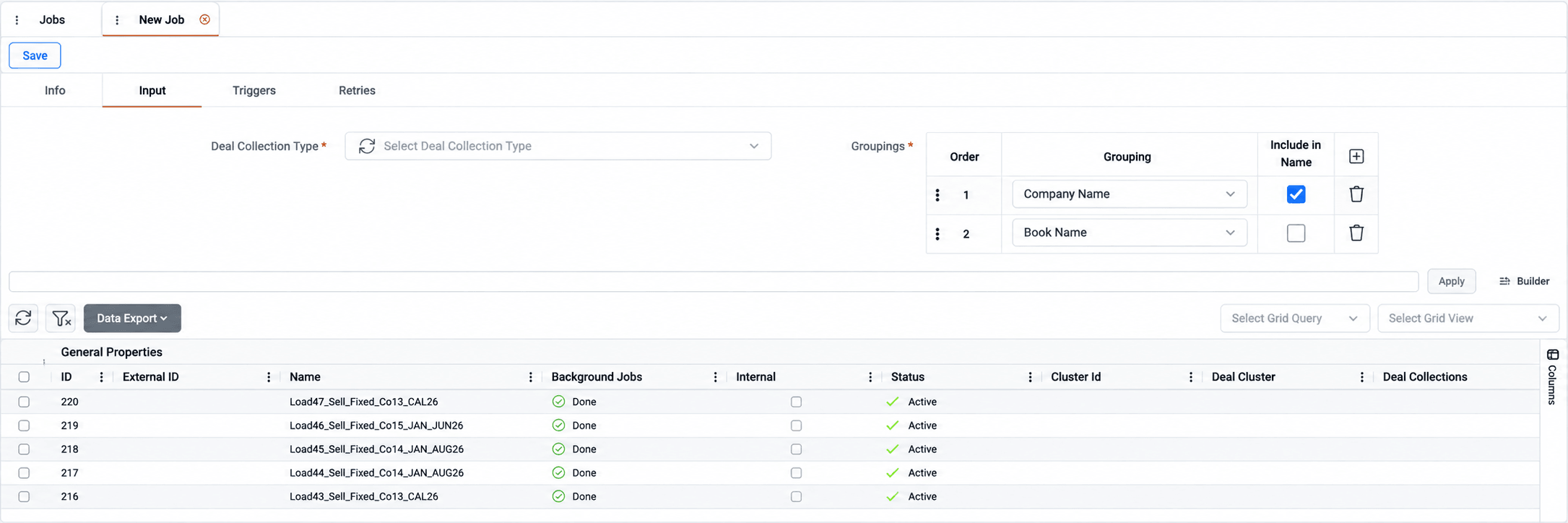
Users select the deal collection type to create and define one or more groupings, such as company, book, portfolio or counterparty (full list in Appendix). The order of the groupings determines how deals are grouped, and each grouping can optionally be included in the collection name. The deals to process are selected through a deal query.
Deals are grouped by the first attribute, then within each group by the second, and so on. Grouping rows are added with +, reordered by dragging and removed with the delete icon. Selecting Include in Name adds the grouping value to the collection name, so a collection grouped by company and counterparty carries both in its name and is easy to identify.
Appendix – Field Details
Field / Element | Description |
Deal Collection Type | Type assigned to the deal collections created by the job. The list displays the deal collection types configured in Administration → Dynamic Types. |
Groupings | Ordered list of deal attributes used to group deals. Add rows with + or remove them with the delete icon. |
Order | Position of the grouping in the grouping sequence. Drag rows to reorder them. |
Grouping | Deal attribute used for grouping. The list includes Company Name, Business Unit Name, Folder Name, Book Name, Portfolio Name, Commodity, Master Agreement Name, Counterparty Legal Name, Deal Class, Mark to Market, Broker Name, Deal Status, Deal Direction, Deal Delivery, Price Type, Profile Type, Deal Total Quantity, Product, Self Billing, Transaction Day. |
Include in Name | When selected, the grouping value is included in the collection name. |
Query | Expression that selects the deals to process, with Apply, Builder, Select Grid Query and Select Grid View. For more details, see References-Query. |