Overview
The Forward Market Nominations Creation job generates the nominations of forward contracts and physical delivery positions for a range of delivery days, and submits them or sends them by email. It removes the need to prepare recurring nominations manually for each contract and entity.
Input Configuration
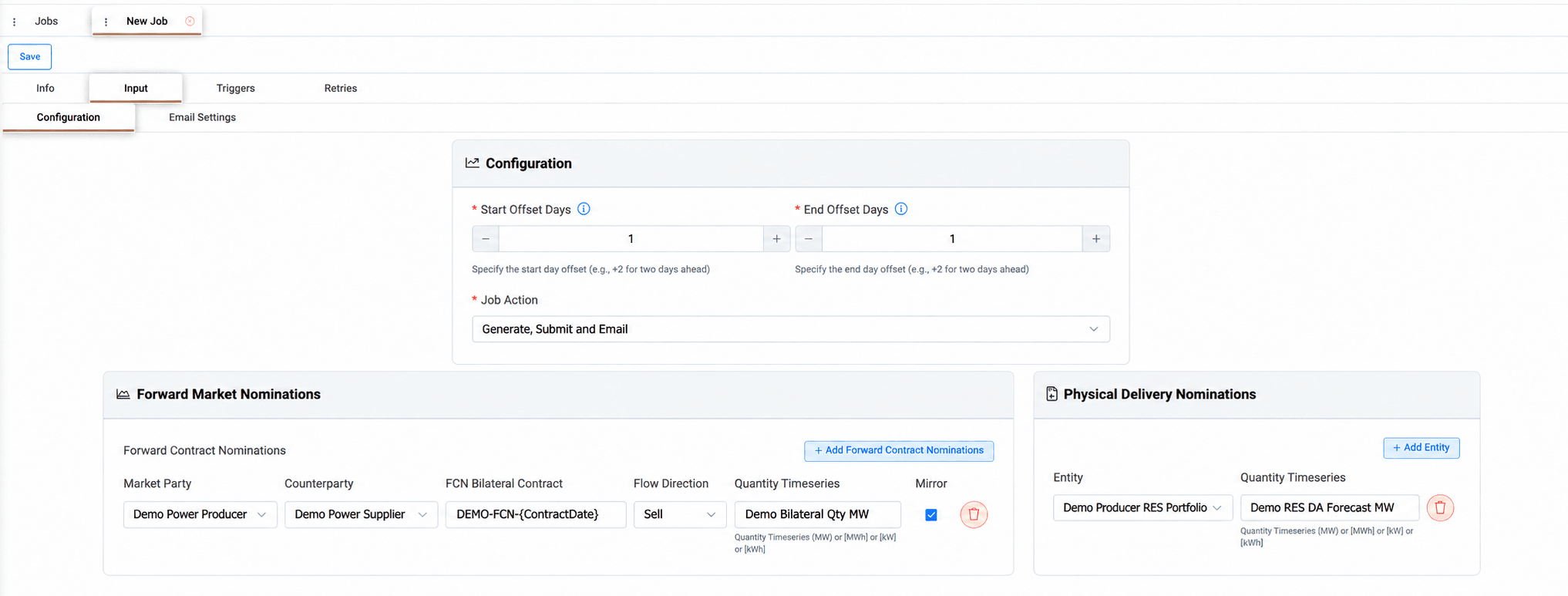
The Input tab is organized into two sub-tabs. In Configuration, users define the delivery days, choose the job action, and list the forward contract and physical delivery nominations to be created.
The Configuration sub-tab is arranged in panels. The Configuration panel sets the first and last delivery day, each expressed as a day offset from the execution date, for example +1 for next-day delivery, so a single job can cover one day or a range of days. It also sets the job action, which includes submission to the market, an email notification, or both, since nominations are sent directly rather than through an approval step.
Forward Market Nominations lists the forward contract nominations, one line per contract. For each line, users select the market party and counterparty, define the contract name, choose whether the flow is a purchase or a sale, and select the timeseries that holds the nominated quantity. The contract name can include the delivery date through a placeholder, so each day's nomination is named automatically, and the Mirror option also creates the opposite nomination for the counterparty.
Physical Delivery Nominations lists the entities to be nominated for physical delivery, each with its quantity timeseries, while the flow direction is taken from the entity.
When a nomination for the same day, market party, counterparty, contract and direction already exists, the job updates it and resubmits it as a new version. If only some submissions fail, the execution ends with a Warning status, and the email highlights the nominations that need manual action.
In the Email Settings sub-tab, users define the recipients, the conditions under which the email is sent, and the subject and body of the message, which can include dynamic variables describing the execution. The subject and body are pre-filled with a default template that summarizes the execution, and they can be edited freely in the rich-text editor. The information icon next to Subject Template lists all available variables, and typing { in the subject or body shows suggestions.
Appendix – Field Details
Configuration
Field / Element | Required | Description |
|---|---|---|
Start Offset Days | Yes | First delivery day relative to the execution date, for example +1 for next-day delivery. |
End Offset Days | Yes | Last delivery day relative to the execution date. |
Job Action | Yes | Determines whether the job submits nominations to the market, sends an email, or both: Generate and Email, Generate and Submit, or Generate, Submit and Email. |
Email Settings | Conditional | Configures recipients, send conditions and the subject and body. Used when the selected Job Action includes email. See [Email Settings]. |
Forward Contract Nominations
Field / Element | Description |
|---|---|
Market Party | Market party submitting the nomination. |
Counterparty | Counterparty of the forward contract. |
FCN Bilateral Contract | Contract name. Pre-filled with {ContractDate}, which is replaced with the delivery date. |
Flow Direction | Purchase or Sale. |
Quantity Timeseries | Timeseries with the nominated quantity, in MW, MWh, kW or kWh. |
Mirror | When selected, the opposite nomination is also created for the counterparty. Selected by default. |
Physical Delivery Nominations
Field / Element | Description |
|---|---|
Entity | Entity nominated for physical delivery. The flow direction is taken from the entity. |
Quantity Timeseries | Timeseries with the nominated quantity, in MW, MWh, kW or kWh. |